Local proxy
ccode has an optional in-process proxy that sits between Claude Code and your third-party provider. When it’s on, ccode binds a small HTTP server on 127.0.0.1, launches Claude Code with ANTHROPIC_BASE_URL pointed at it, and forwards Anthropic-shaped requests to your real upstream (DeepSeek, OpenRouter, an in-house gateway, a local Ollama instance, etc.).
This is the answer to the Remote Control being broken by Anthropic on Claude Code 2.1.139+ for third-party provider profiles. When the proxy is on, ANTHROPIC_API_KEY and ANTHROPIC_AUTH_TOKEN are NOT in Claude Code’s environment, so the new auth check passes; the proxy holds your real upstream credentials in memory and attaches them to outbound requests itself.
Here’s an example of it working:
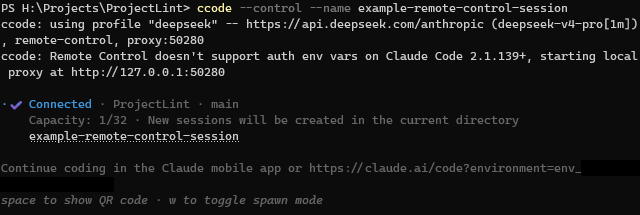
Note: This proxy is plain passthrough. It works with upstreams that already speak the Anthropic Messages API (
/v1/messages), which is the same set of providers that work directly with Claude Code today. To switch the backend mid-session, see the Dynamic proxy. OpenAI-format translation is planned for later.
When you want it on
The short version: when you’re using --control (or always_control: true) with a profile that points at a third-party provider, the proxy is the workaround for Anthropic’s auth check.
You’ll see ccode auto-enable it for you in that exact combination, with a log line. It stays off for the default subscription-passthrough profile (no third-party auth, no need for a proxy) and for cloud-provider profiles (Bedrock, Vertex, Foundry use their own credentials).
Configuration
Add a proxy: block at the top level (default for all profiles) or under a specific profile (override). The simplest version is just the toggle:
profiles:
  openrouter-deepseek:
    anthropic_base_url: "https://openrouter.ai/api"
    anthropic_auth_token: "sk-or-v1-..."
    models:
      model:
        model: "@preset/deep-seek-v4-pro-official-only"
      fable:
        model: "@preset/deep-seek-v4-pro-official-only"
      opus:
        model: "@preset/deep-seek-v4-pro-official-only"
      sonnet:
        model: "@preset/deep-seek-v4-pro-official-only"
      haiku:
        model: "@preset/deep-seek-v4-pro-official-only"
      subagent:
        model: "@preset/deep-seek-v4-pro-official-only"
    proxy:
      enabled: true
The full set of fields, with defaults:
proxy:
  enabled: false              # off by default; auto-enable rule overrides
  bind: "127.0.0.1"           # loopback by default; non-loopback requires allow_external_bind
  port: 0                     # 0 = let the kernel pick an ephemeral port
  pid_file: ""                # default: <system-temp-dir>/ccode-<uid>/pid/<pid>.json on Unix, or <system-temp-dir>/ccode/pid/<pid>.json on Windows
  allow_external_bind: false  # opt-in to non-loopback binds; reads upstream creds out to the network
Either way, you can just launch it like normal:
# Profile shorthand (which has the proxy enabled)
ccode --openrouter-deepseek
# Full profile name (which has the proxy enabled)
ccode --profile openrouter-deepseek
# Will be launched automatically even if a profile doesn't have it configured
# because you're trying to launch Remote Control, which refuses to work otherwise
ccode --another-profile --control
When the proxy is on, the following are always removed from Claude Code’s environment before launch:
ANTHROPIC_API_KEY,ANTHROPIC_AUTH_TOKEN- the third-party Anthropic-shaped credentials whose presence trips Claude Code’s remote-control refusal.CLAUDE_CODE_OAUTH_TOKEN,CLAUDE_CODE_OAUTH_REFRESH_TOKEN- your Claude.ai subscription tokens. They’re meaningless once the proxy is in front (the proxy never speaks claude.ai OAuth to a third-party upstream), and removing them entirely means no quirk in how Claude Code might hand them off can route them somewhere we don’t strip.AWS_BEARER_TOKEN_BEDROCK,ANTHROPIC_AWS_API_KEY,ANTHROPIC_FOUNDRY_API_KEY- first-party cloud-provider credentials. With the proxy on, Claude Code only ever dials localhost, so these would at best be wasted and at worst leak into a child env that no longer needs them.
ANTHROPIC_BASE_URL is also always rewritten to point at the local listener. The proxy holds your real upstream credentials in memory and attaches them to outbound requests itself.
Loopback vs external bind
By default bind must resolve only to loopback (127.0.0.1, ::1, or a hostname that resolves only to loopback) and any other value is refused at startup. The proxy attaches your upstream credential to every forwarded request, so a routable bind hands that credential to anyone on the network.
If you have a real reason to expose the proxy to other machines (containerized dev setup, ssh-tunneled workflow, etc.), opt in by setting allow_external_bind: true on the same proxy block. ccode prints a warning to stderr every time you launch with a non-loopback bind:
proxy:
  enabled: true
  bind: "0.0.0.0"
  port: 11434
  allow_external_bind: true
Top-level vs per-profile
A top-level proxy: block applies to every profile. A proxy: block inside a profile overrides the top-level one field by field. For the most part, you might just put proxy.enabled: true on the one or two profiles that need it. If you want it on for everything, set it at the top level:
proxy:
  enabled: true        # every profile uses the proxy by default

profiles:
  deepseek:
    anthropic_base_url: "https://api.deepseek.com/anthropic"
    anthropic_auth_token: "sk-..."
    # proxy.enabled inherited from top level

  default: {}          # subscription passthrough - proxy is a no-op anyway
Starting a standalone proxy
We also support a standalone proxy mode, in case you might want to point something else at it, rather than just the regular Claude Code instance.
$ ccode proxy --deepseek
ccode: local proxy ready at http://127.0.0.1:54321
ccode: profile "deepseek", upstream https://api.deepseek.com/anthropic
ccode: pidfile /tmp/ccode-1000/pid/12345.json
ccode: press Ctrl+C to stop
ccode proxy accepts the same profile selectors as the regular launcher:
ccode proxy                          # default profile from config
ccode proxy --openrouter             # profile shortcut
ccode proxy --profile openrouter     # long form
ccode proxy --config ./alt.yaml      # alternate config file
The port is chosen by the kernel by default; pin it in config if you want a stable URL across launches:
profiles:
  openrouter-deepseek:
    anthropic_base_url: "https://openrouter.ai/api"
    anthropic_auth_token: "sk-or-v1-..."
    proxy:
      port: 11434   # any free port you like
Pointing clients at it
Set ANTHROPIC_BASE_URL on any client and you’re done. The proxy holds the upstream credential and strips/reattaches headers; the client doesn’t need to know.
# Plain Claude Code, no ccode wrapping, using the standalone proxy:
ANTHROPIC_BASE_URL=http://127.0.0.1:54321 claude

# A `claude -p` one-shot:
ANTHROPIC_BASE_URL=http://127.0.0.1:54321 claude -p "fix this test"

# Curl, for poking at the proxy directly:
curl -sN http://127.0.0.1:54321/v1/messages \
  -H "anthropic-version: 2023-06-01" \
  -H "content-type: application/json" \
  -d '{"model":"...","max_tokens":256,"messages":[{"role":"user","content":"hi"}]}'
You do NOT need to set ANTHROPIC_API_KEY or ANTHROPIC_AUTH_TOKEN on the client - the proxy attaches the upstream credential on the way out. If you do set one, the proxy drops it before forwarding (same reason as in the auto-launched mode - on a subscription-authed session the inbound auth would carry your claude.ai token, and that should never reach a third-party upstream).
Lifecycle
ccode proxy is a foreground process; it blocks until you stop it. Termination paths:
- Ctrl+C in the terminal: clean shutdown. Proxy stops accepting connections, in-flight requests are allowed to finish, pidfile is removed.
- SIGTERM on Unix (e.g.
kill <pid>without-9): same clean shutdown. - SIGKILL /
kill -9/ power loss / Task Manager force-end: the pidfile lingers. The next ccode launch (any kind) sweeps the per-user pid directory and removes orphaned entries automatically (see the Session pidfile section below).
To run it in the background, use your shell’s usual job-control or a launcher of your choice.
What it does NOT do
A standalone proxy is not a full-blown gateway - it’s a single-process forwarder. So:
- No auth on the proxy itself. Anyone who can reach
127.0.0.1:<port>on your machine can use your upstream credential. Loopback-only by default keeps that “anyone” to “processes on your machine running as your user.” Don’t change that without reading the Loopback vs external bind section first. - No rate limiting, no quotas, no per-client tracking. The current implementation is meant to be basic.
- No background daemon mode. It’s a foreground process. If you want it always running, daemonize it with your shell or whatever system tooling you prefer.
- Doesn’t change Claude Code behavior beyond what the auto-launched form already does. Same headers, same body, same streaming.
Switching the backend mid-session is covered by the Dynamic proxy. OpenAI format translation is still planned for a later release, hopefully.
Session pidfile
Every launch with the proxy on writes a JSON file recording the session’s metadata:
<system-temp-dir>/ccode-<uid>/pid/<pid>.json   (Unix)
<system-temp-dir>/ccode/pid/<pid>.json         (Windows; %TEMP% is already per-user)
(Override with proxy.pid_file.) Contents:
{
  "ccode_pid": 12345,
  "port": 54321,
  "profile_name": "openrouter-deepseek",
  "upstream_host": "openrouter.ai",
  "started_at": "2026-05-19T14:22:01Z"
}
The file is removed when the session exits cleanly. It’s what the ccode sessions command enumerates, and it gives you a one-glance answer to “what port is the running proxy bound to” while a session is alive. It carries no credentials - only metadata.
The file is created with mode 0600 on Unix so other users on the machine can’t read it; on Windows, file ACLs do the equivalent.
If a previous ccode died without running its cleanup (SIGKILL, power loss, OOM-kill, etc.), the pidfile it wrote is left behind on disk. On the next ccode launch the proxy scans the per-user pid directory and removes any pidfile whose recorded ccode_pid is no longer alive - foreign files and unparseable JSON are left alone, so the sweep only touches files ccode itself wrote. There’s nothing to clean up by hand, but if you want to wipe the directory manually you can: it’s just metadata.
Status endpoint
Each running proxy exposes a tiny status endpoint at http://127.0.0.1:<port>/_ccode/status, restricted to loopback. It returns JSON with the upstream host, the request count so far, and the proxy start time.
$ curl -s http://127.0.0.1:54321/_ccode/status
{"ok":true,"upstream_host":"api.deepseek.com","requests":42,"started_at":"2026-05-18T14:22:01Z"}
Troubleshooting
“Error: proxy is enabled for profile X but anthropic_base_url is empty.” The proxy needs to know where to forward to. Set anthropic_base_url on the profile.
“Error: proxy is enabled for profile X but no upstream credential is set.” The proxy needs the real upstream credential (so it can attach it after stripping the inbound one). Set anthropic_auth_token or anthropic_api_key on the profile.
Upstream returns 401/403 with the proxy on. The proxy is forwarding your configured credential as Authorization: Bearer <token> (or x-api-key). If the upstream expects a different header or scheme, check whether your existing direct-config (without the proxy) actually works against that upstream first. The proxy only forwards what your profile already says.
Connection refused to 127.0.0.1:<port>. The proxy starts before Claude Code launches; if Claude Code fails immediately it might have hit some other startup error before the first request. The session pidfile under the per-user pid directory (see above) is the quickest way to see whether the proxy actually came up - if it’s there and the port matches, the proxy is alive and Claude Code’s exit happened upstream of any request. If it’s gone, the proxy never started or already shut down.
Remote control still fails on 2.1.139+. Make sure the auto-enable log line appears in ccode’s output (ccode: Remote Control doesn't support auth env vars on Claude Code 2.1.139+, starting local proxy at http://127.0.0.1:<port>) or that you have proxy.enabled: true on the profile. If the proxy is on but --control still complains about ANTHROPIC_AUTH_TOKEN, file an issue - we want to know.
See also
- Dynamic proxy - switch the backend mid-session across your configured profiles, no restart.
- Usage > New Claude Code versions breaking Remote Control - the user-facing note that points here as the fix.
- Configuration - the regular config merge rules. The
proxy:block follows the same rules as the rest of the config. - Providers - every third-party provider that benefits from the proxy when combined with
--control. - FAQ > Local proxy - a short Q&A version of the same information.
- Config Reference - the full list of
proxy.*fields (and every other profile field).