Dynamic proxy
The Local proxy forwards Claude Code to one fixed upstream. With --dynamic, a single launch can serve many profiles, and you can switch which backend it forwards to at runtime.
When you want it
- You bounce between providers (DeepSeek for the bulk work, a bigger model for the hard parts) and don’t want to quit and relaunch each time.
- You’re using a session from the desktop/web app over Remote Control and want to change the model without dropping the session.
- You’re using your Claude subscription, but hit the token limit and want to switch to a different model and continue until it resets.
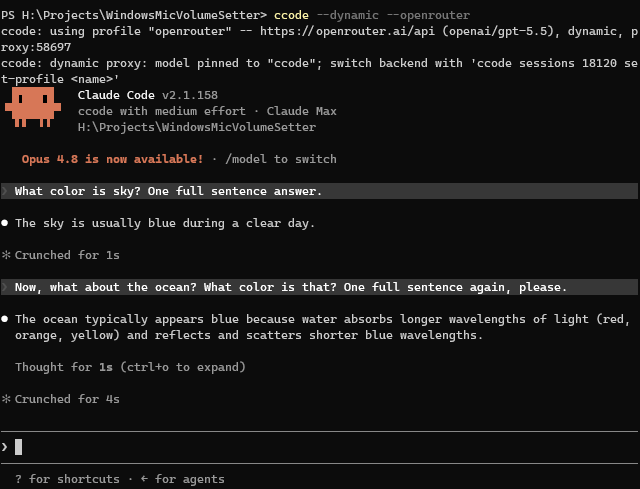
Here’s an example of what it looks like when you launch ccode, those two questions are answered by different models:
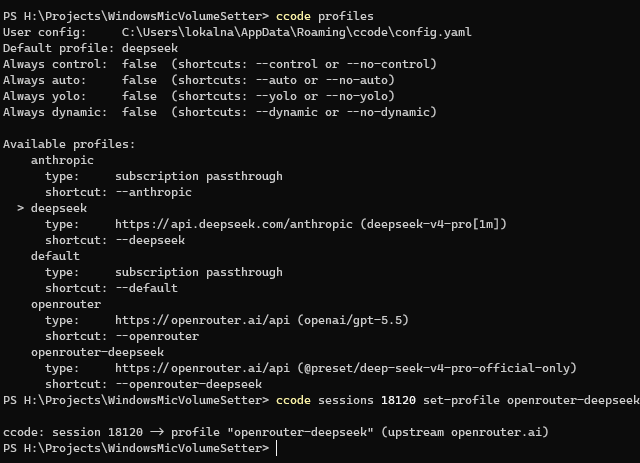
The switching takes place in the background, here I did that after the first answer:
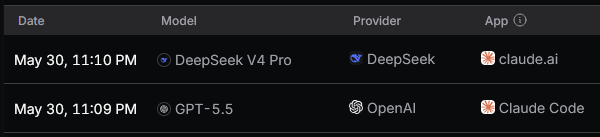
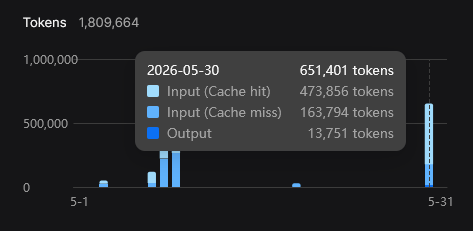
You can see how two different models were used in OpenRouter (no idea why the “App” sometimes shows up different):
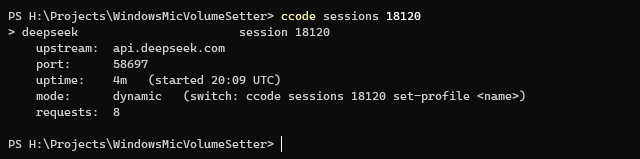
Also you can get stats about the current running sessions, here it is after some more questions:
Note: You should know that a lot of providers are cheap when they can cache the conversation. Be careful in regards to switching models often, though all of this should work really nicely if you switch after
/compact.
Starting a dynamic session
Launch with --dynamic and a starting profile:
# With the default profile
ccode --dynamic
# With a specific starting profile
ccode --dynamic --deepseek
You’ll see the proxy come up with the model pinned:
ccode: using profile "deepseek" -- https://api.deepseek.com/anthropic (deepseek-chat), dynamic, proxy:55240
ccode: dynamic proxy: model slots pinned; switch backend with 'ccode sessions 18900 set-profile <name>'
Each model slot gets its own sentinel name; the proxy rewrites it to the active profile’s configured model on each request. So when you switch backends, the model name Claude Code sends never changes.
A note on model names in dynamic mode
Because the backend is swappable at runtime, a dynamic session can’t pin a provider-specific label to each slot - a name like “DeepSeek V4 Pro” would be wrong the moment you switch to another provider. So in dynamic mode Claude Code’s local /model picker shows generic ccode labels (“ccode-Fable”, “ccode-Opus”, “ccode-Sonnet”, “ccode-Haiku”) instead. A plain (non-dynamic) profile, which is pinned to one backend, keeps showing that provider’s own names.
Remote Control is a little different again. A Remote Control session has no local picker - the model dropdown lives in the desktop/web app, and that picker is rendered by Claude Code’s cloud, not by ccode. It shows Claude’s own model catalog as switch targets and may abbreviate a non-Claude model name (you might see something like Dee***** 4 Pro). That’s a Claude Code behavior we can’t change from here; the session still works and switching still works, the name is just displayed differently. If the exact model names matter to you, use a plain local session rather than Remote Control.
You can start from any profile. A third-party profile needs an anthropic_base_url, a credential (anthropic_auth_token or anthropic_api_key), and a model. Your Claude subscription works too: start with ccode --dynamic (or any subscription profile) and the proxy forwards Claude Code’s own login to Anthropic directly, attaching no third-party credential - this needs an active claude /login. From there you can switch the running session to a third-party provider and back to the subscription whenever you like.
In the config, always_dynamic: true makes --dynamic the default.
You can also use --no-dynamic to turn it off for that specific launch.
Switching the backend
From another terminal, point a running session at a different profile:
ccode sessions 18900 set-profile openrouter-glm
Here’s the output:
ccode: session 18900 -> profile "openrouter-glm" (upstream openrouter.ai)
In-flight requests finish on the old upstream; new ones use the new one. You can switch between every forwardable profile and your Claude subscription - switching to a subscription profile points the session back at Anthropic directly (it needs an active claude /login).
In the command <id> is the session’s ccode pid, or a unique prefix of it. Use all to switch every dynamic session at once:
ccode sessions all set-profile openrouter-glm
Only dynamic sessions can be switched. A fixed (plain local-proxy) session won’t allow that.
Managing sessions
ccode sessions lists everything that’s running:
$ ccode sessions
Running proxy sessions (2):

> deepseek                       session 18900
    upstream:  api.deepseek.com
    port:      55240
    uptime:    12m   (started 14:02 UTC)
    mode:      dynamic   (switch: ccode sessions 18900 set-profile <name>)
    requests:  47

  openrouter-glm                 session 19044
    upstream:  openrouter.ai
    port:      55241
    uptime:    3m   (started 14:11 UTC)
    mode:      fixed
    requests:  8
The > marks the session a bare set-profile would target - it only appears when exactly one dynamic session is running. ccode sessions <id> shows a single session’s detail.
Normally sessions will be closed when you exit Claude Code (and ccode that wraps it), but if needed, you can stop a session with kill:
ccode sessions 18900 kill
ccode sessions all kill        # asks to confirm; add --yes to skip the prompt
Interactive view
ccode sessions tui opens an interactive view over the same operations, so you don’t have to remember the subcommands:
ccode sessions tui
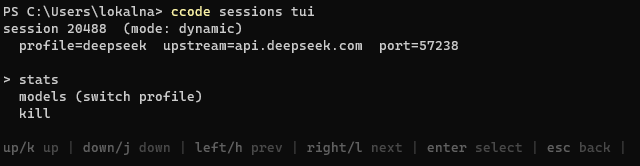
Here’s an example of what it looks like:

It starts on a list of running sessions. Press Enter on one to open it, then pick what to do:
- stats - upstream, port, uptime, and request count, refreshed every couple of seconds.
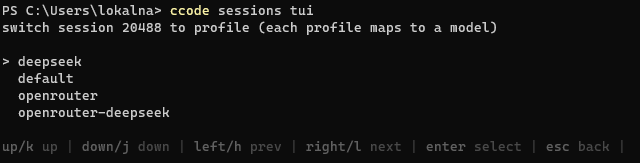
- models - switch the backend to another forwardable profile or your Claude subscription (dynamic sessions only).
- kill - graceful shutdown, with a confirm step.
The help bar shows the keys: arrows (or h/j/k/l) navigate, Enter selects, ESC goes back one screen, q (or Ctrl+C) quits.
Here’s the view for a session:
Here’s changing models interactively:
What it does NOT do
- Each model slot routes independently to the active profile’s configured model for that slot - you set those per slot with the profile’s
models:block (see Config Reference and the Providers examples). On the subscription this means each slot maps to the Claude model your profile names for it, or defaults if it names none. To remap an inbound model name themodels:block does not cover, useproxy.model_map(a lower-level escape hatch). - The limitations of the Local proxy still apply: single-process, loopback-only by default, no auth on the proxy itself.
- OpenAI-format translation in the proxy is still planned for later, for now you can use this with something like OpenRouter, they handle that conversion for you if you use the models they provide.
- I’d also love to let Claude Code switch models itself or allowing the user to do so within a conversation, e.g. develop with Anthropic or DeepSeek models, review with GPT, no good ideas on how to do that yet.
See also
- Local proxy - the underlying proxy, its security model, pidfiles, and the status endpoint.
- Configuration - the config merge rules the
proxy:block follows. - Providers - the third-party providers worth switching between.
- Config Reference - the
models:block,always_dynamic, and every other field.