Introduction
Version: 5.0.0
It reads configuration from YAML files for all of the providers you configure, it sets the required environment variables, and launches Claude Code. This means that it lets you use DeepSeek, OpenRouter, and other providers with a single flag. Optionally, there are shorthands for permissions and Remote Control sessions.
You may also view the Itch.io page for the tool, but this site has the full documentation.
Disclaimer: ccode is not affiliated with or endorsed by Anthropic. You still need a regular Claude Code install.
What does it look like?
It adds the ccode command to your shell, that lets you manage multiple profiles.
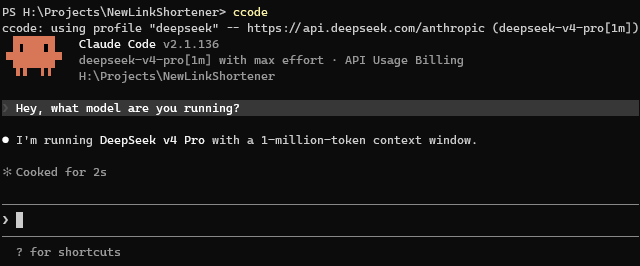
Here’s a quick example of me running with the DeepSeek profile as my default:
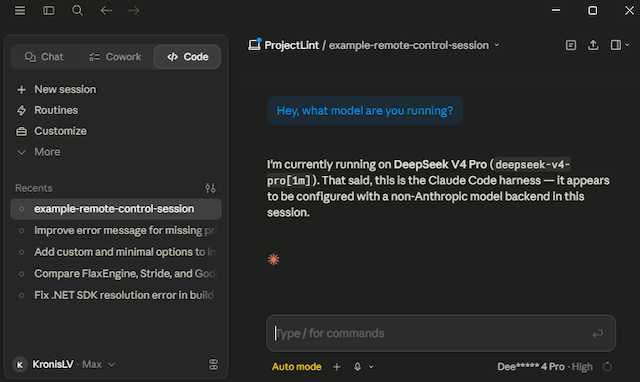
I can even use the --control option to enable Remote Control and see a third party provider driven session in the web or desktop apps:
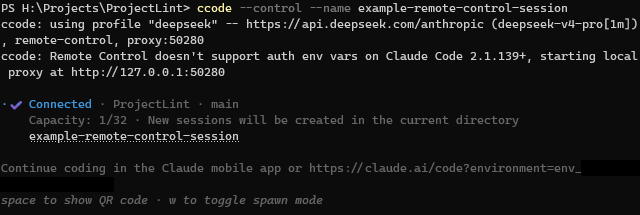
Update: Anthropic broke Remote Control with third-party providers in Claude Code 2.1.139+, it fails to start when
ANTHROPIC_API_KEYorANTHROPIC_AUTH_TOKENis set in the environment. ccode 2.0.0 adds a Local proxy to keep this working, that docs page has more info.
Note: As of 3.0.0 the proxy can also switch backends at runtime. With
ccode --dynamic, you can flip which provider is running a session without restarting it - see the Dynamic proxy page.
Here’s that session visible in the web app (apparently experimental):
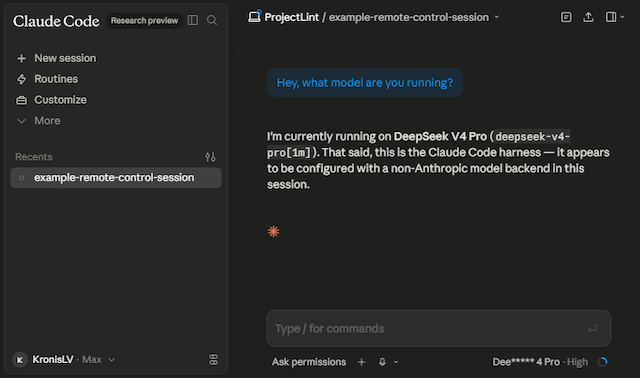
Here’s that session visible in the desktop app (did you even know they have that?):
You can even use something like OpenRouter to use models that normally don’t really talk the Anthropic API, like OpenAI models, try out how well Mistral models work with Claude Code etc.:
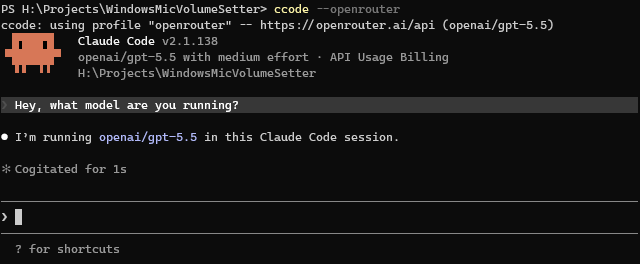
Note that all of the functionality above is already supported by Claude Code and is NOT something I wrote myself. Instead, I wrote the launcher to make accessing it easier, I think EVERYONE should have easy access to that.
I will still probably have an Anthropic subscription, but downgrade mine from Max to Pro. I still think that Anthropic has some of the best models for development out there, it’s just that I don’t have a lot of money. With this tool, I can easily use whatever models I prefer, many of which are more affordable (technically even local ones).
Where do you get it?
It’s offered under a pay-what-you-want model, the suggested price is 7 USD and the minimum is 0 USD.
You can get the pre-built binaries from the Itch.io page.
The tool is also offered as source-available, you can compile it yourself on your own devices.
How do you set it up?
You can use the program portably, but most folks will want to make it available in their PATH.
Commands are provided for this, to put it in the user/system directory and make it easy to invoke.
Windows:
# Install the program to use it from the terminal (restart terminal after)
# There might be a SmartScreen warning the first time you run this executable
# In PowerShell:
.\ccode.exe install
# Or in cmd:
ccode.exe install
Linux:
# Install the program to use it from the terminal (restart terminal after)
chmod +x ./ccode
./ccode install
Mac:
# Install the program to use it from the terminal (restart terminal after)
# Use the .pkg installer for a one-click install,
# or the universal ZIP and ccode install:
chmod +x ./ccode
./ccode install
Configuration management is the same across all platforms (the file paths differ though, of course):
# Create the config file with examples
ccode init-config
# Edit the configuration file to fill in the providers you want to use
ccode edit-config
For example, if you wanted to use DeepSeek, you’d just grab an API key at: DeepSeek Platform - API keys
They also have a Claude Code specific page with instructions, we include examples: Integrate with Claude Code
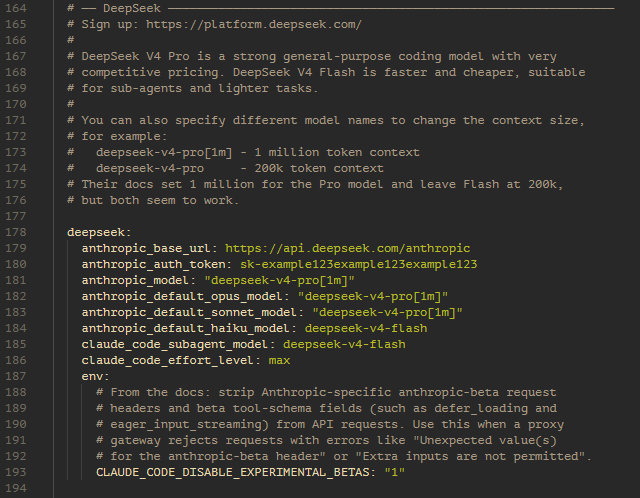
Uncomment the examples we’ve prepared and fill out your API keys, you can also change the models:
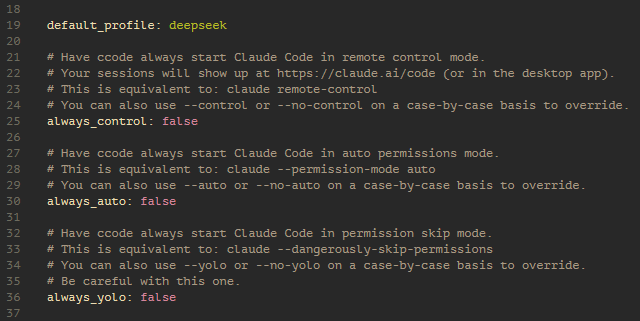
If you always want to use DeepSeek, you can also change it to be the default profile, alongside customizing any other goodies you want:
Once all of that is done, here’s the normal usage you’d use day to day:
# Launch with default profile
ccode

# Launch with a specific profile
ccode --deepseek

# Can also launch with custom permissions or Remote Control
ccode --deepseek --auto
ccode --deepseek --control

# There's also help if you need it, explaining the current config too
ccode --help
# It does override the claude default, however that help is available directly
claude --help
See the Usage page for all the details, including profile selection, permissions, and more. It also shows you how to set up separate default profiles and configuration per-project.
As a quick example, you could have project A where you use your Anthropic subscription (in ./ccode.yaml inside the project directory):
default_profile: "default"
Then for project B you might use a work-issued Anthropic API key:
default_profile: "anthropic"
And for some other projects you could use DeepSeek by default:
default_profile: "deepseek"
Those are just the example profile names from the global config file (ccode edit-config), you can have as many different ones as you want, for any of the supported providers, even local models.
You can also override profile fields (like which DeepSeek model is used) or environment variables per-project, while keeping API keys in your user config so they don’t end up committed. See the Usage page for more details.
To scaffold one of these project configs, cd into the project directory and run:
ccode init-config --minimal .
ccode edit-config .
You can read through the config file in more detail to see how to disable the Anthropic telemetry (this app doesn’t have any telemetry of its own btw).
Note: since 1.3.0 you can also use Importing configuration in case you or your company decide to host/distribute the profile files somewhere.
See the Providers page for more setup details and some of the providers that you can use.
How does it work?
This program is a wrapper around Claude Code, that allows setting the model and API related variables to use a variety of providers, then just launches the executable.
You could get something similar with a bunch of shell scripts, but it’s easier to distribute a single binary that also lets you parse config files and work across different OSes and environments.
For more details, see the Frequently Asked Questions page.
Downloads
Current version: 5.0.0
You can also view the Changelog for version history.
Pre-built binaries
It’s offered under a pay-what-you-want model, the suggested price is 7 USD and the minimum is 0 USD.
You can get the pre-built binaries from the Itch.io page.
Source code
This program is not open source, but is made as source-available.
| Format | Download |
|---|---|
| ZIP archive | ccode-5.0.0-source.zip |
Here’s the instructions to compile it yourself on your own devices.
Please consult the Licenses page for more details.
Installation
Prerequisites
- Claude Code (the terminal version) must be installed and available in your PATH.
Quick install
Download and extract the archive for your platform from the Itch.io page.
You can use the program portably, but most folks will want to make it available in their PATH.
Commands are provided for this, to put it in the user/system directory and make it easy to invoke.
Windows:
# Install the program to use it from the terminal (restart terminal after)
# There might be a SmartScreen warning the first time you run this executable
# In PowerShell:
.\ccode.exe install
# Or in cmd:
ccode.exe install
Linux:
# Install the program to use it from the terminal (restart terminal after)
chmod +x ./ccode
./ccode install
Mac:
You can either use the one-click .pkg installer or the universal ZIP:
ccode-5.0.0-macos.pkg- double-click to install. The .pkg is signed and notarized, so Gatekeeper accepts it without warnings. It drops the binary in/usr/local/bin/ccode(already on PATH on every Mac) and asks for your admin password once during install.ccode-5.0.0-macos-universal.zip- extract and run the sameccode installflow as Linux. The binary inside is universal (Intel + Apple Silicon in one file), signed and notarized, so noxattrquarantine workaround is needed.
# Install the program to use it from the terminal (restart terminal after)
chmod +x ./ccode
./ccode install
The installer will:
- Create the install directory
- Copy the
ccodebinary - Add the directory to your PATH
After that, you can launch it from any directory with:
ccode
It also has built in help:
# There's also help if you need it, explaining the current config too
ccode --help
# It does override the claude default, however that help is available directly
claude --help
Install locations
You can also install system-wide with ./ccode install --system (requires admin/sudo).
Depending on how you run the install command, where the app ends up will change:
| Mode | Windows | Linux / macOS |
|---|---|---|
| User (default) | %LOCALAPPDATA%\Programs\ccode\ | ~/.local/bin/ |
System (--system) | C:\Program Files\ccode\ | /usr/local/bin/ |
After installing, restart your terminal and run the tool to create your configuration file.
Uninstalling
To remove ccode from your system:
ccode uninstall
This will check both user-level and system-level install locations for binaries, and offer to remove the configuration directory. You are prompted before each removal - nothing is deleted without your confirmation. Confirming a binary removal also takes that install directory back out of your PATH, since the entry has nothing left to point at.
You can run the uninstall from the installed binary itself (it handles self-deletion). You might need to run it with sudo if you installed system-wide.
Manual install
If you prefer to install manually, download and extract the archive, then:
Windows
mkdir "C:\Program Files\ccode"
copy ccode.exe "C:\Program Files\ccode\ccode.exe"
# Add C:\Program Files\ccode to your system PATH via:
# Settings > System > About > Advanced System Settings > Environment Variables
Linux / macOS
sudo cp ccode /usr/local/bin/ccode
sudo chmod +x /usr/local/bin/ccode
First-time setup
Here’s the setup process as an all-in-one reference with some alternative commands:
# You can install the program to use it from the terminal
# On Mac, prefer the .pkg installer for one-click setup; for the ZIP just:
# Need to make it executable on some platforms
chmod +x ./ccode
# On Windows, there might be a SmartScreen warning the first time you run this executable
# Install for the local user
./ccode install
# Optional: Install for the system-wide user (requires sudo on some platforms)
./ccode install --system

# Create the config file with examples
# (running ccode with no args also does the same)
ccode init-config
# You can also initialize a minimal one, without all the examples
ccode init-config --minimal

# Optional: You can also reset them to the defaults in case you want to wipe the config
ccode init-config --reset
ccode init-config --reset --minimal

# Then edit the configuration file to fill in the providers you want to use
# (you can specify whatever editor you prefer, if not using the default)
ccode edit-config
ccode edit-config vim
ccode edit-config nano
ccode edit-config zed
# These editor names work on Windows and Linux as long as the editor is on PATH.
# On Mac, sometimes commands will be a bit different.
# For example, if you haven't used "Install CLI" from the Zed menu:
ccode edit-config /Applications/Zed.app/Contents/MacOS/cli
# So the rule is: pass whatever you'd type in your terminal to launch the editor.

# Edit the config to add your API keys for whatever providers you want, setup is done
If you want a project-level config (committed alongside your code, no secrets),
pass a directory or . to init-config and edit-config:
# Create ./ccode.yaml in the current directory (project config, no secrets)
ccode init-config --minimal .

# Open the project config in the current directory (or any other directory)
ccode edit-config .
ccode edit-config some-project/
Configuration
ccode uses YAML configuration files with a two-level merge system: a user-level config for secrets and an optional project-level config for model settings.
Config locations
| Level | Path | Purpose |
|---|---|---|
| User (Windows) | %APPDATA%\ccode\config.yaml | API keys, personal defaults |
| User (Linux/macOS) | ~/.config/ccode/config.yaml | API keys, personal defaults |
| Project | ./ccode.yaml | Model settings for this project |
| Project (alt) | ./.claude/ccode.yaml | Same, tucked into .claude/ |
Field naming
Every profile field maps 1:1 to a Claude Code environment variable. The YAML field name is the lowercased env var name:
ANTHROPIC_BASE_URL        ->  anthropic_base_url
ANTHROPIC_MODEL           ->  anthropic_model  (or use the models: block below)
models: model: model:     ->  ANTHROPIC_MODEL
CLAUDE_CODE_EFFORT_LEVEL  ->  claude_code_effort_level
For the full list of ~200+ supported fields, see the Config Reference.
Merge behavior
When both user and project configs exist, ccode merges them field-by-field:
- User config is loaded first (base layer, carries secrets)
- Project config is overlaid on top (model settings override user values)
--configflag replaces the project config in the merge chain
Launch modes
ccode can automatically enable Claude Code’s launch modes via config. Each has a --flag/--no-flag CLI override.
| Config | CLI override | Effect |
|---|---|---|
always_control: true | --control / --no-control | Remote control mode - sessions show up at claude.ai/code |
always_auto: true | --auto / --no-auto | Auto permissions mode (--permission-mode auto) |
always_yolo: true | --yolo / --no-yolo | Skip permissions mode (--dangerously-skip-permissions) |
always_yolo takes priority over always_auto (they’re mutually exclusive permission modes). always_control can be combined with either.
Note: At the time of writing,
claude remote-controldoes not accept custom permission flags (--dangerously-skip-permissionsor--permission-mode auto). Combining--controlwith--autoor--yolowill print a warning but still attempt to pass the flags, in case a future Claude Code update enables it. Auto permissions can be set in the Claude app/web UI instead.
Global env
The top-level env: block sets environment variables for all profiles. This is useful for settings you want everywhere:
env:
  DISABLE_TELEMETRY: "1"
  CLAUDE_AUTOCOMPACT_PCT_OVERRIDE: "80"

profiles:
  # Passthrough - launches Claude Code as-is with your subscription
  default: {}

  # DeepSeek - https://platform.deepseek.com/
  deepseek:
    anthropic_base_url: "https://api.deepseek.com/anthropic"
    anthropic_auth_token: "YOUR_DEEPSEEK_API_KEY_HERE"
Each profile can also have its own env: block for per-profile overrides. Priority order: global env < profile fields < profile env.
Example user config
default_profile: "deepseek"

profiles:
  # Passthrough - launches Claude Code as-is with your subscription
  default: {}

  # DeepSeek (mixed tiers) - https://platform.deepseek.com/
  deepseek:
    anthropic_base_url: "https://api.deepseek.com/anthropic"
    anthropic_auth_token: "YOUR_DEEPSEEK_API_KEY_HERE"
    models:
      model:
        model: "deepseek-v4-pro"
      fable:
        model: "deepseek-v4-pro"
      opus:
        model: "deepseek-v4-pro"
      sonnet:
        model: "deepseek-v4-flash"
      haiku:
        model: "deepseek-v4-flash"
      subagent:
        model: "deepseek-v4-flash"
    claude_code_effort_level: "max"
    env:
      CLAUDE_CODE_DISABLE_EXPERIMENTAL_BETAS: "1"
Split config example
User config (~/.config/ccode/config.yaml) - has secrets, never committed:
default_profile: "deepseek"

profiles:
  # DeepSeek - https://platform.deepseek.com/
  deepseek:
    anthropic_auth_token: "YOUR_DEEPSEEK_API_KEY_HERE"

  # OpenRouter - https://openrouter.ai/
  openrouter:
    anthropic_auth_token: "YOUR_OPENROUTER_API_KEY_HERE"
Project config (./ccode.yaml) - safe to commit:
default_profile: "deepseek"

profiles:
  # DeepSeek (mixed tiers) - model settings only, auth comes from user config
  deepseek:
    anthropic_base_url: "https://api.deepseek.com/anthropic"
    models:
      model:
        model: "deepseek-v4-pro"
      fable:
        model: "deepseek-v4-pro"
      opus:
        model: "deepseek-v4-pro"
      sonnet:
        model: "deepseek-v4-flash"
      haiku:
        model: "deepseek-v4-flash"
      subagent:
        model: "deepseek-v4-flash"
    claude_code_effort_level: "max"
    env:
      CLAUDE_CODE_DISABLE_EXPERIMENTAL_BETAS: "1"
The merged result has both the API key (from user config) and the model settings (from project config).
The idea is that the project configs could allow using a faster model (like DeepSeek V4 Flash) for one project, and demand using a bigger model (like DeepSeek V4 Pro) for another, all while the actual API keys per-user remain private and there’s lower risk of accidentally committing and pushing them somewhere public.
If you need per-project API keys or want them committed to your private repositories you can do that too, just please be careful.
More info
- Importing configuration - using
ccode add-profileinteractively, from a file, or from a URL (with hosted examples for every provider) - Usage > Practical examples - three worked split-config scenarios (per-project default profile, per-project model, per-project env/telemetry)
- Providers - setup guides for every supported provider
- Config Reference - complete list of all YAML fields
Importing configuration
Since 1.3.0, ccode can import a profile from a local YAML file or an HTTPS URL. This is in addition to the regular Configuration mechanism. The imported file can also declare which fields ccode should ask the user for at import time, like to fill out their own API key.
The idea here is that your team can have files that you distribute as presets for your projects, or host them on your LAN somewhere.
How this works
The three commands that came in with 1.3.0:
ccode add-profile                    # interactive
ccode add-profile --from-file <path> # import from local YAML
ccode add-profile --from-url <url>   # import from https URL
ccode remove-profile <name>          # remove a profile from a config
ccode set-default-profile <name>     # change default_profile in a config
Each one accepts an optional [target] (a directory, ., or an explicit file path) so you can edit project-level configs as well as the user config.
For example, you could execute the following in your project directory to have a config there:
ccode add-profile --from-url https://ccode.kronis.dev/configuration-examples/deepseek.yaml ccode.yaml
Or if you execute the following, then it just gets added to your own global config:
ccode add-profile --from-url https://ccode.kronis.dev/configuration-examples/deepseek.yaml
add-profile imports one profile per file/URL.
The single top-level key in your file is the profile name, and its value is the profile body.
If you’re hosting profile YAMLs for your team or org, here’s how you’d create your own:
- Put the profile body under a single top-level key (the profile name).
- Fill in everything except secrets (unless you want to share those and nobody else can see the files).
- Add a
prompt:list with the field names users should fill in interactively (see below).
Field names are validated strictly against the Config Reference, so typos should get caught.
Prompting for values to fill out
Those profile files can include data like API keys for internal files, but sometimes you can instead give the user an example file without those, and prompt them to enter whatever needs to be filled out on a case-by-case basis.
This can be achieved with a prompt: field listing names of fields the user should be asked about at import time. ccode reads this list, prompts for each one, fills the answers into the profile body, and doesn’t include the actual prompt field in the saved profile.
Here’s the hosted DeepSeek example, trimmed to the parts that matter for prompting:
# Example profile: DeepSeek (mixed tiers)
# Sign up: https://platform.deepseek.com/
#
# Add to your config with:
#   ccode add-profile --from-url https://ccode.kronis.dev/configuration-examples/deepseek.yaml
#
# ccode will prompt you for the auth token during import.

deepseek:
  anthropic_base_url: "https://api.deepseek.com/anthropic"
  # the API key is part of the prompt field below, user will fill this out when pulling
  # anthropic_auth_token: "YOUR_DEEPSEEK_API_KEY_HERE"
  models:
    model:
      model: "deepseek-v4-pro"
    fable:
      model: "deepseek-v4-pro"
    opus:
      model: "deepseek-v4-pro"
    sonnet:
      model: "deepseek-v4-flash"
    haiku:
      model: "deepseek-v4-flash"
    subagent:
      model: "deepseek-v4-flash"
  claude_code_effort_level: "max"
  env:
    CLAUDE_CODE_DISABLE_EXPERIMENTAL_BETAS: "1"
  prompt:
    - anthropic_auth_token
Importing this file would show:
This profile asks for the following values - press ENTER to skip any:
  anthropic_auth_token: sk-...
A few rules:
- Each name must be a valid profile YAML field (see the Config Reference).
- ENTER skips a prompt; the field stays unset.
- The
prompt:field can target any single-string profile field. It cannot target the profile’senv:block, since that’s a map of arbitrary env vars rather than one fillable value.
If you want users to set their own env vars, ship the YAML with placeholder values and have them run ccode edit-config afterwards. You can also use --value to set fields without prompting, or --no-prompts to skip all prompts. See the ccode add-profile reference on the Usage page for examples.
Hosted example profiles
The example files below live on this site and you can use them directly. This would work nicely together with a minimal profile:
ccode init-config --minimal
ccode add-profile --from-url https://ccode.kronis.dev/configuration-examples/deepseek.yaml --set-default
Most use a prompt: list for any field ccode can’t fill in for you (auth tokens, project IDs, gateway URLs); a couple of providers don’t need any prompts at all and the file is a one-shot starter.
| Provider | URL | Prompts for | Open |
|---|---|---|---|
| Anthropic API | https://ccode.kronis.dev/configuration-examples/anthropic.yaml | API key | view |
| Amazon Bedrock | https://ccode.kronis.dev/configuration-examples/bedrock.yaml | (none - uses AWS creds) | view |
| Claude Platform on AWS | https://ccode.kronis.dev/configuration-examples/anthropic-aws.yaml | workspace ID + API key (ENTER on key for SigV4) | view |
| Amazon Bedrock Mantle | https://ccode.kronis.dev/configuration-examples/mantle.yaml | (none - uses AWS creds) | view |
| Google Vertex AI | https://ccode.kronis.dev/configuration-examples/vertex.yaml | GCP project ID | view |
| Microsoft Foundry (Azure) | https://ccode.kronis.dev/configuration-examples/foundry.yaml | resource URL + API key | view |
| DeepSeek (mixed tiers) | https://ccode.kronis.dev/configuration-examples/deepseek.yaml | auth token | view |
| DeepSeek V4 Pro | https://ccode.kronis.dev/configuration-examples/deepseek-pro.yaml | auth token | view |
| DeepSeek V4 Flash | https://ccode.kronis.dev/configuration-examples/deepseek-flash.yaml | auth token | view |
| Xiaomi MiMo | https://ccode.kronis.dev/configuration-examples/mimo.yaml | auth token | view |
| OpenRouter | https://ccode.kronis.dev/configuration-examples/openrouter.yaml | auth token | view |
| OpenRouter (custom model) | https://ccode.kronis.dev/configuration-examples/openrouter-model.yaml | auth token + every model slug | view |
| OpenRouter (custom preset) | https://ccode.kronis.dev/configuration-examples/openrouter-preset.yaml | auth token (preset slug edited after import) | view |
| Z.AI (mixed tiers) | https://ccode.kronis.dev/configuration-examples/zai.yaml | auth token | view |
| Z.AI GLM-5.3 | https://ccode.kronis.dev/configuration-examples/zai-glm53.yaml | auth token | view |
| Moonshot Kimi (mixed tiers) | https://ccode.kronis.dev/configuration-examples/kimi.yaml | auth token | view |
| Moonshot Kimi K3 | https://ccode.kronis.dev/configuration-examples/kimi-k3.yaml | auth token | view |
| Kimi Code plan (mixed tiers) | https://ccode.kronis.dev/configuration-examples/kimi-code.yaml | API key | view |
| Kimi Code plan (K3 1M) | https://ccode.kronis.dev/configuration-examples/kimi-code-k3.yaml | API key | view |
| Kimi Code plan (K3 256k) | https://ccode.kronis.dev/configuration-examples/kimi-code-256k.yaml | API key | view |
| Alibaba Qwen (mixed tiers) | https://ccode.kronis.dev/configuration-examples/qwen.yaml | auth token | view |
| Alibaba Qwen3.7-Max | https://ccode.kronis.dev/configuration-examples/qwen-max.yaml | auth token | view |
| Alibaba Qwen Coding Plan | https://ccode.kronis.dev/configuration-examples/qwen-coding-plan.yaml | auth token | view |
| Alibaba Qwen Token Plan | https://ccode.kronis.dev/configuration-examples/qwen-token-plan.yaml | auth token | view |
| MiniMax | https://ccode.kronis.dev/configuration-examples/minimax.yaml | auth token | view |
| Local / self-hosted | https://ccode.kronis.dev/configuration-examples/local.yaml | local server URL (model name edited after import) | view |
| Organization gateway | https://ccode.kronis.dev/configuration-examples/gateway.yaml | gateway URL + auth token | view |
Handling of secrets during import
If you import a profile into a project file that needs a secret, ccode will ask where the secret should go:
Where should the API key go?
If you intend to commit project files, the separate user config is safer.
  1) Your user config:  <user-config-path>
  2) This project file: <project-config-path>
Option 1 (default) puts the secret fields in your user config and the rest in the project file; option 2 keeps everything in the project file. Importing into your user config skips the prompt entirely.
The fields treated as secrets:
anthropic_api_keyanthropic_auth_tokenclaude_code_oauth_tokenclaude_code_oauth_refresh_tokenanthropic_foundry_api_keyaws_bearer_token_bedrockanthropic_aws_api_key
See also
For the day-to-day usage of:
ccode add-profile- adding a profileccode remove-profile- removing a profileccode set-default-profile- setting the default profile
you can also see the Commands section on the Usage page.
Providers
ccode supports a variety of model providers out of the box. Each provider gets its own profile in your config file. This page covers the setup for each supported provider type.
For the full list of available YAML fields, see the Config Reference.
Note: since 1.3.0, every provider example below has a matching hosted YAML file you can pull in directly with
ccode add-profile --from-url ..., without hand-editing YAML. ccode will prompt you for any required fields it can’t fill in for you (auth tokens, project IDs, gateway URLs).See Importing configuration for the full walkthrough.
Anthropic direct
The simplest setup. ccode launches Claude Code without setting any provider-specific environment variables.
Subscription passthrough
If you have a Claude Pro, Max, Team, or Enterprise subscription, add default: {} to the profiles: map in your config to launch Claude Code as-is:
profiles:
  default: {}
No hosted file - this is an empty profile and there’s nothing to pull.
This is a valid --dynamic starting profile and a valid switch target: ccode --dynamic starts a swappable session on your subscription, and a running session can be switched to or from it. You can optionally name a model (anthropic_model) for the dynamic proxy to pin to; if you don’t, it uses a default. See Dynamic proxy.
API key billing
For pay-per-token billing through Anthropic’s API, set anthropic_api_key. Get your API key at console.anthropic.com.
Anthropic’s current lineup is Claude Fable 5 (the top tier), Claude Opus 5, Claude Sonnet 5, and Claude Haiku 4.5. This profile puts Fable 5 on the Fable tier and Opus 5 on the Opus and default tiers - note Fable costs about 2x Opus per token.
# Example profile: Anthropic API (pay-per-token billing)
# Get your API key at: https://console.anthropic.com/settings/keys
#
# Anthropic's current lineup is Claude Fable 5 (the top tier), Claude
# Opus 5, Claude Sonnet 5, and Claude Haiku 4.5. This profile puts Fable
# on the Fable tier and Opus 5 on the Opus and default tiers - note Fable
# costs about 2x Opus per token.
#
# Add to your config with:
#   ccode add-profile --from-url https://ccode.kronis.dev/configuration-examples/anthropic.yaml
#
# ccode will prompt you for the API key during import.

anthropic:
  anthropic_api_key: "YOUR_ANTHROPIC_API_KEY_HERE"
  models:
    model:
      model: "claude-opus-5"
      name: "Claude Opus 5"
      description: "Claude model via the Anthropic API"
    fable:
      model: "claude-fable-5"
      name: "Claude Fable 5"
      description: "Claude model via the Anthropic API"
    opus:
      model: "claude-opus-5"
      name: "Claude Opus 5"
      description: "Claude model via the Anthropic API"
    sonnet:
      model: "claude-sonnet-5"
      name: "Claude Sonnet 5"
      description: "Claude model via the Anthropic API"
    haiku:
      model: "claude-haiku-4-5"
      name: "Claude Haiku 4.5"
      description: "Claude model via the Anthropic API"
    subagent:
      model: "claude-sonnet-5"
      name: "Claude Sonnet 5 (subagent)"
      description: "Claude model via the Anthropic API"
First-party cloud providers
These run Claude models on AWS, GCP, or Azure infrastructure. Authentication uses your cloud provider’s credentials, not an Anthropic auth token.
Amazon Bedrock
Runs Claude models on AWS infrastructure using your AWS credentials. Authentication is handled by AWS (IAM roles, SSO, environment variables, credential files, etc.) - you do not need to set anthropic_auth_token. Billing goes through your AWS account, which may be preferable for enterprise environments.
# Example profile: Amazon Bedrock
# Runs Claude on AWS infrastructure using your AWS credentials.
# Authentication is handled by AWS (IAM roles, SSO, environment variables,
# credential files, etc.) - no Anthropic auth token needed.
# Docs: https://docs.anthropic.com/en/docs/claude-code/amazon-bedrock
#
# Add to your config with:
#   ccode add-profile --from-url https://ccode.kronis.dev/configuration-examples/bedrock.yaml
#
# This profile has no prompt: field - everything required is set already.
# Useful as a quick starter, or for orgs distributing a standardized Bedrock
# profile to their team. Edit afterwards with ccode edit-config to add any of
# the optional fields (anthropic_bedrock_base_url, claude_code_skip_bedrock_auth,
# aws_bearer_token_bedrock, anthropic_bedrock_service_tier).

bedrock:
  claude_code_use_bedrock: true
Claude Platform on AWS
Anthropic’s first-party platform deployed on AWS, distinct from Amazon Bedrock. Uses a workspace API key generated in the AWS Console (sent as x-api-key), with AWS SigV4 (IAM credentials) supported as a fallback. The workspace ID is required on every request.
# Example profile: Claude Platform on AWS
# Runs Claude on AWS infrastructure. Distinct from Amazon Bedrock - this uses
# Anthropic's first-party platform deployed on AWS, with a workspace API key
# generated in the AWS Console (sent as x-api-key). AWS SigV4 (IAM credentials)
# is supported as a fallback - press ENTER at the API key prompt to use SigV4
# instead, and ccode will leave anthropic_aws_api_key unset.
# Docs: https://docs.anthropic.com/en/docs/claude-code/claude-platform-on-aws
#
# Add to your config with:
#   ccode add-profile --from-url https://ccode.kronis.dev/configuration-examples/anthropic-aws.yaml
#
# ccode will prompt you for the workspace ID and API key during import.

anthropic-aws:
  claude_code_use_anthropic_aws: true
  anthropic_aws_workspace_id: "your-workspace-id"
  anthropic_aws_api_key: "YOUR_ANTHROPIC_AWS_API_KEY_HERE"
Amazon Bedrock Mantle
A variant of Bedrock with a dedicated endpoint. Uses the same AWS credentials as Bedrock.
# Example profile: Amazon Bedrock Mantle
# A variant of Bedrock with a dedicated endpoint. Uses the same AWS credentials
# as Bedrock (IAM roles, SSO, environment variables, credential files, etc.).
# Docs: https://docs.anthropic.com/en/docs/claude-code/amazon-bedrock#use-the-mantle-endpoint
#
# Add to your config with:
#   ccode add-profile --from-url https://ccode.kronis.dev/configuration-examples/mantle.yaml
#
# This profile has no prompt: field - everything required is set already.
# Edit afterwards with ccode edit-config to add optional fields like
# anthropic_bedrock_mantle_base_url or claude_code_skip_mantle_auth.

mantle:
  claude_code_use_mantle: true
Google Vertex AI
Runs Claude models on GCP infrastructure using your Google Cloud credentials (application default credentials from gcloud auth). You need to specify your GCP project ID.
# Example profile: Google Vertex AI
# Runs Claude on GCP infrastructure using your Google Cloud credentials
# (application default credentials from gcloud auth).
# Docs: https://docs.anthropic.com/en/docs/claude-code/google-vertex-ai
#
# Add to your config with:
#   ccode add-profile --from-url https://ccode.kronis.dev/configuration-examples/vertex.yaml
#
# ccode will prompt you for your GCP project ID during import.

vertex:
  claude_code_use_vertex: true
  anthropic_vertex_project_id: "your-gcp-project-id"
Microsoft Foundry (Azure)
Runs Claude models on Azure infrastructure.
# Example profile: Microsoft Foundry (Azure)
# Runs Claude on Azure infrastructure.
# Docs: https://docs.anthropic.com/en/docs/claude-code/microsoft-foundry
#
# Add to your config with:
#   ccode add-profile --from-url https://ccode.kronis.dev/configuration-examples/foundry.yaml
#
# ccode will prompt you for the Foundry resource URL and API key during import.

foundry:
  claude_code_use_foundry: true
  anthropic_foundry_base_url: "https://your-resource.services.ai.azure.com/anthropic"
  anthropic_foundry_api_key: "YOUR_FOUNDRY_API_KEY_HERE"
  # Alternative to the API key, after import: a bearer token (e.g. a Microsoft
  # Entra access token). Takes precedence over the API key.
  # anthropic_foundry_auth_token: "YOUR_FOUNDRY_BEARER_TOKEN_HERE"
Third-party providers (native Anthropic format)
These providers expose an Anthropic-compatible API endpoint, letting you use non-Claude models with Claude Code’s full interface. Each needs anthropic_base_url (the provider’s endpoint) and anthropic_auth_token (your API key with that provider).
Note: Most third-party providers need
CLAUDE_CODE_DISABLE_EXPERIMENTAL_BETASset to"1"in theirenv:block. This strips Anthropic-specific headers and beta tool-schema fields that non-Anthropic providers reject (you’ll see errors like “Unexpected value(s) for the anthropic-beta header” or “Extra inputs are not permitted” without it). Each example below includes it preemptively.
DeepSeek
Sign up at platform.deepseek.com.
DeepSeek V4 Pro is a strong general-purpose coding model with very competitive pricing. DeepSeek V4 Flash is faster and cheaper, suitable for sub-agents and lighter tasks. Both default to a 1 million token context window. This profile mixes them: Pro on the Fable, Opus, and default tiers, Flash on Sonnet, Haiku, and sub-agents.
# Example profile: DeepSeek (mixed tiers)
# Sign up: https://platform.deepseek.com/
# Docs: https://api-docs.deepseek.com/quick_start/pricing
#
# The Fable, Opus, and default tiers run DeepSeek V4 Pro; the Sonnet,
# Haiku, and sub-agent tiers run the cheaper V4 Flash. Both models have a
# 1M token context window. For a single-model profile, import
# deepseek-pro.yaml or deepseek-flash.yaml instead.
#
# Add to your config with:
#   ccode add-profile --from-url https://ccode.kronis.dev/configuration-examples/deepseek.yaml
#
# ccode will prompt you for the auth token during import.

deepseek:
  anthropic_base_url: "https://api.deepseek.com/anthropic"
  anthropic_auth_token: "YOUR_DEEPSEEK_API_KEY_HERE"
  models:
    model:
      model: "deepseek-v4-pro"
      name: "DeepSeek V4 Pro"
      description: "DeepSeek coding model via ccode"
    fable:
      model: "deepseek-v4-pro"
      name: "DeepSeek V4 Pro (Fable tier)"
      description: "DeepSeek coding model via ccode"
      capabilities:
        adaptive_thinking: false
    opus:
      model: "deepseek-v4-pro"
      name: "DeepSeek V4 Pro"
      description: "DeepSeek coding model via ccode"
      capabilities:
        adaptive_thinking: false
    sonnet:
      model: "deepseek-v4-flash"
      name: "DeepSeek V4 Flash (Sonnet tier)"
      description: "DeepSeek coding model via ccode"
      capabilities:
        adaptive_thinking: false
    haiku:
      model: "deepseek-v4-flash"
      name: "DeepSeek V4 Flash"
      description: "DeepSeek coding model via ccode"
      capabilities:
        adaptive_thinking: false
    subagent:
      model: "deepseek-v4-flash"
      name: "DeepSeek V4 Flash (subagent)"
      description: "DeepSeek coding model via ccode"
  claude_code_effort_level: "max"
  env:
    CLAUDE_CODE_DISABLE_EXPERIMENTAL_BETAS: "1"
DeepSeek Pro
Every tier on DeepSeek V4 Pro, for when you would rather not think about which tier you are on.
# Example profile: DeepSeek V4 Pro (single model)
# Sign up: https://platform.deepseek.com/
# Docs: https://api-docs.deepseek.com/quick_start/pricing
#
# Every tier runs DeepSeek V4 Pro, DeepSeek's top model, with a 1M token
# context window. For a cheaper mix that keeps V4 Flash on the lower
# tiers, import deepseek.yaml instead.
#
# Add to your config with:
#   ccode add-profile --from-url https://ccode.kronis.dev/configuration-examples/deepseek-pro.yaml
#
# ccode will prompt you for the auth token during import.

deepseek-pro:
  anthropic_base_url: "https://api.deepseek.com/anthropic"
  anthropic_auth_token: "YOUR_DEEPSEEK_API_KEY_HERE"
  models:
    model:
      model: "deepseek-v4-pro"
      name: "DeepSeek V4 Pro"
      description: "DeepSeek coding model via ccode"
    fable:
      model: "deepseek-v4-pro"
      name: "DeepSeek V4 Pro (Fable tier)"
      description: "DeepSeek coding model via ccode"
      capabilities:
        adaptive_thinking: false
    opus:
      model: "deepseek-v4-pro"
      name: "DeepSeek V4 Pro"
      description: "DeepSeek coding model via ccode"
      capabilities:
        adaptive_thinking: false
    sonnet:
      model: "deepseek-v4-pro"
      name: "DeepSeek V4 Pro (Sonnet tier)"
      description: "DeepSeek coding model via ccode"
      capabilities:
        adaptive_thinking: false
    haiku:
      model: "deepseek-v4-pro"
      name: "DeepSeek V4 Pro (Haiku tier)"
      description: "DeepSeek coding model via ccode"
      capabilities:
        adaptive_thinking: false
    subagent:
      model: "deepseek-v4-pro"
      name: "DeepSeek V4 Pro (subagent)"
      description: "DeepSeek coding model via ccode"
  claude_code_effort_level: "max"
  env:
    CLAUDE_CODE_DISABLE_EXPERIMENTAL_BETAS: "1"
DeepSeek Flash
Every tier on DeepSeek V4 Flash. The cheapest way to run ccode against DeepSeek.
# Example profile: DeepSeek V4 Flash (single model)
# Sign up: https://platform.deepseek.com/
# Docs: https://api-docs.deepseek.com/quick_start/pricing
#
# Every tier runs DeepSeek V4 Flash, DeepSeek's cheap fast model, with a
# 1M token context window. For a mix that puts V4 Pro on the top tiers,
# import deepseek.yaml instead.
#
# Add to your config with:
#   ccode add-profile --from-url https://ccode.kronis.dev/configuration-examples/deepseek-flash.yaml
#
# ccode will prompt you for the auth token during import.

deepseek-flash:
  anthropic_base_url: "https://api.deepseek.com/anthropic"
  anthropic_auth_token: "YOUR_DEEPSEEK_API_KEY_HERE"
  models:
    model:
      model: "deepseek-v4-flash"
      name: "DeepSeek V4 Flash"
      description: "DeepSeek coding model via ccode"
    fable:
      model: "deepseek-v4-flash"
      name: "DeepSeek V4 Flash (Fable tier)"
      description: "DeepSeek coding model via ccode"
      capabilities:
        adaptive_thinking: false
    opus:
      model: "deepseek-v4-flash"
      name: "DeepSeek V4 Flash"
      description: "DeepSeek coding model via ccode"
      capabilities:
        adaptive_thinking: false
    sonnet:
      model: "deepseek-v4-flash"
      name: "DeepSeek V4 Flash (Sonnet tier)"
      description: "DeepSeek coding model via ccode"
      capabilities:
        adaptive_thinking: false
    haiku:
      model: "deepseek-v4-flash"
      name: "DeepSeek V4 Flash"
      description: "DeepSeek coding model via ccode"
      capabilities:
        adaptive_thinking: false
    subagent:
      model: "deepseek-v4-flash"
      name: "DeepSeek V4 Flash (subagent)"
      description: "DeepSeek coding model via ccode"
  claude_code_effort_level: "max"
  env:
    CLAUDE_CODE_DISABLE_EXPERIMENTAL_BETAS: "1"
Z.AI (Zhipu GLM)
Sign up at z.ai (international) or open.bigmodel.cn (China). GLM-5.3 is Zhipu’s latest flagship coding model; GLM-4.7 is the cheaper model Z.AI itself maps to Claude Code’s lower tiers.
GLM-5.3 is served through the GLM Coding Plan, so these profiles need a Coding Plan key rather than a pay-per-token API key.
# Example profile: Z.AI (Zhipu GLM, mixed tiers)
# Sign up (international): https://z.ai/
# Sign up (China):         https://open.bigmodel.cn/
# Docs: https://docs.z.ai/devpack/latest-model
#
# GLM-5.3 is served through the GLM Coding Plan, so this profile needs a
# Coding Plan key rather than a pay-per-token API key. Create one at
# https://z.ai/manage-apikey/apikey-list
#
# The Fable, Opus, and default tiers run GLM-5.3, Zhipu's latest flagship
# coding model; the Sonnet, Haiku, and sub-agent tiers run the cheaper
# GLM-4.7. For a single-model profile, import zai-glm53.yaml instead.
#
# For the China endpoint, after import run `ccode edit-config` and change
#   anthropic_base_url: "https://api.z.ai/api/anthropic"
# to:
#   anthropic_base_url: "https://open.bigmodel.cn/api/anthropic"
#
# Add to your config with:
#   ccode add-profile --from-url https://ccode.kronis.dev/configuration-examples/zai.yaml
#
# ccode will prompt you for the auth token during import.

zai:
  anthropic_base_url: "https://api.z.ai/api/anthropic"
  anthropic_auth_token: "YOUR_ZAI_API_KEY_HERE"
  models:
    model:
      model: "glm-5.3"
      name: "GLM-5.3"
      description: "ZhipuAI GLM coding model via ccode"
    fable:
      model: "glm-5.3"
      name: "GLM-5.3 (Fable tier)"
      description: "ZhipuAI GLM coding model via ccode"
      capabilities:
        adaptive_thinking: false
    opus:
      model: "glm-5.3"
      name: "GLM-5.3"
      description: "ZhipuAI GLM coding model via ccode"
      capabilities:
        adaptive_thinking: false
    sonnet:
      model: "glm-4.7"
      name: "GLM-4.7 (Sonnet tier)"
      description: "ZhipuAI GLM coding model via ccode"
      capabilities:
        adaptive_thinking: false
    haiku:
      model: "glm-4.7"
      name: "GLM-4.7"
      description: "ZhipuAI GLM coding model via ccode"
      capabilities:
        adaptive_thinking: false
    subagent:
      model: "glm-4.7"
      name: "GLM-4.7 (subagent)"
      description: "ZhipuAI GLM coding model via ccode"
  env:
    CLAUDE_CODE_DISABLE_EXPERIMENTAL_BETAS: "1"
Z.AI GLM-5.3
Every tier on GLM-5.3.
# Example profile: Z.AI GLM-5.3 (single model)
# Sign up (international): https://z.ai/
# Sign up (China):         https://open.bigmodel.cn/
# Docs: https://docs.z.ai/devpack/latest-model
#
# GLM-5.3 is served through the GLM Coding Plan, so this profile needs a
# Coding Plan key rather than a pay-per-token API key. Create one at
# https://z.ai/manage-apikey/apikey-list
#
# Every tier runs GLM-5.3, Zhipu's latest flagship coding model. For a
# cheaper mix that keeps GLM-4.7 on the lower tiers, import zai.yaml
# instead.
#
# For the China endpoint, after import run `ccode edit-config` and change
#   anthropic_base_url: "https://api.z.ai/api/anthropic"
# to:
#   anthropic_base_url: "https://open.bigmodel.cn/api/anthropic"
#
# Add to your config with:
#   ccode add-profile --from-url https://ccode.kronis.dev/configuration-examples/zai-glm53.yaml
#
# ccode will prompt you for the auth token during import.

zai-glm53:
  anthropic_base_url: "https://api.z.ai/api/anthropic"
  anthropic_auth_token: "YOUR_ZAI_API_KEY_HERE"
  models:
    model:
      model: "glm-5.3"
      name: "GLM-5.3"
      description: "ZhipuAI GLM coding model via ccode"
    fable:
      model: "glm-5.3"
      name: "GLM-5.3 (Fable tier)"
      description: "ZhipuAI GLM coding model via ccode"
      capabilities:
        adaptive_thinking: false
    opus:
      model: "glm-5.3"
      name: "GLM-5.3"
      description: "ZhipuAI GLM coding model via ccode"
      capabilities:
        adaptive_thinking: false
    sonnet:
      model: "glm-5.3"
      name: "GLM-5.3 (Sonnet tier)"
      description: "ZhipuAI GLM coding model via ccode"
      capabilities:
        adaptive_thinking: false
    haiku:
      model: "glm-5.3"
      name: "GLM-5.3 (Haiku tier)"
      description: "ZhipuAI GLM coding model via ccode"
      capabilities:
        adaptive_thinking: false
    subagent:
      model: "glm-5.3"
      name: "GLM-5.3 (subagent)"
      description: "ZhipuAI GLM coding model via ccode"
  env:
    CLAUDE_CODE_DISABLE_EXPERIMENTAL_BETAS: "1"
Moonshot Kimi
Sign up at platform.kimi.ai (international) or platform.moonshot.cn (China). This is the pay-per-token Kimi API; the Kimi Code subscription plan is a separate endpoint with its own model IDs, covered below.
Kimi K3 is Moonshot’s flagship model with a 1 million token context window. Kimi K2.7 Code is the cheaper dedicated coding model at 256k. claude_code_auto_compact_window is a per-session setting rather than a per-tier one, so this profile follows the smaller 256k model; the all-K3 profile below raises it to 1M.
# Example profile: Moonshot Kimi API (mixed tiers)
# Sign up (international): https://platform.kimi.ai/
# Sign up (China):         https://platform.moonshot.cn/
# Docs: https://platform.kimi.ai/docs/guide/claude-code-kimi
#
# This is the pay-per-token Kimi API. If you have a Kimi Code plan
# subscription instead, import kimi-code.yaml - it uses a different
# endpoint and different model IDs.
#
# The Fable, Opus, and default tiers run Kimi K3, Moonshot's flagship
# model with a 1M token context window; the Sonnet, Haiku, and sub-agent
# tiers run the cheaper Kimi K2.7 Code. For a single-model profile,
# import kimi-k3.yaml instead.
#
# The compact window is a per-session setting rather than a per-tier one,
# so it follows the smaller model here (K2.7 Code at 256k). The all-K3
# profile raises it to 1M.
#
# For the China endpoint, after import run `ccode edit-config` and change
#   anthropic_base_url: "https://api.moonshot.ai/anthropic"
# to:
#   anthropic_base_url: "https://api.moonshot.cn/anthropic"
#
# Add to your config with:
#   ccode add-profile --from-url https://ccode.kronis.dev/configuration-examples/kimi.yaml
#
# ccode will prompt you for the auth token during import.

kimi:
  anthropic_base_url: "https://api.moonshot.ai/anthropic"
  anthropic_auth_token: "YOUR_KIMI_API_KEY_HERE"
  enable_tool_search: "false"
  claude_code_auto_compact_window: "262144"
  models:
    model:
      model: "kimi-k3"
      name: "Kimi K3"
      description: "Moonshot Kimi coding model via ccode"
    fable:
      model: "kimi-k3"
      name: "Kimi K3 (Fable tier)"
      description: "Moonshot Kimi coding model via ccode"
      capabilities:
        adaptive_thinking: false
    opus:
      model: "kimi-k3"
      name: "Kimi K3"
      description: "Moonshot Kimi coding model via ccode"
      capabilities:
        adaptive_thinking: false
    sonnet:
      model: "kimi-k2.7-code"
      name: "Kimi K2.7 Code (Sonnet tier)"
      description: "Moonshot Kimi coding model via ccode"
      capabilities:
        adaptive_thinking: false
    haiku:
      model: "kimi-k2.7-code"
      name: "Kimi K2.7 Code"
      description: "Moonshot Kimi coding model via ccode"
      capabilities:
        adaptive_thinking: false
    subagent:
      model: "kimi-k2.7-code"
      name: "Kimi K2.7 Code (subagent)"
      description: "Moonshot Kimi coding model via ccode"
  env:
    CLAUDE_CODE_DISABLE_EXPERIMENTAL_BETAS: "1"
Moonshot Kimi K3
Every tier on Kimi K3.
# Example profile: Moonshot Kimi K3 (single model)
# Sign up (international): https://platform.kimi.ai/
# Sign up (China):         https://platform.moonshot.cn/
# Docs: https://platform.kimi.ai/docs/guide/claude-code-kimi
#
# This is the pay-per-token Kimi API. If you have a Kimi Code plan
# subscription instead, import kimi-code.yaml - it uses a different
# endpoint and different model IDs.
#
# Every tier runs Kimi K3, Moonshot's flagship model. The [1m] suffix and
# the matching compact window are the pairing Moonshot documents for K3's
# full 1M token context. For a cheaper mix that keeps Kimi K2.7 Code on
# the lower tiers, import kimi.yaml instead.
#
# For the China endpoint, after import run `ccode edit-config` and change
#   anthropic_base_url: "https://api.moonshot.ai/anthropic"
# to:
#   anthropic_base_url: "https://api.moonshot.cn/anthropic"
#
# Add to your config with:
#   ccode add-profile --from-url https://ccode.kronis.dev/configuration-examples/kimi-k3.yaml
#
# ccode will prompt you for the auth token during import.

kimi-k3:
  anthropic_base_url: "https://api.moonshot.ai/anthropic"
  anthropic_auth_token: "YOUR_KIMI_API_KEY_HERE"
  enable_tool_search: "false"
  claude_code_auto_compact_window: "1048576"
  models:
    model:
      model: "kimi-k3[1m]"
      name: "Kimi K3 (1M)"
      description: "Moonshot Kimi coding model via ccode"
    fable:
      model: "kimi-k3[1m]"
      name: "Kimi K3 (1M, Fable tier)"
      description: "Moonshot Kimi coding model via ccode"
      capabilities:
        adaptive_thinking: false
    opus:
      model: "kimi-k3[1m]"
      name: "Kimi K3 (1M)"
      description: "Moonshot Kimi coding model via ccode"
      capabilities:
        adaptive_thinking: false
    sonnet:
      model: "kimi-k3[1m]"
      name: "Kimi K3 (1M, Sonnet tier)"
      description: "Moonshot Kimi coding model via ccode"
      capabilities:
        adaptive_thinking: false
    haiku:
      model: "kimi-k3[1m]"
      name: "Kimi K3 (1M, Haiku tier)"
      description: "Moonshot Kimi coding model via ccode"
      capabilities:
        adaptive_thinking: false
    subagent:
      model: "kimi-k3[1m]"
      name: "Kimi K3 (1M, subagent)"
      description: "Moonshot Kimi coding model via ccode"
  env:
    CLAUDE_CODE_DISABLE_EXPERIMENTAL_BETAS: "1"
Kimi Code plan
The Kimi Code subscription plan, which is billed by plan quota rather than per token. It is a different endpoint from the Kimi API above, it uses different model IDs, and it authenticates with anthropic_api_key rather than anthropic_auth_token.
K3 runs at either a 1 million or a 256k token context window, and the 256k variant costs about half the plan quota for the same quality within its window. This profile runs K3-256k on the Fable, Opus, Sonnet, and default tiers, with the cheaper Kimi K2.7 Code on Haiku and sub-agents. Because the context settings are per session rather than per tier, they are pinned to 256k for the models that need it, so there is nothing to gain by putting the 1M variant on the top tier here. The all-K3 profile below is the one to use if you want the 1M window.
# Example profile: Kimi Code plan (mixed tiers)
# Sign up: https://www.kimi.com/code
# Docs: https://www.kimi.com/code/docs/en/third-party-tools/claude-code.html
#
# This is the Kimi Code subscription plan, which is a different endpoint
# and a different set of model IDs from the pay-per-token Kimi API. For
# the API, import kimi.yaml instead.
#
# Note this plan authenticates with anthropic_api_key (the X-Api-Key
# header), not anthropic_auth_token. Create a key in the Kimi Code
# console.
#
# The Fable, Opus, Sonnet, and default tiers run K3-256k, and the Haiku
# and sub-agent tiers run the cheaper Kimi K2.7 Code.
#
# The context settings are per session rather than per tier, so they are
# pinned to 256k for the models that need it. K3-256k is the same K3
# model capped at that window, and within it Moonshot rates the two as
# equivalent while the 1M variant spends about twice the plan quota - so
# there is nothing to gain by putting K3 on the top tier here. If you
# want the 1M window, import kimi-code-k3.yaml, which runs K3 on every
# tier and raises the session settings to match. For the cheapest
# single-model profile, import kimi-code-256k.yaml.
#
# Add to your config with:
#   ccode add-profile --from-url https://ccode.kronis.dev/configuration-examples/kimi-code.yaml
#
# ccode will prompt you for the API key during import.

kimi-code:
  anthropic_base_url: "https://api.kimi.com/coding/"
  anthropic_api_key: "YOUR_KIMI_CODE_API_KEY_HERE"
  claude_code_effort_level: "high"
  claude_code_auto_compact_window: "262144"
  claude_code_max_context_tokens: "262144"
  models:
    model:
      model: "k3-256k"
      name: "Kimi K3 (256k)"
      description: "Kimi Code plan model via ccode"
    fable:
      model: "k3-256k"
      name: "Kimi K3 (256k, Fable tier)"
      description: "Kimi Code plan model via ccode"
      capabilities:
        adaptive_thinking: false
    opus:
      model: "k3-256k"
      name: "Kimi K3 (256k)"
      description: "Kimi Code plan model via ccode"
      capabilities:
        adaptive_thinking: false
    sonnet:
      model: "k3-256k"
      name: "Kimi K3 (256k, Sonnet tier)"
      description: "Kimi Code plan model via ccode"
      capabilities:
        adaptive_thinking: false
    haiku:
      model: "kimi-for-coding"
      name: "Kimi K2.7 Code"
      description: "Kimi Code plan model via ccode"
      capabilities:
        adaptive_thinking: false
    subagent:
      model: "kimi-for-coding"
      name: "Kimi K2.7 Code (subagent)"
      description: "Kimi Code plan model via ccode"
  env:
    CLAUDE_CODE_DISABLE_EXPERIMENTAL_BETAS: "1"
Kimi Code plan (K3 1M)
Every tier on K3 with its full 1 million token window, and the session context settings raised to match.
# Example profile: Kimi Code plan, K3 1M (single model)
# Sign up: https://www.kimi.com/code
# Docs: https://www.kimi.com/code/docs/en/third-party-tools/claude-code.html
#
# This is the Kimi Code subscription plan, which is a different endpoint
# and a different set of model IDs from the pay-per-token Kimi API. For
# the API, import kimi.yaml or kimi-k3.yaml instead.
#
# Note this plan authenticates with anthropic_api_key (the X-Api-Key
# header), not anthropic_auth_token. Create a key in the Kimi Code
# console.
#
# Every tier runs K3 with its full 1M token context window, which
# consumes roughly twice the plan quota of the 256k variant. For the
# cheaper 256k variant, import kimi-code-256k.yaml; for a mix, import
# kimi-code.yaml.
#
# Add to your config with:
#   ccode add-profile --from-url https://ccode.kronis.dev/configuration-examples/kimi-code-k3.yaml
#
# ccode will prompt you for the API key during import.

kimi-code-k3:
  anthropic_base_url: "https://api.kimi.com/coding/"
  anthropic_api_key: "YOUR_KIMI_CODE_API_KEY_HERE"
  claude_code_effort_level: "high"
  claude_code_auto_compact_window: "1048576"
  claude_code_max_context_tokens: "1048576"
  models:
    model:
      model: "k3[1m]"
      name: "Kimi K3 (1M)"
      description: "Kimi Code plan model via ccode"
    fable:
      model: "k3[1m]"
      name: "Kimi K3 (1M, Fable tier)"
      description: "Kimi Code plan model via ccode"
      capabilities:
        adaptive_thinking: false
    opus:
      model: "k3[1m]"
      name: "Kimi K3 (1M)"
      description: "Kimi Code plan model via ccode"
      capabilities:
        adaptive_thinking: false
    sonnet:
      model: "k3[1m]"
      name: "Kimi K3 (1M, Sonnet tier)"
      description: "Kimi Code plan model via ccode"
      capabilities:
        adaptive_thinking: false
    haiku:
      model: "k3[1m]"
      name: "Kimi K3 (1M, Haiku tier)"
      description: "Kimi Code plan model via ccode"
      capabilities:
        adaptive_thinking: false
    subagent:
      model: "k3[1m]"
      name: "Kimi K3 (1M, subagent)"
      description: "Kimi Code plan model via ccode"
  env:
    CLAUDE_CODE_DISABLE_EXPERIMENTAL_BETAS: "1"
Kimi Code plan (K3 256k)
Every tier on K3-256k, for roughly half the plan quota of the 1M profile.
# Example profile: Kimi Code plan, K3 256k (single model)
# Sign up: https://www.kimi.com/code
# Docs: https://www.kimi.com/code/docs/en/third-party-tools/claude-code.html
#
# This is the Kimi Code subscription plan, which is a different endpoint
# and a different set of model IDs from the pay-per-token Kimi API. For
# the API, import kimi.yaml or kimi-k3.yaml instead.
#
# Note this plan authenticates with anthropic_api_key (the X-Api-Key
# header), not anthropic_auth_token. Create a key in the Kimi Code
# console.
#
# Every tier runs K3-256k, which performs like the 1M variant within a
# 256k context window for roughly half the plan quota. For the full 1M
# window, import kimi-code-k3.yaml; for a mix, import kimi-code.yaml.
#
# Add to your config with:
#   ccode add-profile --from-url https://ccode.kronis.dev/configuration-examples/kimi-code-256k.yaml
#
# ccode will prompt you for the API key during import.

kimi-code-256k:
  anthropic_base_url: "https://api.kimi.com/coding/"
  anthropic_api_key: "YOUR_KIMI_CODE_API_KEY_HERE"
  claude_code_effort_level: "high"
  claude_code_auto_compact_window: "262144"
  claude_code_max_context_tokens: "262144"
  models:
    model:
      model: "k3-256k"
      name: "Kimi K3 (256k)"
      description: "Kimi Code plan model via ccode"
    fable:
      model: "k3-256k"
      name: "Kimi K3 (256k, Fable tier)"
      description: "Kimi Code plan model via ccode"
      capabilities:
        adaptive_thinking: false
    opus:
      model: "k3-256k"
      name: "Kimi K3 (256k)"
      description: "Kimi Code plan model via ccode"
      capabilities:
        adaptive_thinking: false
    sonnet:
      model: "k3-256k"
      name: "Kimi K3 (256k, Sonnet tier)"
      description: "Kimi Code plan model via ccode"
      capabilities:
        adaptive_thinking: false
    haiku:
      model: "k3-256k"
      name: "Kimi K3 (256k, Haiku tier)"
      description: "Kimi Code plan model via ccode"
      capabilities:
        adaptive_thinking: false
    subagent:
      model: "k3-256k"
      name: "Kimi K3 (256k, subagent)"
      description: "Kimi Code plan model via ccode"
  env:
    CLAUDE_CODE_DISABLE_EXPERIMENTAL_BETAS: "1"
Alibaba Qwen (DashScope)
Sign up at Alibaba Cloud Model Studio. Qwen3.7-Max is the top model Alibaba serves on its Anthropic-compatible endpoint, which is the one Claude Code talks to.
The cheaper tiers run Qwen3.7-Plus and Qwen3.6-Flash. Alibaba’s doc mirrors disagree on whether the newer Qwen3.8-Max is served on this endpoint, so these examples stay on models both of them list. Alibaba also sells a Coding Plan and a Token Plan, each on its own endpoint and its own model allowlist - both are below.
# Example profile: Alibaba Qwen API (mixed tiers)
# Sign up: https://www.alibabacloud.com/help/en/model-studio/
# Docs: https://www.alibabacloud.com/help/en/model-studio/claude-code
#
# This is the pay-per-token Model Studio API. Alibaba also sells a Coding
# Plan and a Token Plan, each on its own endpoint - import
# qwen-coding-plan.yaml or qwen-token-plan.yaml for those.
#
# The Fable, Opus, and default tiers run Qwen3.7-Max, the top model on
# Alibaba's Anthropic-compatible endpoint; the Sonnet tier runs
# Qwen3.7-Plus and the Haiku and sub-agent tiers run the cheap
# Qwen3.6-Flash. Alibaba's doc mirrors disagree on whether the newer
# Qwen3.8-Max is served here, so this example stays on models both of
# them list. For a single-model profile, import qwen-max.yaml.
#
# Add to your config with:
#   ccode add-profile --from-url https://ccode.kronis.dev/configuration-examples/qwen.yaml
#
# ccode will prompt you for the auth token during import.

qwen:
  anthropic_base_url: "https://dashscope-intl.aliyuncs.com/apps/anthropic"
  anthropic_auth_token: "YOUR_DASHSCOPE_API_KEY_HERE"
  models:
    model:
      model: "qwen3.7-max"
      name: "Qwen3.7-Max"
      description: "Alibaba Qwen coding model via ccode"
    fable:
      model: "qwen3.7-max"
      name: "Qwen3.7-Max (Fable tier)"
      description: "Alibaba Qwen coding model via ccode"
      capabilities:
        adaptive_thinking: false
    opus:
      model: "qwen3.7-max"
      name: "Qwen3.7-Max"
      description: "Alibaba Qwen coding model via ccode"
      capabilities:
        adaptive_thinking: false
    sonnet:
      model: "qwen3.7-plus"
      name: "Qwen3.7-Plus (Sonnet tier)"
      description: "Alibaba Qwen coding model via ccode"
      capabilities:
        adaptive_thinking: false
    haiku:
      model: "qwen3.6-flash"
      name: "Qwen3.6-Flash"
      description: "Alibaba Qwen coding model via ccode"
      capabilities:
        adaptive_thinking: false
    subagent:
      model: "qwen3.6-flash"
      name: "Qwen3.6-Flash (subagent)"
      description: "Alibaba Qwen coding model via ccode"
  env:
    CLAUDE_CODE_DISABLE_EXPERIMENTAL_BETAS: "1"
Alibaba Qwen3.7-Max
Every tier on Qwen3.7-Max.
# Example profile: Alibaba Qwen3.7-Max (single model)
# Sign up: https://www.alibabacloud.com/help/en/model-studio/
# Docs: https://www.alibabacloud.com/help/en/model-studio/claude-code
#
# This is the pay-per-token Model Studio API. Alibaba also sells a Coding
# Plan and a Token Plan, each on its own endpoint - import
# qwen-coding-plan.yaml or qwen-token-plan.yaml for those.
#
# Every tier runs Qwen3.7-Max, the top model on Alibaba's
# Anthropic-compatible endpoint. Alibaba's doc mirrors disagree on
# whether the newer Qwen3.8-Max is served here, so this example stays on
# a model both of them list. For a cheaper mix that puts Plus and Flash
# models on the lower tiers, import qwen.yaml instead.
#
# Add to your config with:
#   ccode add-profile --from-url https://ccode.kronis.dev/configuration-examples/qwen-max.yaml
#
# ccode will prompt you for the auth token during import.

qwen-max:
  anthropic_base_url: "https://dashscope-intl.aliyuncs.com/apps/anthropic"
  anthropic_auth_token: "YOUR_DASHSCOPE_API_KEY_HERE"
  models:
    model:
      model: "qwen3.7-max"
      name: "Qwen3.7-Max"
      description: "Alibaba Qwen coding model via ccode"
    fable:
      model: "qwen3.7-max"
      name: "Qwen3.7-Max (Fable tier)"
      description: "Alibaba Qwen coding model via ccode"
      capabilities:
        adaptive_thinking: false
    opus:
      model: "qwen3.7-max"
      name: "Qwen3.7-Max"
      description: "Alibaba Qwen coding model via ccode"
      capabilities:
        adaptive_thinking: false
    sonnet:
      model: "qwen3.7-max"
      name: "Qwen3.7-Max (Sonnet tier)"
      description: "Alibaba Qwen coding model via ccode"
      capabilities:
        adaptive_thinking: false
    haiku:
      model: "qwen3.7-max"
      name: "Qwen3.7-Max (Haiku tier)"
      description: "Alibaba Qwen coding model via ccode"
      capabilities:
        adaptive_thinking: false
    subagent:
      model: "qwen3.7-max"
      name: "Qwen3.7-Max (subagent)"
      description: "Alibaba Qwen coding model via ccode"
  env:
    CLAUDE_CODE_DISABLE_EXPERIMENTAL_BETAS: "1"
Alibaba Qwen Coding Plan
The Coding Plan subscription, on its own endpoint, serving Qwen3.7-Plus.
# Example profile: Alibaba Qwen Coding Plan
# Sign up: https://www.alibabacloud.com/help/en/model-studio/
# Docs: https://www.alibabacloud.com/help/en/model-studio/claude-code
#
# This is the Coding Plan subscription, which has its own endpoint and
# serves Qwen3.7-Plus on every tier. For the pay-per-token API, import
# qwen.yaml or qwen-max.yaml; for the Token Plan, import
# qwen-token-plan.yaml.
#
# Add to your config with:
#   ccode add-profile --from-url https://ccode.kronis.dev/configuration-examples/qwen-coding-plan.yaml
#
# ccode will prompt you for the auth token during import.

qwen-coding-plan:
  anthropic_base_url: "https://coding-intl.dashscope.aliyuncs.com/apps/anthropic"
  anthropic_auth_token: "YOUR_DASHSCOPE_API_KEY_HERE"
  models:
    model:
      model: "qwen3.7-plus"
      name: "Qwen3.7-Plus"
      description: "Alibaba Qwen Coding Plan model via ccode"
    fable:
      model: "qwen3.7-plus"
      name: "Qwen3.7-Plus (Fable tier)"
      description: "Alibaba Qwen Coding Plan model via ccode"
      capabilities:
        adaptive_thinking: false
    opus:
      model: "qwen3.7-plus"
      name: "Qwen3.7-Plus"
      description: "Alibaba Qwen Coding Plan model via ccode"
      capabilities:
        adaptive_thinking: false
    sonnet:
      model: "qwen3.7-plus"
      name: "Qwen3.7-Plus (Sonnet tier)"
      description: "Alibaba Qwen Coding Plan model via ccode"
      capabilities:
        adaptive_thinking: false
    haiku:
      model: "qwen3.7-plus"
      name: "Qwen3.7-Plus (Haiku tier)"
      description: "Alibaba Qwen Coding Plan model via ccode"
      capabilities:
        adaptive_thinking: false
    subagent:
      model: "qwen3.7-plus"
      name: "Qwen3.7-Plus (subagent)"
      description: "Alibaba Qwen Coding Plan model via ccode"
  env:
    CLAUDE_CODE_DISABLE_EXPERIMENTAL_BETAS: "1"
Alibaba Qwen Token Plan
The Token Plan (Team Edition) subscription, on its own endpoint. The tier mapping matches what Alibaba documents for this plan.
# Example profile: Alibaba Qwen Token Plan (Team Edition)
# Sign up: https://www.alibabacloud.com/help/en/model-studio/
# Docs: https://www.alibabacloud.com/help/en/model-studio/claude-code
#
# This is the Token Plan subscription, which has its own endpoint and its
# own allowlist of model versions. The top tiers run Qwen3.7-Max, the
# Sonnet tier runs Qwen3.7-Plus, and the Haiku and sub-agent tiers run
# the cheap Qwen3.6-Flash - all three are on that allowlist. For the
# pay-per-token API, import qwen.yaml or qwen-max.yaml; for the Coding
# Plan, import qwen-coding-plan.yaml.
#
# The endpoint is region-specific and your Model Studio console shows the
# exact address. If yours is not the ap-southeast-1 (Singapore) host
# below, after import run `ccode edit-config` and change
#   anthropic_base_url: "https://token-plan.ap-southeast-1.maas.aliyuncs.com/apps/anthropic"
# to the address your console gives you.
#
# Add to your config with:
#   ccode add-profile --from-url https://ccode.kronis.dev/configuration-examples/qwen-token-plan.yaml
#
# ccode will prompt you for the auth token during import.

qwen-token-plan:
  anthropic_base_url: "https://token-plan.ap-southeast-1.maas.aliyuncs.com/apps/anthropic"
  anthropic_auth_token: "YOUR_DASHSCOPE_API_KEY_HERE"
  models:
    model:
      model: "qwen3.7-max"
      name: "Qwen3.7-Max"
      description: "Alibaba Qwen Token Plan model via ccode"
    fable:
      model: "qwen3.7-max"
      name: "Qwen3.7-Max (Fable tier)"
      description: "Alibaba Qwen Token Plan model via ccode"
      capabilities:
        adaptive_thinking: false
    opus:
      model: "qwen3.7-max"
      name: "Qwen3.7-Max"
      description: "Alibaba Qwen Token Plan model via ccode"
      capabilities:
        adaptive_thinking: false
    sonnet:
      model: "qwen3.7-plus"
      name: "Qwen3.7-Plus (Sonnet tier)"
      description: "Alibaba Qwen Token Plan model via ccode"
      capabilities:
        adaptive_thinking: false
    haiku:
      model: "qwen3.6-flash"
      name: "Qwen3.6-Flash"
      description: "Alibaba Qwen Token Plan model via ccode"
      capabilities:
        adaptive_thinking: false
    subagent:
      model: "qwen3.6-flash"
      name: "Qwen3.6-Flash (subagent)"
      description: "Alibaba Qwen Token Plan model via ccode"
  env:
    CLAUDE_CODE_DISABLE_EXPERIMENTAL_BETAS: "1"
MiniMax
Sign up at minimax.io. MiniMax-M3 is a frontier open-weight coding model with a 1 million token context window and native multimodal input. It is the only model in the M3 line, so every tier runs it.
# Example profile: MiniMax
# Sign up: https://www.minimax.io/
# Docs: https://platform.minimax.io/docs/api-reference/text-anthropic-api
#
# Every tier runs MiniMax-M3, MiniMax's frontier coding model, with a 1M
# token context window. It is the only model in the M3 line, so there is
# no cheaper tier to mix in. The compact window is pinned because the
# endpoint advertises a smaller context than M3 actually serves, which
# is the setting MiniMax's own Claude Code guide uses.
#
# Add to your config with:
#   ccode add-profile --from-url https://ccode.kronis.dev/configuration-examples/minimax.yaml
#
# ccode will prompt you for the auth token during import.

minimax:
  anthropic_base_url: "https://api.minimax.io/anthropic"
  anthropic_auth_token: "YOUR_MINIMAX_API_KEY_HERE"
  claude_code_auto_compact_window: "1000000"
  models:
    model:
      model: "MiniMax-M3"
      name: "MiniMax M3"
      description: "MiniMax coding model via ccode"
    fable:
      model: "MiniMax-M3"
      name: "MiniMax M3 (Fable tier)"
      description: "MiniMax coding model via ccode"
      capabilities:
        adaptive_thinking: false
    opus:
      model: "MiniMax-M3"
      name: "MiniMax M3"
      description: "MiniMax coding model via ccode"
      capabilities:
        adaptive_thinking: false
    sonnet:
      model: "MiniMax-M3"
      name: "MiniMax M3"
      description: "MiniMax coding model via ccode"
      capabilities:
        adaptive_thinking: false
    haiku:
      model: "MiniMax-M3"
      name: "MiniMax M3"
      description: "MiniMax coding model via ccode"
      capabilities:
        adaptive_thinking: false
    subagent:
      model: "MiniMax-M3"
      name: "MiniMax M3 (subagent)"
      description: "MiniMax coding model via ccode"
  env:
    CLAUDE_CODE_DISABLE_EXPERIMENTAL_BETAS: "1"
Xiaomi MiMo
Sign up at mimo.mi.com. MiMo v2.5 Pro is Xiaomi’s most capable model, with a 1 million token context window and support for very long tool-calling runs.
# Example profile: Xiaomi MiMo
# Sign up: https://mimo.mi.com/
# Docs: https://mimo.mi.com/docs/en-US/quick-start/summary/first-api-call
#
# Every tier runs MiMo v2.5 Pro, Xiaomi's most capable model. The [1m]
# suffix is what Xiaomi documents for the model's full 1M token context;
# drop it if you would rather stay on the smaller default window.
#
# Add to your config with:
#   ccode add-profile --from-url https://ccode.kronis.dev/configuration-examples/mimo.yaml
#
# ccode will prompt you for the auth token during import.

mimo:
  anthropic_base_url: "https://api.xiaomimimo.com/anthropic"
  anthropic_auth_token: "YOUR_MIMO_API_KEY_HERE"
  models:
    model:
      model: "mimo-v2.5-pro[1m]"
      name: "Xiaomi MiMo v2.5 Pro"
      description: "Xiaomi MiMo coding model via ccode"
    fable:
      model: "mimo-v2.5-pro[1m]"
      name: "Xiaomi MiMo v2.5 Pro (Fable tier)"
      description: "Xiaomi MiMo coding model via ccode"
      capabilities:
        adaptive_thinking: false
    opus:
      model: "mimo-v2.5-pro[1m]"
      name: "Xiaomi MiMo v2.5 Pro"
      description: "Xiaomi MiMo coding model via ccode"
      capabilities:
        adaptive_thinking: false
    sonnet:
      model: "mimo-v2.5-pro[1m]"
      name: "Xiaomi MiMo v2.5 Pro (Sonnet tier)"
      description: "Xiaomi MiMo coding model via ccode"
      capabilities:
        adaptive_thinking: false
    haiku:
      model: "mimo-v2.5-pro[1m]"
      name: "Xiaomi MiMo v2.5 Pro (Haiku tier)"
      description: "Xiaomi MiMo coding model via ccode"
      capabilities:
        adaptive_thinking: false
    subagent:
      model: "mimo-v2.5-pro[1m]"
      name: "Xiaomi MiMo v2.5 Pro (subagent)"
      description: "Xiaomi MiMo coding model via ccode"
  claude_code_effort_level: "max"
  env:
    CLAUDE_CODE_DISABLE_EXPERIMENTAL_BETAS: "1"
OpenRouter
Sign up at openrouter.ai. OpenRouter is a gateway to 400+ models (including Claude, GPT, Gemini, DeepSeek, Llama, and many more) behind a single Anthropic-compatible API endpoint. You can use specific model IDs (like anthropic/claude-opus-5) or create presets on their website.
Anthropic’s current lineup is Claude Fable 5 (the top tier), Claude Opus 5, Claude Sonnet 5, and Claude Haiku 4.5. The example below puts Fable 5 on the Fable tier and Opus 5 on the Opus and default tiers - note Fable costs about 2x Opus per token.
Because every vendor sits behind one endpoint, this is also the way to mix vendors across tiers today: point the Fable and Opus slots at moonshotai/kimi-k3 and the Sonnet and Haiku slots at z-ai/glm-4.7, for instance.
# Example profile: OpenRouter
# Sign up: https://openrouter.ai/
# Docs: https://openrouter.ai/anthropic
#
# Anthropic's current lineup is Claude Fable 5 (the top tier), Claude
# Opus 5, Claude Sonnet 5, and Claude Haiku 4.5. This example puts Fable
# on the Fable tier and Opus 5 on the Opus and default tiers - note Fable
# costs about 2x Opus per token.
#
# OpenRouter fronts every vendor behind one endpoint, so you can also mix
# vendors across tiers: point fable and opus at moonshotai/kimi-k3 and
# sonnet and haiku at z-ai/glm-4.7, for example.
#
# Add to your config with:
#   ccode add-profile --from-url https://ccode.kronis.dev/configuration-examples/openrouter.yaml
#
# ccode will prompt you for the auth token during import.

openrouter:
  anthropic_base_url: "https://openrouter.ai/api"
  anthropic_auth_token: "YOUR_OPENROUTER_API_KEY_HERE"
  models:
    model:
      model: "anthropic/claude-opus-5"
      name: "Claude Opus 5"
      description: "Claude model via OpenRouter"
    fable:
      model: "anthropic/claude-fable-5"
      name: "Claude Fable 5"
      description: "Claude model via OpenRouter"
    opus:
      model: "anthropic/claude-opus-5"
      name: "Claude Opus 5"
      description: "Claude model via OpenRouter"
    sonnet:
      model: "anthropic/claude-sonnet-5"
      name: "Claude Sonnet 5"
      description: "Claude model via OpenRouter"
    haiku:
      model: "anthropic/claude-haiku-4.5"
      name: "Claude Haiku 4.5"
      description: "Claude model via OpenRouter"
    subagent:
      model: "anthropic/claude-haiku-4.5"
      name: "Claude Haiku 4.5 (subagent)"
      description: "Claude model via OpenRouter"
  env:
    CLAUDE_CODE_DISABLE_EXPERIMENTAL_BETAS: "1"
OpenRouter (custom preset)
Presets let you configure model selection and provider preferences once on OpenRouter’s side, then reference the result by slug.
# Example profile: OpenRouter (custom preset)
# Sign up: https://openrouter.ai/
# Docs: https://openrouter.ai/anthropic
#
# Presets let you configure model selection and provider preferences once on
# OpenRouter's side, then reference the result by slug. To use this profile:
#   1. Create a preset at https://openrouter.ai/workspaces/default/presets
#      (e.g. choose "DeepSeek V4 Pro" under Model Selection, then under
#      Provider Preferences pick "only: DeepSeek" - up to you).
#   2. Note the preset slug it gives you.
#   3. Import this file, then run `ccode edit-config` and replace
#      "@preset/your-preset-slug" with your real "@preset/<slug>" string.
#
# Add to your config with:
#   ccode add-profile --from-url https://ccode.kronis.dev/configuration-examples/openrouter-preset.yaml
#
# ccode will prompt you for the auth token during import.

openrouter-preset:
  anthropic_base_url: "https://openrouter.ai/api"
  models:
    model:
      model: "@preset/your-preset-slug"
      name: "OpenRouter Preset"
      description: "Custom OpenRouter preset via ccode"
    fable:
      model: "@preset/your-preset-slug"
      name: "OpenRouter Preset"
      description: "Custom OpenRouter preset via ccode"
    opus:
      model: "@preset/your-preset-slug"
      name: "OpenRouter Preset"
      description: "Custom OpenRouter preset via ccode"
    sonnet:
      model: "@preset/your-preset-slug"
      name: "OpenRouter Preset"
      description: "Custom OpenRouter preset via ccode"
    haiku:
      model: "@preset/your-preset-slug"
      name: "OpenRouter Preset"
      description: "Custom OpenRouter preset via ccode"
    subagent:
      model: "@preset/your-preset-slug"
      name: "OpenRouter Preset (subagent)"
      description: "Custom OpenRouter preset via ccode"
  anthropic_auth_token: "YOUR_OPENROUTER_API_KEY_HERE"
  env:
    CLAUDE_CODE_DISABLE_EXPERIMENTAL_BETAS: "1"
Local and self-hosted models
Point anthropic_base_url at your local server. Several tools support the Anthropic Messages API format natively:
- llama.cpp - native
/v1/messagessupport, most complete implementation (github.com/ggml-org/llama.cpp) - vLLM - native
/v1/messagessince v0.4 (github.com/vllm-project/vllm) - Ollama - Anthropic-compatible endpoint (ollama.com)
- LM Studio - Anthropic-compatible endpoint (lmstudio.ai)
For tools that only speak OpenAI format, run a translation proxy like LiteLLM (github.com/BerriAI/litellm).
You will likely need to disable some Anthropic-specific features for local models. The example below sets the most common three.
# Example profile: Local or self-hosted model
# Point this at any tool exposing /v1/messages: llama.cpp, vLLM, Ollama, LM Studio.
# For tools that only speak OpenAI format, run LiteLLM as a translation proxy
# (https://github.com/BerriAI/litellm).
#
# Add to your config with:
#   ccode add-profile --from-url https://ccode.kronis.dev/configuration-examples/local.yaml
#
# ccode will prompt you for the local server URL during import.
#
# This file uses "your-local-model" as a placeholder in all six model slots.
# After import, run `ccode edit-config` and replace "your-local-model" with
# your real model name in each slot. (Local setups generally use the same model
# everywhere, so a single find/replace is enough.)

local:
  anthropic_base_url: "http://localhost:8080/v1"
  anthropic_auth_token: "not-needed"
  models:
    model:
      model: "your-local-model"
      name: "Local Model"
      description: "Locally hosted model via ccode"
    fable:
      model: "your-local-model"
      name: "Local Model"
      description: "Locally hosted model via ccode"
    opus:
      model: "your-local-model"
      name: "Local Model"
      description: "Locally hosted model via ccode"
    sonnet:
      model: "your-local-model"
      name: "Local Model"
      description: "Locally hosted model via ccode"
    haiku:
      model: "your-local-model"
      name: "Local Model"
      description: "Locally hosted model via ccode"
    subagent:
      model: "your-local-model"
      name: "Local Model (subagent)"
      description: "Locally hosted model via ccode"
  env:
    CLAUDE_CODE_DISABLE_EXPERIMENTAL_BETAS: "1"
    DISABLE_INTERLEAVED_THINKING: "1"
    CLAUDE_CODE_DISABLE_NONSTREAMING_FALLBACK: "1"
Organization gateway
If your company runs an internal proxy/gateway for Claude Code (typically with one shared auth token mapped to per-team budgets and quotas), point a profile at it the same way as a third-party provider.
# Example profile: Organization-wide LLM gateway
# Use this when your company runs an internal proxy/gateway for Claude Code,
# usually with one shared auth token mapped to per-team budgets/quotas.
#
# Add to your config with:
#   ccode add-profile --from-url https://ccode.kronis.dev/configuration-examples/gateway.yaml
#
# ccode will prompt you for the gateway URL and auth token during import.
#
# Useful as a generic starter, or as a template for orgs to host their own
# version of this YAML (typically on the internal network with the gateway URL
# pre-filled, so employees only get prompted for the auth token).
#
# The model names below are Anthropic's current lineup. Gateways usually
# accept the same names, but if yours renames or restricts models, run
# `ccode edit-config` after import and set each slot to a name it serves.
#
# The profile is named org-gateway because "gateway" is a Claude Code
# subcommand, and a profile by that name could never be selected with a
# --gateway shortcut.

org-gateway:
  anthropic_base_url: "https://llm-gateway.internal.example.com/anthropic"
  anthropic_auth_token: "YOUR_GATEWAY_TOKEN_HERE"
  models:
    model:
      model: "claude-opus-5"
      name: "Claude Opus 5"
      description: "Claude model via org gateway"
    fable:
      model: "claude-fable-5"
      name: "Claude Fable 5"
      description: "Claude model via org gateway"
    opus:
      model: "claude-opus-5"
      name: "Claude Opus 5"
      description: "Claude model via org gateway"
    sonnet:
      model: "claude-sonnet-5"
      name: "Claude Sonnet 5"
      description: "Claude model via org gateway"
    haiku:
      model: "claude-haiku-4-5"
      name: "Claude Haiku 4.5"
      description: "Claude model via org gateway"
    subagent:
      model: "claude-haiku-4-5"
      name: "Claude Haiku 4.5 (subagent)"
      description: "Claude model via org gateway"
  env:
    CLAUDE_CODE_DISABLE_EXPERIMENTAL_BETAS: "1"
For org distribution, host your own copy of this YAML on your internal network with the gateway URL pre-filled, so employees only get prompted for the auth token.
Common gotchas
| Issue | Fix |
|---|---|
| “Unexpected value(s) for the anthropic-beta header” | Set CLAUDE_CODE_DISABLE_EXPERIMENTAL_BETAS: "1" in env: |
| Provider doesn’t support interleaved thinking | Set DISABLE_INTERLEAVED_THINKING: "1" in env: |
| Streaming fallback fails | Set CLAUDE_CODE_DISABLE_NONSTREAMING_FALLBACK: "1" in env: |
| Edit patches don’t land cleanly | Non-Claude models may struggle with Claude Code’s diff format. Try smaller scopes. |
Community resources
For an actively maintained reference of model IDs, pricing, and per-provider configs, see the Alorse/cc-compatible-models repo on GitHub.
Usage
Basic usage
# Launch with default profile
ccode

# Launch with a specific profile
ccode --bedrock
ccode --deepseek
ccode --openrouter
ccode --openrouter-preset
ccode --zai
ccode --kimi
ccode --qwen
ccode --minimax
ccode --some-other-custom-profile

# There's also a longer form for profiles
# (in case they'd add a --bedrock flag and you couldn't use such a shorthand)
ccode --profile bedrock

# Pass arguments through to Claude Code
ccode --deepseek --ide
ccode --deepseek -p "Fix the bug in auth.py"
Profile selection
Profiles are selected in this priority order:
--profile <name>flag (explicit, always works)--<name>shortcut (auto-generated from profile names)default_profilefrom config
Since 1.3.0 you can build profiles without hand-editing YAML using ccode add-profile (interactive, --from-file, or --from-url), ccode remove-profile, and ccode set-default-profile. See the Commands section below for each one, or Importing configuration for hosted example YAMLs you can pull in directly.
Profile shortcuts
Every profile name automatically becomes a --<name> shortcut. If you have a profile called deepseek, then --deepseek works.
If a profile name collides with a Claude Code flag (e.g. you named a profile model), the shortcut is disabled and ccode will warn you. Use --profile model instead.
Practical examples
One of ccode’s features is the split config - a global user config that can hold your API keys, plus optional per-project configs that can override pieces of it. You can find the merge rules on the Configuration page, but here’s a few practical scenarios.
Example 1: a different default profile per project
If you mostly want everything in one place, you can keep all your providers and API keys in your user config and just use default_profile in each project’s ccode.yaml to pick which one runs there.
User config (~/.config/ccode/config.yaml on Linux/macOS, %APPDATA%\ccode\config.yaml on Windows, you can just use ccode edit-config to open it):
default_profile: "default"

profiles:
  # Passthrough - launches Claude Code as-is with your subscription
  default: {}

  # Anthropic API - pay-per-token billing
  anthropic:
    anthropic_api_key: "YOUR_ANTHROPIC_API_KEY_HERE"

  # DeepSeek - https://platform.deepseek.com/
  deepseek:
    anthropic_base_url: "https://api.deepseek.com/anthropic"
    anthropic_auth_token: "YOUR_DEEPSEEK_API_KEY_HERE"

  # OpenRouter - https://openrouter.ai/
  openrouter:
    anthropic_base_url: "https://openrouter.ai/api"
    anthropic_auth_token: "YOUR_OPENROUTER_API_KEY_HERE"
    models:
      model:
        model: "anthropic/claude-sonnet-5"
        name: "Claude Sonnet 5"
        description: "Anthropic Claude Sonnet via OpenRouter"
Local config (./ccode.yaml lives in the project directory and can be created per-project as needed):
ccode init-config --minimal .
ccode edit-config .
init-config accepts either a file path or a directory; passing . (or any directory) drops a ccode.yaml in there. edit-config does the same in reverse - pass a directory and it opens the project config inside it.
Project A - personal hobby project, use your Anthropic subscription:
# ./ccode.yaml
default_profile: "default"
Project B - work project, use the work-issued API key:
# ./ccode.yaml
default_profile: "anthropic"
Project C - cost-sensitive project, use DeepSeek:
# ./ccode.yaml
default_profile: "deepseek"
Project D - want to try OpenRouter for this one:
# ./ccode.yaml
default_profile: "openrouter"
In each project, ccode (no flags) just picks the right provider. The API keys never leave your user config, and you can still override per-launch with ccode --deepseek or ccode --profile anthropic if you want.
Example 2: different DeepSeek models per project
Same provider, different models. Maybe you want DeepSeek V4 Pro for a complex codebase and V4 Flash for a tiny utility script.
User config (the API key lives here, never in the project):
profiles:
  # DeepSeek - https://platform.deepseek.com/
  deepseek:
    anthropic_base_url: "https://api.deepseek.com/anthropic"
    anthropic_auth_token: "YOUR_DEEPSEEK_API_KEY_HERE"
Project A - bigger model, longer thinking:
# ./ccode.yaml
default_profile: "deepseek"
profiles:
  deepseek:
    models:
      model:
        model: "deepseek-v4-pro"
      fable:
        model: "deepseek-v4-pro"
        name: "DeepSeek V4 Pro (Fable tier)"
        capabilities:
          adaptive_thinking: false
      opus:
        model: "deepseek-v4-pro"
        name: "DeepSeek V4 Pro"
        capabilities:
          adaptive_thinking: false
      sonnet:
        model: "deepseek-v4-pro"
        name: "DeepSeek V4 Pro (Sonnet tier)"
        capabilities:
          adaptive_thinking: false
      haiku:
        model: "deepseek-v4-flash"
        name: "DeepSeek V4 Flash"
        capabilities:
          adaptive_thinking: false
      subagent:
        model: "deepseek-v4-flash"
        name: "DeepSeek V4 Flash (subagent)"
    claude_code_effort_level: "max"
Project B - cheaper, faster model for trivial work:
# ./ccode.yaml
default_profile: "deepseek"
profiles:
  deepseek:
    models:
      model:
        model: "deepseek-v4-flash"
      fable:
        model: "deepseek-v4-flash"
        name: "DeepSeek V4 Flash (Fable tier)"
        capabilities:
          adaptive_thinking: false
      opus:
        model: "deepseek-v4-flash"
        name: "DeepSeek V4 Flash"
        capabilities:
          adaptive_thinking: false
      sonnet:
        model: "deepseek-v4-flash"
        capabilities:
          adaptive_thinking: false
      haiku:
        model: "deepseek-v4-flash"
        capabilities:
          adaptive_thinking: false
      subagent:
        model: "deepseek-v4-flash"
        name: "DeepSeek V4 Flash (subagent)"
Because the API key only lives in the user config, both project files are safe to commit - your team can clone the repo and ccode just works as long as they have their own DeepSeek key set up.
The same trick works with OpenRouter, where you get access to a much wider model catalog (Claude, GPT, Gemini, Mistral, Qwen, etc.) and can switch per-project without touching the user config.
Example 3: different environment and telemetry settings per project
Project configs can also flip the always-on launch modes and tweak environment variables. Useful when one repo wants telemetry off, or you want auto-permissions only in a sandbox project.
Project A - sandbox, always launch in yolo mode (--dangerously-skip-permissions, just shorter):
# ./ccode.yaml
default_profile: "default"
always_yolo: true
env:
  DISABLE_TELEMETRY: "1"
  DISABLE_ERROR_REPORTING: "1"
Project B - real codebase, leave permissions strict but always use auto-mode:
# ./ccode.yaml
default_profile: "anthropic"
always_auto: true
Project C - turn off the autoupdater and disable cost warnings here:
# ./ccode.yaml
default_profile: "deepseek"
env:
  DISABLE_AUTOUPDATER: "1"
  DISABLE_COST_WARNINGS: "1"
The env: block is also handy when you want to set Claude Code variables that ccode doesn’t have a first-class field for yet, or for OpenTelemetry exporters in a specific project.
Commands
ccode install
Installs the ccode binary to your PATH. See the Installation page for full details.
ccode install            # User-level install (no admin/sudo required)
ccode install --system   # System-wide install (requires admin/sudo)
ccode init-config
Creates a configuration file and prints its path.
ccode init-config                        # Create user config (fails if exists)
ccode init-config --minimal              # Create minimal user config (Anthropic only)
ccode init-config --reset                # Overwrite existing config with defaults
ccode init-config --minimal --reset      # Reset with minimal config
ccode init-config ccode.yaml             # Create config at a custom file path
ccode init-config --minimal ccode.yaml   # Create minimal config at custom file path
ccode init-config .                      # Create ./ccode.yaml in current dir (project config)
ccode init-config --minimal .            # Same, but with the minimal template
ccode init-config --minimal some-project/ # Create some-project/ccode.yaml
The --minimal flag creates a smaller configuration with only the top-level settings and Anthropic direct profiles (no cloud providers, third-party providers, or local model examples). Useful for quick setup or project-level configs.
If you pass a directory (or .) as the path argument, ccode creates ccode.yaml inside it. This is the easiest way to scaffold a project-level config: cd into your project and run ccode init-config --minimal ..
ccode edit-config
Opens a config file in a text editor. By default it opens the user config; pass a directory to open the project config inside it. If no user config exists yet, it’s created automatically.
ccode edit-config              # Open user config in default editor
ccode edit-config vim          # Open user config in a specific editor
ccode edit-config nano
ccode edit-config zed
ccode edit-config .            # Open ./ccode.yaml (project config) in default editor
ccode edit-config some-project/  # Open some-project/ccode.yaml
The editor is resolved in this order: command argument > $EDITOR > $VISUAL > platform default (notepad on Windows, nano on Linux/macOS).
The editor names above (vim, nano, zed) work on Windows and Linux as long as the editor is on PATH. On Mac, sometimes commands will be a bit different - for example, Zed only registers a zed CLI on PATH if you run “Install CLI” from the Zed menu; otherwise you’d point at the actual binary inside the .app bundle:
# Zed on macOS without "Install CLI" run from the menu
ccode edit-config /Applications/Zed.app/Contents/MacOS/cli
The rule is: pass whatever you’d type in your terminal to launch the editor. GUI editors like Zed/VS Code/Sublime hand off to the running app and exit immediately, which is fine - ccode doesn’t need to wait for the editor to close, you just edit and save whenever, and the next ccode launch picks up the new config.
If you pass a directory and there’s no ccode.yaml (or .claude/ccode.yaml) inside it, ccode warns you and suggests running ccode init-config --minimal <dir> to create one - it won’t silently fall back to the user config in that case.
ccode profiles
Lists all available profiles from the merged configuration.
$ ccode profiles
User config:     C:\Users\you\AppData\Roaming\ccode\config.yaml
Default profile: default
Always control:  false  (shortcuts: --control or --no-control)
Always auto:     false  (shortcuts: --auto or --no-auto)
Always yolo:     false  (shortcuts: --yolo or --no-yolo)

Available profiles:
  > default
      type:     subscription passthrough
      shortcut: --default
    deepseek
      type:     https://api.deepseek.com/anthropic (deepseek-v4-pro)
      shortcut: --deepseek
    openrouter
      type:     https://openrouter.ai/api (anthropic/claude-sonnet-5) [no auth]
      shortcut: --openrouter
ccode add-profile
Build a new profile from scratch (interactively), or import one from a local YAML file or an https URL. Each call adds exactly one profile.
# Interactive: walks through name, base URL, auth token, model overrides.
# Press ENTER to skip any field that doesn't apply.
ccode add-profile

# From a local YAML file (or stdin via `-`):
ccode add-profile --from-file ./team-deepseek.yaml
cat profile.yaml | ccode add-profile --from-file -

# From an https URL (refuses http:// without --allow-http):
ccode add-profile --from-url https://ccode.kronis.dev/configuration-examples/deepseek.yaml

# Add and set as default in one go:
ccode add-profile --from-url https://... --set-default

# Replace an existing profile of the same name:
ccode add-profile --from-url https://... --overwrite
By default the profile lands in your user-level config. To target a project config instead, pass a directory or . as a positional argument:
ccode add-profile .                      # writes to ./ccode.yaml
ccode add-profile some-project/          # writes to some-project/ccode.yaml
ccode add-profile some-project/foo.yaml  # writes to some-project/foo.yaml
The target file must already exist - if it doesn’t, ccode prints the exact init-config command to scaffold it.
ccode shows what’s about to be written and asks for confirmation before touching the file. Comments in your config are preserved.
Where API keys live (split-key prompt). When the target is a project config and the profile carries a real auth token, ccode asks where the key should be saved:
Where should the API key go?
If you intend to commit project files, the separate user config is safer.

  1) Your user config:  /home/you/.config/ccode/config.yaml
  2) This project file: ./ccode.yaml

Pick a choice [default 1]:
Picking 1 writes the auth fields to your user config and the rest of the profile to the project file. The two combine at runtime via ccode’s normal field-level merge.
Unattended use (CI / scripts). Two flags bypass the interactive prompts that come from a profile’s prompt: field:
# Pre-fill specific prompt slots. Repeat for multiple fields.
ccode add-profile --from-url https://... --value anthropic_auth_token=$DEEPSEEK_KEY

# Skip prompts entirely; the prompted fields stay unset.
ccode add-profile --from-url https://... --no-prompts
A --value whose name isn’t in the source YAML’s prompt: list is rejected.
Profile name rules. Names must be non-empty, contain no whitespace, not start with a hyphen, and not collide with a Claude Code or ccode flag (so the auto-generated --<name> shortcut keeps working). A name like model or init-config is rejected with a clear error.
For the hosted YAML examples and guidance on hosting your own profile YAMLs for your team or org, see Importing configuration.
ccode remove-profile
Remove a profile from a config file. Asks for confirmation by default (defaults to yes).
ccode remove-profile my-custom-profile
ccode remove-profile deepseek .          # from ./ccode.yaml
ccode remove-profile deepseek --yes      # skip the confirmation prompt
If the profile being removed is the file’s default_profile, ccode warns you so you don’t end up pointing at a profile that no longer exists.
ccode set-default-profile
Set default_profile in a config file without opening an editor.
ccode set-default-profile deepseek
ccode set-default-profile default .            # in ./ccode.yaml
ccode set-default-profile foo some-project/    # in some-project/ccode.yaml
The named profile must already exist in the target file. If it doesn’t, ccode lists what’s available and exits without changes. If default_profile is already set to the chosen name, the command is a no-op.
ccode --help
Shows ccode’s own help, including the current config paths, available profiles, and ccode-specific commands and flags.
ccode --help
Since ccode wraps Claude Code, it overrides the default claude --help. The original Claude Code help is always available directly:
claude --help
ccode uninstall
Removes ccode binaries, PATH entries, and optionally the configuration directory. You are prompted before each removal - nothing is deleted without your confirmation. Confirming a binary removal also takes its install directory back out of your PATH. See the Installation page for full details.
ccode uninstall
Launch modes
ccode can automatically enable Claude Code’s launch modes. Set always_control, always_auto, or always_yolo in your config, or use CLI flags to override per-launch:
# Remote control - sessions show up at claude.ai/code
ccode --control                # Enable for this session
ccode --no-control             # Disable for this session

# Auto permissions - Claude handles permission prompts automatically
ccode --auto                   # Enable for this session
ccode --no-auto                # Disable for this session

# Skip permissions - bypass all permission prompts (be careful!)
ccode --yolo                   # Enable for this session
ccode --no-yolo                # Disable for this session

# Combine modes
ccode --control --yolo         # Remote control + skip permissions

# Combine with profiles
ccode --deepseek --auto
ccode --deepseek --yolo
ccode --deepseek --control
always_yolo takes priority over always_auto (they’re mutually exclusive permission modes). always_control can be combined with either.
Note: At the time of writing,
claude remote-controldoes not accept custom permission flags (--dangerously-skip-permissionsor--permission-mode auto). Combining--controlwith--autoor--yolowill print a warning but still attempt to pass the flags, in case a future Claude Code update enables it. Auto permissions can be set in the Claude app/web UI instead.
New Claude Code versions breaking Remote Control with 3rd party models
Some Claude Code version after 2.1.138 seems to have introduced a check that blocks remote-control whenever ANTHROPIC_API_KEY or ANTHROPIC_AUTH_TOKEN is set in the environment.
Every ccode profile that points at a third-party provider (OpenRouter, DeepSeek, a local proxy, etc.) sets one of those variables to route inference, so on that version ccode --control / always_control: true no longer works with those profiles. The previous versions allowed it and it doesn’t really seem like they have a good reason for doing this - since you need a subscription for Remote Control anyway.
Depending on which variable the profile populates, the error looks like one of these:
ccode: using profile "openrouter-deepseek" -- https://openrouter.ai/api (@preset/deep-seek-v4-pro-official-only), remote-control
Error: Remote Control requires claude.ai subscription auth. ANTHROPIC_AUTH_TOKEN is set, so this session is using API-key auth - unset it (or run in a shell without it) to use Remote Control.
ccode: using profile "example-local-proxy" -- http://127.0.0.1:11434 (example-local-model), remote-control
Error: Remote Control requires claude.ai subscription auth. ANTHROPIC_API_KEY is set, so this session is using API-key auth - unset it (or run in a shell without it) to use Remote Control.
I noticed this after deploying ccode on a new computer and could reproduce the issue after an update:
C:\Users\lokalna>claude update
Current version: 2.1.138
Checking for updates to latest version...
Successfully updated from 2.1.138 to version 2.1.141
Running claude /login or claude setup-token does not seem to help - the check fires on the presence of the env variable, not on whether subscription OAuth exists alongside it.
I wrote about it on Itch.io and made a GitHub issue as well.
Starting with version 2.0.0, ccode ships a Local proxy as the fix for this.
Passthrough
We have a few commands/flags of our own, but all other flags are passed through to Claude Code. We try not to have naming conflicts.
All Claude Code flags and arguments work as expected:
ccode --deepseek --continue          # Resume last conversation
ccode --deepseek -r                  # Interactive session picker
ccode --deepseek --worktree          # New git worktree
ccode --deepseek --debug             # Debug mode
Use -- to force everything after it to be passed through:
ccode --deepseek -- --some-future-flag
Known limitations
So far, most of the issues I’ve run into are related to Remote Control (which is extremely cool when it works) not always working consistently. Sometimes I’ll start a Remote Control session, even with regular Claude, and it’ll just sit there and do nothing instead of showing up in the web/desktop app. ccode is just a launcher, so there’s not much it can do about that.
There’s also the issue of Remote Control not letting me set the permissions reliably. Even when Remote Control itself works, I’ll usually have to open the session in the app and use the dropdown to change permissions to what I want (for example, Auto mode). The --auto and --yolo flags don’t always survive into a claude remote-control session at the time of writing - see the warning ccode prints when you combine them.
macOS code signing is now in place as of 1.2.0. The macOS binary ships as a signed and notarized universal binary (Intel + Apple Silicon in one file), and there’s also a signed and notarized .pkg installer for one-click installs. The previous xattr -d com.apple.quarantine ./ccode workaround is no longer needed.
Local proxy
ccode has an optional in-process proxy that sits between Claude Code and your third-party provider. When it’s on, ccode binds a small HTTP server on 127.0.0.1, launches Claude Code with ANTHROPIC_BASE_URL pointed at it, and forwards Anthropic-shaped requests to your real upstream (DeepSeek, OpenRouter, an in-house gateway, a local Ollama instance, etc.).
This is the answer to the Remote Control being broken by Anthropic on Claude Code 2.1.139+ for third-party provider profiles. When the proxy is on, ANTHROPIC_API_KEY and ANTHROPIC_AUTH_TOKEN are NOT in Claude Code’s environment, so the new auth check passes; the proxy holds your real upstream credentials in memory and attaches them to outbound requests itself.
Here’s an example of it working:
Note: This proxy is plain passthrough. It works with upstreams that already speak the Anthropic Messages API (
/v1/messages), which is the same set of providers that work directly with Claude Code today. To switch the backend mid-session, see the Dynamic proxy. OpenAI-format translation is planned for later.
When you want it on
The short version: when you’re using --control (or always_control: true) with a profile that points at a third-party provider, the proxy is the workaround for Anthropic’s auth check.
You’ll see ccode auto-enable it for you in that exact combination, with a log line. It stays off for the default subscription-passthrough profile (no third-party auth, no need for a proxy) and for cloud-provider profiles (Bedrock, Vertex, Foundry use their own credentials).
Configuration
Add a proxy: block at the top level (default for all profiles) or under a specific profile (override). The simplest version is just the toggle:
profiles:
  openrouter-deepseek:
    anthropic_base_url: "https://openrouter.ai/api"
    anthropic_auth_token: "sk-or-v1-..."
    models:
      model:
        model: "@preset/deep-seek-v4-pro-official-only"
      fable:
        model: "@preset/deep-seek-v4-pro-official-only"
      opus:
        model: "@preset/deep-seek-v4-pro-official-only"
      sonnet:
        model: "@preset/deep-seek-v4-pro-official-only"
      haiku:
        model: "@preset/deep-seek-v4-pro-official-only"
      subagent:
        model: "@preset/deep-seek-v4-pro-official-only"
    proxy:
      enabled: true
The full set of fields, with defaults:
proxy:
  enabled: false              # off by default; auto-enable rule overrides
  bind: "127.0.0.1"           # loopback by default; non-loopback requires allow_external_bind
  port: 0                     # 0 = let the kernel pick an ephemeral port
  pid_file: ""                # default: <system-temp-dir>/ccode-<uid>/pid/<pid>.json on Unix, or <system-temp-dir>/ccode/pid/<pid>.json on Windows
  allow_external_bind: false  # opt-in to non-loopback binds; reads upstream creds out to the network
Either way, you can just launch it like normal:
# Profile shorthand (which has the proxy enabled)
ccode --openrouter-deepseek
# Full profile name (which has the proxy enabled)
ccode --profile openrouter-deepseek
# Will be launched automatically even if a profile doesn't have it configured
# because you're trying to launch Remote Control, which refuses to work otherwise
ccode --another-profile --control
When the proxy is on, the following are always removed from Claude Code’s environment before launch:
ANTHROPIC_API_KEY,ANTHROPIC_AUTH_TOKEN- the third-party Anthropic-shaped credentials whose presence trips Claude Code’s remote-control refusal.CLAUDE_CODE_OAUTH_TOKEN,CLAUDE_CODE_OAUTH_REFRESH_TOKEN- your Claude.ai subscription tokens. They’re meaningless once the proxy is in front (the proxy never speaks claude.ai OAuth to a third-party upstream), and removing them entirely means no quirk in how Claude Code might hand them off can route them somewhere we don’t strip.AWS_BEARER_TOKEN_BEDROCK,ANTHROPIC_AWS_API_KEY,ANTHROPIC_FOUNDRY_API_KEY- first-party cloud-provider credentials. With the proxy on, Claude Code only ever dials localhost, so these would at best be wasted and at worst leak into a child env that no longer needs them.
ANTHROPIC_BASE_URL is also always rewritten to point at the local listener. The proxy holds your real upstream credentials in memory and attaches them to outbound requests itself.
Loopback vs external bind
By default bind must resolve only to loopback (127.0.0.1, ::1, or a hostname that resolves only to loopback) and any other value is refused at startup. The proxy attaches your upstream credential to every forwarded request, so a routable bind hands that credential to anyone on the network.
If you have a real reason to expose the proxy to other machines (containerized dev setup, ssh-tunneled workflow, etc.), opt in by setting allow_external_bind: true on the same proxy block. ccode prints a warning to stderr every time you launch with a non-loopback bind:
proxy:
  enabled: true
  bind: "0.0.0.0"
  port: 11434
  allow_external_bind: true
Top-level vs per-profile
A top-level proxy: block applies to every profile. A proxy: block inside a profile overrides the top-level one field by field. For the most part, you might just put proxy.enabled: true on the one or two profiles that need it. If you want it on for everything, set it at the top level:
proxy:
  enabled: true        # every profile uses the proxy by default

profiles:
  deepseek:
    anthropic_base_url: "https://api.deepseek.com/anthropic"
    anthropic_auth_token: "sk-..."
    # proxy.enabled inherited from top level

  default: {}          # subscription passthrough - proxy is a no-op anyway
Starting a standalone proxy
We also support a standalone proxy mode, in case you might want to point something else at it, rather than just the regular Claude Code instance.
$ ccode proxy --deepseek
ccode: local proxy ready at http://127.0.0.1:54321
ccode: profile "deepseek", upstream https://api.deepseek.com/anthropic
ccode: pidfile /tmp/ccode-1000/pid/12345.json
ccode: press Ctrl+C to stop
ccode proxy accepts the same profile selectors as the regular launcher:
ccode proxy                          # default profile from config
ccode proxy --openrouter             # profile shortcut
ccode proxy --profile openrouter     # long form
ccode proxy --config ./alt.yaml      # alternate config file
The port is chosen by the kernel by default; pin it in config if you want a stable URL across launches:
profiles:
  openrouter-deepseek:
    anthropic_base_url: "https://openrouter.ai/api"
    anthropic_auth_token: "sk-or-v1-..."
    proxy:
      port: 11434   # any free port you like
Pointing clients at it
Set ANTHROPIC_BASE_URL on any client and you’re done. The proxy holds the upstream credential and strips/reattaches headers; the client doesn’t need to know.
# Plain Claude Code, no ccode wrapping, using the standalone proxy:
ANTHROPIC_BASE_URL=http://127.0.0.1:54321 claude

# A `claude -p` one-shot:
ANTHROPIC_BASE_URL=http://127.0.0.1:54321 claude -p "fix this test"

# Curl, for poking at the proxy directly:
curl -sN http://127.0.0.1:54321/v1/messages \
  -H "anthropic-version: 2023-06-01" \
  -H "content-type: application/json" \
  -d '{"model":"...","max_tokens":256,"messages":[{"role":"user","content":"hi"}]}'
You do NOT need to set ANTHROPIC_API_KEY or ANTHROPIC_AUTH_TOKEN on the client - the proxy attaches the upstream credential on the way out. If you do set one, the proxy drops it before forwarding (same reason as in the auto-launched mode - on a subscription-authed session the inbound auth would carry your claude.ai token, and that should never reach a third-party upstream).
Lifecycle
ccode proxy is a foreground process; it blocks until you stop it. Termination paths:
- Ctrl+C in the terminal: clean shutdown. Proxy stops accepting connections, in-flight requests are allowed to finish, pidfile is removed.
- SIGTERM on Unix (e.g.
kill <pid>without-9): same clean shutdown. - SIGKILL /
kill -9/ power loss / Task Manager force-end: the pidfile lingers. The next ccode launch (any kind) sweeps the per-user pid directory and removes orphaned entries automatically (see the Session pidfile section below).
To run it in the background, use your shell’s usual job-control or a launcher of your choice.
What it does NOT do
A standalone proxy is not a full-blown gateway - it’s a single-process forwarder. So:
- No auth on the proxy itself. Anyone who can reach
127.0.0.1:<port>on your machine can use your upstream credential. Loopback-only by default keeps that “anyone” to “processes on your machine running as your user.” Don’t change that without reading the Loopback vs external bind section first. - No rate limiting, no quotas, no per-client tracking. The current implementation is meant to be basic.
- No background daemon mode. It’s a foreground process. If you want it always running, daemonize it with your shell or whatever system tooling you prefer.
- Doesn’t change Claude Code behavior beyond what the auto-launched form already does. Same headers, same body, same streaming.
Switching the backend mid-session is covered by the Dynamic proxy. OpenAI format translation is still planned for a later release, hopefully.
Session pidfile
Every launch with the proxy on writes a JSON file recording the session’s metadata:
<system-temp-dir>/ccode-<uid>/pid/<pid>.json   (Unix)
<system-temp-dir>/ccode/pid/<pid>.json         (Windows; %TEMP% is already per-user)
(Override with proxy.pid_file.) Contents:
{
  "ccode_pid": 12345,
  "port": 54321,
  "profile_name": "openrouter-deepseek",
  "upstream_host": "openrouter.ai",
  "started_at": "2026-05-19T14:22:01Z"
}
The file is removed when the session exits cleanly. It’s what the ccode sessions command enumerates, and it gives you a one-glance answer to “what port is the running proxy bound to” while a session is alive. It carries no credentials - only metadata.
The file is created with mode 0600 on Unix so other users on the machine can’t read it; on Windows, file ACLs do the equivalent.
If a previous ccode died without running its cleanup (SIGKILL, power loss, OOM-kill, etc.), the pidfile it wrote is left behind on disk. On the next ccode launch the proxy scans the per-user pid directory and removes any pidfile whose recorded ccode_pid is no longer alive - foreign files and unparseable JSON are left alone, so the sweep only touches files ccode itself wrote. There’s nothing to clean up by hand, but if you want to wipe the directory manually you can: it’s just metadata.
Status endpoint
Each running proxy exposes a tiny status endpoint at http://127.0.0.1:<port>/_ccode/status, restricted to loopback. It returns JSON with the upstream host, the request count so far, and the proxy start time.
$ curl -s http://127.0.0.1:54321/_ccode/status
{"ok":true,"upstream_host":"api.deepseek.com","requests":42,"started_at":"2026-05-18T14:22:01Z"}
Troubleshooting
“Error: proxy is enabled for profile X but anthropic_base_url is empty.” The proxy needs to know where to forward to. Set anthropic_base_url on the profile.
“Error: proxy is enabled for profile X but no upstream credential is set.” The proxy needs the real upstream credential (so it can attach it after stripping the inbound one). Set anthropic_auth_token or anthropic_api_key on the profile.
Upstream returns 401/403 with the proxy on. The proxy is forwarding your configured credential as Authorization: Bearer <token> (or x-api-key). If the upstream expects a different header or scheme, check whether your existing direct-config (without the proxy) actually works against that upstream first. The proxy only forwards what your profile already says.
Connection refused to 127.0.0.1:<port>. The proxy starts before Claude Code launches; if Claude Code fails immediately it might have hit some other startup error before the first request. The session pidfile under the per-user pid directory (see above) is the quickest way to see whether the proxy actually came up - if it’s there and the port matches, the proxy is alive and Claude Code’s exit happened upstream of any request. If it’s gone, the proxy never started or already shut down.
Remote control still fails on 2.1.139+. Make sure the auto-enable log line appears in ccode’s output (ccode: Remote Control doesn't support auth env vars on Claude Code 2.1.139+, starting local proxy at http://127.0.0.1:<port>) or that you have proxy.enabled: true on the profile. If the proxy is on but --control still complains about ANTHROPIC_AUTH_TOKEN, file an issue - we want to know.
See also
- Dynamic proxy - switch the backend mid-session across your configured profiles, no restart.
- Usage > New Claude Code versions breaking Remote Control - the user-facing note that points here as the fix.
- Configuration - the regular config merge rules. The
proxy:block follows the same rules as the rest of the config. - Providers - every third-party provider that benefits from the proxy when combined with
--control. - FAQ > Local proxy - a short Q&A version of the same information.
- Config Reference - the full list of
proxy.*fields (and every other profile field).
Dynamic proxy
The Local proxy forwards Claude Code to one fixed upstream. With --dynamic, a single launch can serve many profiles, and you can switch which backend it forwards to at runtime.
When you want it
- You bounce between providers (DeepSeek for the bulk work, a bigger model for the hard parts) and don’t want to quit and relaunch each time.
- You’re using a session from the desktop/web app over Remote Control and want to change the model without dropping the session.
- You’re using your Claude subscription, but hit the token limit and want to switch to a different model and continue until it resets.
Here’s an example of what it looks like when you launch ccode, those two questions are answered by different models:
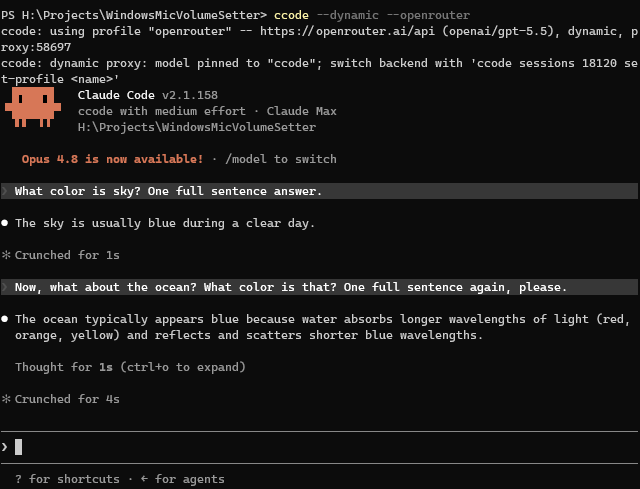
The switching takes place in the background, here I did that after the first answer:
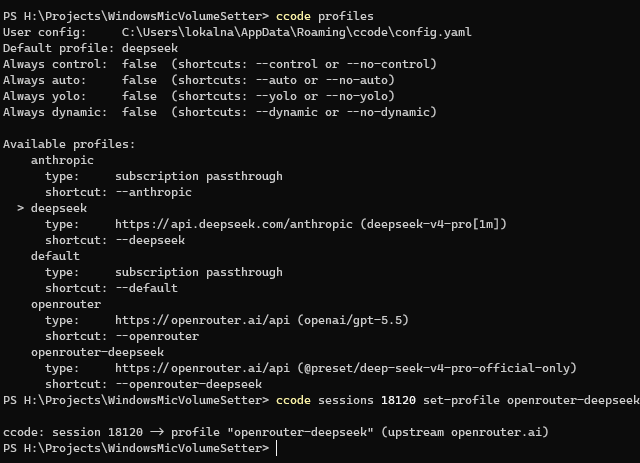
You can see how two different models were used in OpenRouter (no idea why the “App” sometimes shows up different):
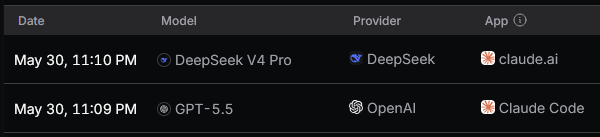
Also you can get stats about the current running sessions, here it is after some more questions:
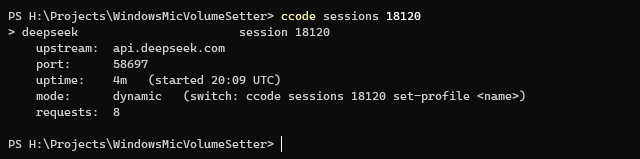
Note: You should know that a lot of providers are cheap when they can cache the conversation. Be careful in regards to switching models often, though all of this should work really nicely if you switch after
/compact.
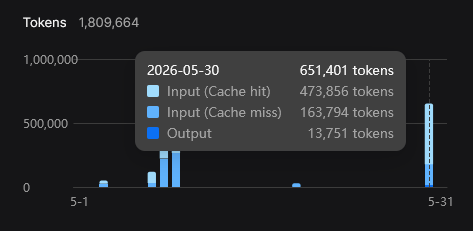
Starting a dynamic session
Launch with --dynamic and a starting profile:
# With the default profile
ccode --dynamic
# With a specific starting profile
ccode --dynamic --deepseek
You’ll see the proxy come up with the model pinned:
ccode: using profile "deepseek" -- https://api.deepseek.com/anthropic (deepseek-chat), dynamic, proxy:55240
ccode: dynamic proxy: model slots pinned; switch backend with 'ccode sessions 18900 set-profile <name>'
Each model slot gets its own sentinel name; the proxy rewrites it to the active profile’s configured model on each request. So when you switch backends, the model name Claude Code sends never changes.
A note on model names in dynamic mode
Because the backend is swappable at runtime, a dynamic session can’t pin a provider-specific label to each slot - a name like “DeepSeek V4 Pro” would be wrong the moment you switch to another provider. So in dynamic mode Claude Code’s local /model picker shows generic ccode labels (“ccode-Fable”, “ccode-Opus”, “ccode-Sonnet”, “ccode-Haiku”) instead. A plain (non-dynamic) profile, which is pinned to one backend, keeps showing that provider’s own names.
Remote Control is a little different again. A Remote Control session has no local picker - the model dropdown lives in the desktop/web app, and that picker is rendered by Claude Code’s cloud, not by ccode. It shows Claude’s own model catalog as switch targets and may abbreviate a non-Claude model name (you might see something like Dee***** 4 Pro). That’s a Claude Code behavior we can’t change from here; the session still works and switching still works, the name is just displayed differently. If the exact model names matter to you, use a plain local session rather than Remote Control.
You can start from any profile. A third-party profile needs an anthropic_base_url, a credential (anthropic_auth_token or anthropic_api_key), and a model. Your Claude subscription works too: start with ccode --dynamic (or any subscription profile) and the proxy forwards Claude Code’s own login to Anthropic directly, attaching no third-party credential - this needs an active claude /login. From there you can switch the running session to a third-party provider and back to the subscription whenever you like.
In the config, always_dynamic: true makes --dynamic the default.
You can also use --no-dynamic to turn it off for that specific launch.
Switching the backend
From another terminal, point a running session at a different profile:
ccode sessions 18900 set-profile openrouter-glm
Here’s the output:
ccode: session 18900 -> profile "openrouter-glm" (upstream openrouter.ai)
In-flight requests finish on the old upstream; new ones use the new one. You can switch between every forwardable profile and your Claude subscription - switching to a subscription profile points the session back at Anthropic directly (it needs an active claude /login).
In the command <id> is the session’s ccode pid, or a unique prefix of it. Use all to switch every dynamic session at once:
ccode sessions all set-profile openrouter-glm
Only dynamic sessions can be switched. A fixed (plain local-proxy) session won’t allow that.
Managing sessions
ccode sessions lists everything that’s running:
$ ccode sessions
Running proxy sessions (2):

> deepseek                       session 18900
    upstream:  api.deepseek.com
    port:      55240
    uptime:    12m   (started 14:02 UTC)
    mode:      dynamic   (switch: ccode sessions 18900 set-profile <name>)
    requests:  47

  openrouter-glm                 session 19044
    upstream:  openrouter.ai
    port:      55241
    uptime:    3m   (started 14:11 UTC)
    mode:      fixed
    requests:  8
The > marks the session a bare set-profile would target - it only appears when exactly one dynamic session is running. ccode sessions <id> shows a single session’s detail.
Normally sessions will be closed when you exit Claude Code (and ccode that wraps it), but if needed, you can stop a session with kill:
ccode sessions 18900 kill
ccode sessions all kill        # asks to confirm; add --yes to skip the prompt
Interactive view
ccode sessions tui opens an interactive view over the same operations, so you don’t have to remember the subcommands:
ccode sessions tui
Here’s an example of what it looks like:

It starts on a list of running sessions. Press Enter on one to open it, then pick what to do:
- stats - upstream, port, uptime, and request count, refreshed every couple of seconds.
- models - switch the backend to another forwardable profile or your Claude subscription (dynamic sessions only).
- kill - graceful shutdown, with a confirm step.
The help bar shows the keys: arrows (or h/j/k/l) navigate, Enter selects, ESC goes back one screen, q (or Ctrl+C) quits.
Here’s the view for a session:
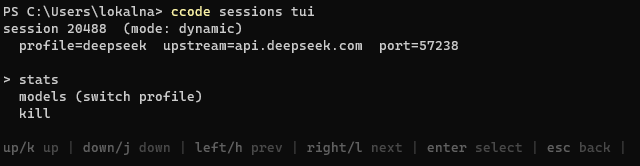
Here’s changing models interactively:
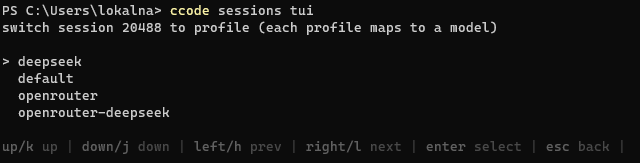
What it does NOT do
- Each model slot routes independently to the active profile’s configured model for that slot - you set those per slot with the profile’s
models:block (see Config Reference and the Providers examples). On the subscription this means each slot maps to the Claude model your profile names for it, or defaults if it names none. To remap an inbound model name themodels:block does not cover, useproxy.model_map(a lower-level escape hatch). - The limitations of the Local proxy still apply: single-process, loopback-only by default, no auth on the proxy itself.
- OpenAI-format translation in the proxy is still planned for later, for now you can use this with something like OpenRouter, they handle that conversion for you if you use the models they provide.
- I’d also love to let Claude Code switch models itself or allowing the user to do so within a conversation, e.g. develop with Anthropic or DeepSeek models, review with GPT, no good ideas on how to do that yet.
See also
- Local proxy - the underlying proxy, its security model, pidfiles, and the status endpoint.
- Configuration - the config merge rules the
proxy:block follows. - Providers - the third-party providers worth switching between.
- Config Reference - the
models:block,always_dynamic, and every other field.
FAQ
General
What is ccode?
ccode is a third-party launcher for Claude Code that adds profile management. It lets you switch between different model providers (Anthropic, DeepSeek, OpenRouter, Bedrock, etc.) with a single flag.
Is ccode affiliated with Anthropic?
No. ccode is not affiliated with or endorsed by Anthropic. It’s an independent, source-available tool.
Why not just use OpenCode (or similar)?
Other harnesses like OpenCode are lovely, but some people are more familiar with Claude Code, and it also has good support for various models on a per-task basis (e.g. sub-agents), permission controls etc.
You can even do something like launch it with ccode --deepseek remote-control and view the session either in your browser or the Claude Desktop app on any of your devices, even if the underlying model is different!
So with this tool you get both the Claude Code user experience that you enjoy, as well as pricing from other providers that you may enjoy more. See also Similar Software for alternatives.
Does ccode collect any data?
No. There’s no analytics or telemetry in ccode itself. Your prompts, API keys, and usage data stay between you and your chosen model provider.
Does ccode modify Claude Code?
No. ccode is a launcher, not a patch. It sets environment variables and then runs the standard claude binary. Claude Code itself is unchanged.
Configuration
Where is my config file?
| Platform | Path |
|---|---|
| Windows | %APPDATA%\ccode\config.yaml |
| Linux / macOS | ~/.config/ccode/config.yaml |
Run ccode profiles to see the exact path, or ccode edit-config to open it directly.
What’s the difference between the full and minimal config?
The full config (ccode init-config) includes commented-out examples for every supported provider: cloud providers (Bedrock, Vertex, Foundry), third-party providers (DeepSeek, OpenRouter, Z.AI, Kimi, Qwen, MiniMax), and local models. It’s 700+ lines.
The minimal config (ccode init-config --minimal) includes only the top-level settings and Anthropic direct profiles. It’s about 100 lines, and is useful for quick setup or project-level configs.
Can I use a project-level config?
Yes. Place a ccode.yaml (or .claude/ccode.yaml) in your project root. It merges with your user config at the field level, so you can put model settings in the project config and keep API keys in your user config. See Configuration for details.
How do I add a provider that isn’t in the default config?
Any provider that exposes an Anthropic-compatible API endpoint (/v1/messages) works. Set anthropic_base_url to the provider’s endpoint and anthropic_auth_token to your API key. See Providers for examples.
The fastest way to add one is ccode add-profile, which walks you through the fields interactively. You can also point it at a hosted YAML file with ccode add-profile --from-url <url> (the Importing configuration page lists ready-to-import examples for every supported provider).
Local proxy
What’s the local proxy, and when does it run?
It’s an in-process HTTP server that ccode 2.0.0+ can stand up on 127.0.0.1 to sit between Claude Code and your third-party provider. Claude Code dials it instead of the real upstream; the proxy strips inbound auth headers, attaches your configured upstream credential, and forwards the request. The full story is on the Local proxy page.
You’ll see it auto-attach when you use --control (or always_control: true) with a profile that points at a third-party provider - the combination Claude Code 2.1.139+ otherwise refuses. ccode prints a log line below the usual “using profile” line in that case, including the proxy’s bind address. For the default subscription-passthrough profile (and for cloud-provider profiles like Bedrock or Vertex) the proxy stays out of the way.
Can I run the proxy on its own, without Claude Code?
Yes - ccode proxy [--profile <name>] starts only the proxy and blocks until Ctrl+C, with no Claude Code launch. Useful for pointing several claude invocations (or any other Anthropic-compatible tool) at one upstream. Details on the Local proxy page.
Where do the proxy’s pidfiles live?
Under a per-user subdirectory of the system temp dir: <tmp>/ccode-<uid>/pid/<pid>.json on Unix, <tmp>/ccode/pid/<pid>.json on Windows (where %TEMP% is already per-user). They’re metadata only, no credentials in them. Cleaned up on clean shutdown; on the next launch the pid directory is swept for entries whose ccode process is no longer alive.
Can I switch models or providers without restarting?
Yes - launch with ccode --dynamic <profile> and then, from another terminal, run ccode sessions <id> set-profile <name> to point the running session at a different configured profile. Claude Code keeps going; in-flight requests finish on the old upstream and new ones use the new one. ccode sessions lists what’s running. See the Dynamic proxy page.
Profiles
How do profile shortcuts work?
Every profile name automatically becomes a --<name> CLI shortcut. If you have a profile called deepseek, then ccode --deepseek is equivalent to ccode --profile deepseek.
If a profile name collides with a Claude Code flag (e.g. you named a profile model), the shortcut is disabled and you’ll need to use --profile model instead.
Can I use multiple profiles at once?
No. Only one profile is active per session. However, you can set a different default_profile in a project-level config, so different projects can use different providers automatically.
How do I set a default profile?
Set default_profile in your config:
default_profile: "deepseek"
This profile is used when you run ccode without specifying one.
Troubleshooting
“No configuration found” on first run
This is normal. ccode creates a default config automatically on first run and tells you where it is. Edit the file to add your API keys, then run ccode again.
My profile shows “[no auth]”
This means the profile has no authentication mechanism set up. For third-party providers, you need anthropic_auth_token. For Anthropic API, you need anthropic_api_key. For cloud providers (Bedrock, Vertex, Foundry), set the corresponding claude_code_use_* flag (those use your AWS/GCP/Azure credentials). Run ccode profiles to see which profiles have this warning.
Claude Code flags aren’t working
Make sure you’re putting ccode flags before Claude Code flags:
# Correct
ccode --deepseek --continue

# Also correct (-- forces everything after it to pass through)
ccode --deepseek -- --some-flag
All flags that aren’t recognized by ccode are passed through to Claude Code automatically.
Licensing and pricing
Why source available license, not open source? Why not develop on GitHub?
A source available license was picked, so people wouldn’t just resell this app or sidestep the distribution method.
The limitation on no distribution of binaries is there so people also can’t just put something in the app that might be malicious or problematic, like telemetry. You are allowed to make forks and even make them available to others, but it must be a source distribution - so people can inspect the code and compile it themselves.
The source is not on GitHub, because I’m not really interested in the social aspects of development and providing free support. You can e-mail me, just don’t be mean.
Why charge money for this at all? Why allow 0 USD prices (free downloads)? Why Itch.io?
Someone has to pay for the Apple Developer account license, so I can sign the software and not have to ask people to work around quarantine restrictions.
At the same time, if someone doesn’t want to pay, they can still download the program for free, since that’s probably a bit safer than something like torrenting. Treat it like a WinRAR trial if you please.
I also chose Itch.io for the pay-what-you-want features, so it meets people’s needs better, given how many with different circumstances there are. If this shows that people will just download it for free and not pay, then so be it.
Frankly I’m helping a friend with their medical expenses, so I don’t really get to bad about trying to earn a buck in addition to my job with this.
What about updates? Do I have to pay if I only want the source?
I mostly ask for money for the prebuilt binaries and even that is optional.
If you feel like throwing a few dollars my way for the source, then that’s nice, if not, then that’s okay.
If updates come out and you’ve bought an older version, I don’t see an issue of you downloading the new version for free.
Can’t this be replicated in an evening?
Sure, probably in a few days. I just made something that I wanted to use. No reason why I couldn’t make it more widely available.
There was some annoying stuff around changing env variables and just multi-OS support in general, and OpenRouter seems to not work too well with claude -p and needs workarounds.
Development questions
I found a bug, how do I report it?
If you want, you can send me an e-mail, the details are on my homepage.
I’ve also created a dedicated Itch.io thread for reporting any bugs or issues: Bug Reports
Past that, I can’t commit to an SLA, since my job takes up most of my time.
Is there a roadmap?
Not quite, I’ll add whatever features seem nice.
The profile-management commands (add-profile with interactive / --from-file / --from-url flavors, remove-profile, and set-default-profile) shipped in 1.3.0, along with hosted example YAMLs for every supported provider you can pull in with one command.
2.0.0 added the Local proxy - an in-process Anthropic passthrough that auto-attaches around your session to keep Remote Control working with third-party providers on Claude Code 2.1.139+. 3.0.0 built on it with the Dynamic proxy: ccode --dynamic plus a ccode sessions CLI (and an interactive TUI) for switching a running session’s backend on the fly. The remaining idea on my mind is an optional Anthropic API to OpenAI API translation layer for providers that don’t speak Anthropic-compat natively - I’ve done something similar already internally for a company project.
If you have any other ideas, you can ask about them in the new Itch.io thread: Feature Requests
Will other harnesses like OpenCode be supported?
I was thinking about this, but that’d kind of bloat the config - and there’d probably be some confusion over that, managing just Claude Code is simpler.
OpenCode already has some settings files and while they’re not too comfy to manage, they seem to work already. I’ll just develop this well first.
How much of this is vibe coded?
A bunch. Then again, I’m not handling high volume financial transactions with that code, I’m just writing a convenience tool, so there’s not a lot of reason not to.
What is the site running on?
It’s a tool called mdBook, I really like it!
You input Markdown, it gives you a static HTML site that you can host wherever (I personally still like the Apache2 web server in a Docker container).
Changelog
5.0.0
Claude Code’s Fable tier is now a first-class model slot, and every provider example that names models has been rebuilt around it with current models. Profiles from earlier versions keep working unchanged.
- New
fable:slot in themodels:block, alongsidemodel,opus,sonnet,haiku, andsubagent. It takes the same model ID, display name, description, and capabilities as the other slots, and it routes independently in a dynamic session - previously the Fable tier was passed through as configured but never remapped, so a dynamic session sent it upstream unchanged. A profile that names no Fable model falls back to its primary model, and the subscription passthrough profile resolves the tier to Claude Fable 5. - Every provider example that names models now fills all six slots, and providers with more than one current model lead with a mixed-tier profile followed by single-model variants. The Anthropic and OpenRouter examples move to Claude Opus 5 and Claude Fable 5; Z.AI moves to GLM-5.3 with GLM-4.7 on the cheaper tiers; Alibaba Qwen moves to Qwen3.7-Max with Qwen3.7-Plus and Qwen3.6-Flash underneath; Moonshot Kimi keeps Kimi K3 on top with Kimi K2.7 Code underneath; Xiaomi MiMo runs v2.5 Pro throughout. The MiMo and single-model Kimi K3 profiles now ask for each model’s full 1M token context window, which those providers gate behind a suffix on the model ID, and the MiniMax profile pins the compact window its vendor guide recommends. The Claude subscription Opus tier moves to Claude Opus 5, while the default tier stays on Claude Sonnet 5 to match what Pro and Team Standard seats get.
- Nine new importable examples: DeepSeek Pro, Z.AI GLM-5.3, Moonshot Kimi K3, Alibaba Qwen3.7-Max, and five subscription-plan profiles - the Kimi Code plan in mixed, 1M, and 256k variants, plus the Qwen Coding Plan and Token Plan. The plan profiles use their providers’ own endpoints and model IDs, which differ from the pay-per-token APIs. See the Providers and Importing configuration pages.
- The organization gateway example is now named
org-gateway. Claude Code reservesgatewayas a subcommand name, so the old profile could not be imported. - Profiles that authenticate through an
ant auth loginprofile or Workload Identity Federation are now recognized as configured. Previously they were refused at launch with a message suggesting a token that would have taken priority over the credential you meant to use. Federation needs all four of its variables, soanthropic_service_account_idand the identity token fields are tracked as profile fields too. - Importing a profile into a project config now offers to keep every credential field in your user config, the Microsoft Foundry bearer token, the MCP OAuth client secret, the client key passphrase, and the federation identity token included. Fields that only name a credential file, such as the identity token path, stay with the project settings where they belong.
ccode add-profilenow asks which model should map to the Fable tier, alongside the Opus, Sonnet, and Haiku prompts.- Another batch of Claude Code environment variables and flags pass through cleanly, including the Vertex region for Claude Opus 5, a switch for the context-window enforcement Claude Code applies to model IDs it does not recognize (useful with third-party providers), the fast-mode availability checks, sub-agent concurrency and depth limits, the WebFetch cache lifetime and the Bash memory cap, Anthropic profile and federation credentials, the Bedrock cross-region inference prefix, restricted mode, the prompt cache lifetime for the main conversation and for sub-agents, the MCP discovery cache and protocol settings, the artifact comment toggles, the model new sessions start on, the background-work check-in interval, the tool memory exclusions, the session transcript directory name, the screen-reader write delay, and the Windows backspace key handling; plus
autocompact,environment,import,post,no-post,ref,restricted, andself-hosted-runneras reserved names. A profile named after one of those keeps working with--profile <name>, but its--<name>shortcut is disabled so the flag reaches Claude Code. See the Config Reference for the full list. - The
ccode uninstalldocumentation and its in-app help now describe the PATH cleanup accurately: confirming a binary removal also takes that install directory out of your PATH. The uninstall behavior itself is unchanged.
4.1.0
ccode now ships a Xiaomi MiMo provider example, refreshes the OpenRouter and Kimi example profiles to their latest models, and tracks the newest Claude Code settings.
- New example profile for Xiaomi MiMo, importable with
ccode add-profile --from-url https://ccode.kronis.dev/configuration-examples/mimo.yaml. It routes the main, Opus, and Sonnet tiers to MiMo v2.5 Pro and the Haiku and sub-agent tiers to MiMo v2.5. The profile also ships as a commented-out example in the default config, and is documented on the Providers and Importing configuration pages. - Updated the Z.AI example profile to GLM-5.2, Zhipu’s latest flagship coding model, for the main, Opus, and Sonnet tiers. The Haiku and sub-agent tiers continue to use GLM-4.5-Air.
- Track the newest Claude Code environment variables and flags so they pass through cleanly: the new Fable model tier (
anthropic_default_fable_model, with its name, description, and capabilities), safe mode, always-on effort, the advisor-tool and bundled-skills toggles, session-persistence and idle-timeout controls, Fable prompt-caching, Vertex regions for the latest Claude models, screen-reader mode, artifact open/disable toggles, the connect-timeout and OTEL-diag-stderr controls, the background-wait ceiling, the client-presence file, background-session handoff and memory-pressure controls, the auto-continue AFK timeouts, the remote MCP tool idle timeout, the retry watchdog for unattended runs, and strikethrough and mouse-click rendering toggles; plus--advisor,--safe-mode,--ax-screen-reader,--background,--cloud,gateway, and--no-browseras reserved flags. See the Config Reference for the full list. - Newer Claude Code environment variables are tracked as profile fields too: bearer-token authentication for Microsoft Foundry, the AWS credential-chain resolve timeout and credential-cache toggle, the Bedrock streaming content-type guard skip, subagent system-prompt appending and subagent text forwarding, the corporate process wrapper, the interrupted-turn resume age bound, the agent-team teardown timeout, and clickable terminal hyperlinks. The matching
--append-subagent-system-promptand--forward-subagent-textflags, plus--label, are reserved as well. - Each third-party provider example now links out to its official API and model docs. The OpenRouter example moves to Claude Sonnet 5, and the Moonshot Kimi example moves to Kimi K3 - Moonshot’s latest flagship model with a 1M token context window - on the main, Opus, and Sonnet tiers, keeping the cheaper Kimi K2.7 Code on the Haiku and sub-agent tiers and applying Moonshot’s recommended Claude Code settings for K3. See the Providers page for the current set.
- The Claude subscription defaults now use Claude Sonnet 5, and the examples show how to run Anthropic’s new top Mythos-class tier, Claude Fable 5: pin it on a direct Anthropic profile, or point an OpenRouter profile at it. The DeepSeek examples no longer carry a context-size suffix, since both DeepSeek V4 Pro and V4 Flash default to a 1M token context window.
4.0.0
ccode now supports per-slot model routing in dynamic mode. Instead of every tier (Opus, Sonnet, Haiku) collapsing to a single model, each tier can use a different model - the same way Claude Code works on a subscription.
- New
models:config block, the recommended way to configure models under a profile. Each slot (model,opus,sonnet,haiku,subagent) can set its own model ID, display name, description, and supported capabilities. For example, a DeepSeek profile can route Opus-tier requests to DeepSeek V4 Pro and Haiku-tier requests to DeepSeek V4 Flash, while a ZhipuAI profile routes Opus to GLM-5.1 and Haiku to GLM-4.5 Air. The old flat fields (anthropic_model, etc.) keep working, so existing profiles need no changes. - Per-slot display metadata: the name, description, and capabilities you set for each slot now show up in Claude Code’s
/modelpicker. A plain (non-dynamic) profile shows its provider’s own names; a dynamic session shows generic labels (“ccode-Opus”, “ccode-Sonnet”, “ccode-Haiku”) instead, since its backend can be swapped mid-session. Remote Control sessions keep working as before. - New
capabilitiesblock per slot to tell Claude Code which features a provider supports (effort levels, thinking, interleaved thinking, and so on). Each is a simple on/off toggle, with provider-appropriate defaults shown in the config examples. - Provider examples and configuration docs now lead with the
models:block, and the Config Reference has a new per-slot model routing section. - Newer Claude Code environment variables (
claude_code_enable_auto_mode,claude_code_sync_skills_install_timeout_ms,otel_metrics_include_resource_attributes) can now be set as profile fields, and recent Claude Code subcommand flags pass through cleanly.
3.1.0
The dynamic proxy can now start on and switch to or from your Claude subscription, not only third-party providers.
ccode --dynamicworks whatever profile you start from. Start on a third-party provider as before, or start on your Claude subscription (with an activeclaude /login) and the session forwards your login to Anthropic directly.- A running dynamic session can be switched to your Claude subscription and back to a third-party provider at any time with
ccode sessions <id> set-profile <name>(or from theccode sessions tuiview), without restarting Claude Code. - Updated the Dynamic proxy page to cover starting on and switching to or from the subscription.
3.0.0
ccode can now run a dynamic proxy: one launch that serves several provider profiles and lets you switch which backend Claude Code talks to at runtime, without restarting it or dropping a Remote Control session. Everything from 2.x keeps working unchanged - this release only adds the dynamic proxy on top.
- New
--dynamiclaunch mode (and analways_dynamicconfig flag). It starts the local proxy and pins Claude Code to a stable virtual model name, so ccode can repoint the session at a different provider on the fly while Claude Code keeps running. The starting profile needs a base URL, a credential, and a model. - New
ccode sessionscommand to see and steer running sessions.ccode sessionslists them;ccode sessions <id> set-profile <name>switches one to another configured profile;ccode sessions <id> killstops one. Useallin place of an id to act on every session at once (all killasks to confirm, or pass--yes).<id>is the session’s process id or a unique prefix of it. In-flight requests finish on the old provider and new requests use the new one. - New
ccode sessions tuiinteractive terminal view: it lists running sessions and lets you switch a session’s profile, kill one, or kill all without retyping session ids. Exit withqor Ctrl+C. The plainccode sessionssubcommands above still work for scripting. - New optional
proxy.model_mapconfig to rewrite model names per request (inbound name to upstream name), at the top level or per profile. - New website page: Dynamic proxy. The Local proxy, FAQ, and Config Reference pages point at it.
- Track recent Claude Code additions as first-class profile fields: skills syncing (
claude_code_sync_skills,claude_code_sync_skills_wait_timeout_ms),claude_code_disable_workflows,claude_code_propagate_traceparent, andotel_metrics_include_entrypoint; plus theexecandprompt-suggestionssubcommands as reserved names so a profile by either name won’t shadow them. See the Config Reference for the full list.
2.0.0
ccode now ships an in-process Local proxy that sits between Claude Code and your third-party provider. Profiles that worked in 1.x keep working identically.
- New Local proxy mode that restores
claude remote-controlfor third-party provider profiles on Claude Code 2.1.139+. ccode binds a small HTTP server on127.0.0.1, pointsANTHROPIC_BASE_URLat it, and forwards Anthropic-shaped requests to your real upstream (DeepSeek, OpenRouter, in-house gateway, local Ollama, etc.). Credential env vars are pulled out of Claude Code’s environment so the new auth check passes, and inbound credential and identity headers are stripped before forwarding. The proxy holds the upstream credential in memory and attaches it to outbound requests itself. See the Local proxy page for the full shape. - Auto-enables whenever
--control(oralways_control: true) is in effect for a third-party provider profile. Most users don’t need to touch the config; you’ll see a log line explaining what happened. Subscription passthrough and cloud-provider profiles (Bedrock, Vertex, Foundry) stay untouched. - New
proxy:config block at the top level and per-profile. The simplest opt-in isproxy: { enabled: true }; the full set (enabled,bind,port,pid_file,allow_external_bind) is documented on the Local proxy page and the Config Reference. - New
ccode proxy [--profile <name>]subcommand that starts only the local proxy and blocks until Ctrl+C, with no Claude Code launch. Useful for pointing multipleclaudeinvocations (or any other Anthropic-compatible tool) at the same upstream. - Subscription passthrough with
--controlnow works cleanly whenCLAUDE_CODE_OAUTH_TOKENis in your shell (e.g. afterclaude /login); the proxy auto-enable rule now also requires a non-Anthropicanthropic_base_url. - New website page: Local proxy. The Introduction, Usage, and FAQ pages now point at it as the fix for Remote Control on 2.1.139+.
- Track two more Claude Code reserved names (
daemonsubcommand,--cwdflag) and a fresh batch of upstream env vars as first-class profile fields (notablyclaude_code_powershell_respect_execution_policy,claude_code_plugin_prefer_https, and the standardforce_color/no_color). The retiredclaude_code_enable_opus_4_7_fast_modeis tracked in the Deprecated section so existing configs that mention it still parse. See the Config Reference for the full list.
1.5.0
- New first-party cloud provider: Claude Platform on AWS, Anthropic’s first-party platform deployed on AWS (distinct from Amazon Bedrock). Six new first-class profile fields wired through:
claude_code_use_anthropic_aws(the toggle),anthropic_aws_workspace_id(required on every request),anthropic_aws_api_key(workspace API key from the AWS Console, sent asx-api-key),anthropic_aws_base_url(optional endpoint override), andclaude_code_skip_anthropic_aws_auth(for gateways that sign requests themselves). The toggle is treated as a cloud-provider profile by auth validation, so it skips the auth-token check (AWS SigV4 is supported as a fallback when no API key is set).anthropic_aws_api_keyjoins the secret-fields list, so the split-config prompt fires for it when importing into a project config. - New hosted profile example:
anthropic-aws.yaml. Prompts for the workspace ID and the workspace API key - press ENTER at the API key prompt to leave it unset and fall back to AWS SigV4 (IAM credentials). Matching uncommented section on the Providers page (placed right below Bedrock), a row on the Importing configuration hosted-examples table, and a commented-out block in the fullccode init-configdefault config. - Track one more upstream Claude Code env var as a first-class profile field:
claude_code_max_turns(caps agentic turns when no explicit--max-turnsflag is passed; Claude Code rejects a value that’s not a positive integer at startup).
1.4.2
- New hosted profile example:
openrouter-model.yaml(“OpenRouter (custom model)”). Same OpenRouter base URL as the existingopenrouter.yaml, but the auth token and every model slot (anthropic_model, the three default model fields, andclaude_code_subagent_model) are part of theprompt:list - so you can pick your own slugs for non-Anthropic models (Llama, Mistral, GPT, Gemini, DeepSeek, etc.) at import time without editing YAML afterwards. ENTER skips any slot. Slots into the docs above the existingopenrouter-preset.yaml(“OpenRouter (custom preset)”) variant. The existingopenrouter.yaml(Claude defaults) andopenrouter-preset.yaml(preset slug workflow) are unchanged. - All hosted profile examples, the default config templates (
init-configandinit-config --minimal), and every YAML example across the README, Providers, Configuration, and Importing configuration pages now use double-quoted string values consistently (anthropic_auth_token: "YOUR_KEY_HERE"instead ofanthropic_auth_token: YOUR_KEY_HERE). Booleans stay unquoted. Defensive against pasted values that happen to contain YAML-reserved characters - cuts down the surface area for “my key starts with@and now nothing works” kinds of bugs. - The Providers page is rewritten so each provider section shows the corresponding hosted YAML file 1:1 (header comments included), with the only deviation being that the API key/token field is uncommented with a
YOUR_KEY_HEREplaceholder and theprompt:block is dropped. Easier to skim the field set, single source of truth between the page and the hosted file. The “OpenRouter (custom model)” variant is documented on the Importing configuration hosted-examples table only, since its body is mostly aprompt:list and doesn’t fit the page format. - Side notes on the Providers, Introduction, Configuration, and Usage pages, plus the bundled README, now use a consistent
> Note:blockquote format (no bolded “Tip:”/“New:” inline labels). - Track six new Claude Code subcommands (
attach,bg,kill,logs,respawn,rm,stop) as reserved names, so a profile called e.g.killwon’t try to claim a--killshortcut that would collide with Claude Code itself. Also added theclaude_code_disable_agent_viewprofile field (and matchingCLAUDE_CODE_DISABLE_AGENT_VIEWenv var) to track an upstream Claude Code addition.
1.4.1
A small follow-up to 1.4.0 with quality-of-life improvements to the profile-management commands.
- On Linux and macOS, configs that ccode writes (
init-config,add-profile,remove-profile,set-default-profile) now use mode0600so saved credentials aren’t readable by other users on the same machine. No-op on Windows, where access is controlled by ACLs instead. - Stricter URL handling on
ccode add-profile --from-url: the scheme check is case-insensitive (HTTPS://is accepted just likehttps://), and redirects are constrained to http(s) with no transport-security downgrade. - More robust split-key flow: when you choose to save the API key to your user config, ccode writes the user config first so a problem there can’t affect the project file.
- Cleaner error messages on failed URL fetches.
app/README.mdnow documents--valueand--no-promptswith examples for unattended and CI use.- Expanded internal test coverage.
1.4.0
- The hosted profile examples on Importing configuration now cover every provider documented in the default config (15 files instead of 8). New additions: Amazon Bedrock, Bedrock Mantle, Google Vertex AI, Microsoft Foundry (Azure), OpenRouter custom-preset variant, Local/self-hosted, and an Organization gateway template. Each file follows the rule “prompt only for fields that are required AND have no sensible default” - so Bedrock/Mantle have no prompts at all (AWS creds handle auth), Vertex prompts for the GCP project ID, Foundry prompts for both the resource URL and API key, the gateway template prompts for both the URL and the auth token, and the rest prompt for just the auth token. The OpenRouter preset and Local examples leave the slug/model name as a placeholder you edit after import (since the same value is repeated across five model slots, prompting once-per-field would be redundant - both files explain this in the leading comment).
- The hosted YAMLs now include a commented-out body line for every prompted field with a hint explaining where the value comes from (
# the API key is part of the prompt field below, user will fill this out when pulling). Reads as a near-mirror of the corresponding default_config profile, so the field set is visible to anyone browsing the file on the website, not just at the moment of import. - The Providers page is rewritten to mirror
default_config.yamlfield-for-field across every provider section (no more trimmed Kimi/Qwen/MiniMax bodies), with accode add-profile --from-url ...snippet under each provider that has a hosted file. DeepSeek Flash, the OpenRouter custom-preset workflow, and the organization gateway pattern get their own dedicated subsections instead of being mentioned in passing. The China-endpoint variants for Z.AI and Moonshot Kimi are documented inline. - The “Hosted example profiles” table on Importing configuration now lists all 15 files with a “Prompts for” column so the trade-off between auto-filled and user-supplied fields is visible at a glance. The Bedrock/Mantle/gateway files are flagged as particularly useful when paired with
init-config --minimalor as templates for orgs to fork and host on their own internal network.
1.3.0
- New
ccode add-profilecommand for adding profiles without hand-editing YAML. Three modes: interactive (walks you through name + the most common fields, with Anthropic and DeepSeek shown as examples and ENTER to skip),--from-file <path>(or-for stdin), and--from-url <url>(https only by default; pass--allow-httpfor plain HTTP). All three show what’s about to be added and ask for confirmation before writing. Each invocation adds exactly one profile; to add multiple, run it once per profile. Comments and unrelated content in the target file are preserved. - New
--set-defaultflag onadd-profile: also pointsdefault_profile:at the new profile in the same file. The confirmation diff shows both changes side by side, so the add and the default-flip are accepted or aborted together. - New
prompt:field on profile YAMLs: a list of profile field names that ccode should ask the user to fill in at import time (e.g.prompt: [anthropic_auth_token]). Each name must be a valid Profile field; typos surface immediately. The list is stripped before writing, so the saved profile contains only the user’s answers, never the directive itself. ENTER skips a prompt; the field stays unset. Use--value <field>=<value>(repeatable) to pre-fill specific prompt slots non-interactively, or--no-promptsto skip them all (CI use).--valueonly fills declared prompt slots; arbitrary fields require writing your own YAML. - New split-key prompt: when
add-profiletargets a project config (./ccode.yaml, etc.) and the profile carries a real auth token, ccode offers a numbered choice between saving the auth fields in the user config (default; safer for committable repos) or in the project file. Splitting works through ccode’s existing field-level merge, so the two halves combine seamlessly at runtime. Refuses cleanly with the exactinit-configcommand if the user picks “user config” but it doesn’t exist yet. - New
ccode remove-profile <name>command, with a[Y/n]confirmation that defaults to yes (skip with--yes/-y). Warns if the profile being removed is the file’sdefault_profile. - New
ccode set-default-profile <name>command for changingdefault_profile:in a config file without opening an editor. Validates that the named profile actually exists in that file (lists what’s available if not). One-line edit, so no confirmation prompt; no-op if already set. - All three commands accept an optional positional
[target]argument (a directory,., or an explicit file path) so they can edit project-level configs as well as the user config. If the target file doesn’t exist, ccode prints the exactinit-configcommand needed to scaffold it first. --from-file/--from-urlaccept one profile per file/URL: the top-level key in the YAML is the profile name, and its value is the profile body. Multi-profile imports are rejected so the workflow stays “one URL = one profile” (matching the hosted examples). Field names are validated strictly against the Config Reference, catching typos likeanthropic_base_urat import time. Theenv:map remains the escape hatch for anything not first-class.- Profile names are validated to avoid collisions with Claude Code or ccode flags, so the auto-generated
--<name>shortcut keeps working. Trying to add a profile namedmodel(or any other reserved name) is rejected with a clear error. - Conflict handling for
--from-file/--from-url: if a profile of the same name already exists in the target file, ccode refuses unless--overwriteis passed. - HTTP fetching has a 10-second timeout, a 256 KiB response cap, surfaces non-2xx responses as errors, and logs the post-redirect URL.
ccode uninstallconfirmations now default to yes (the user already typeduninstall); prompts updated from[y/N]to[Y/n]accordingly.- New website page: Importing configuration, with hosted example profile YAMLs for Anthropic, DeepSeek (Pro + Flash as separate files), OpenRouter, Z.AI, Kimi, Qwen, and MiniMax. Each example uses the
prompt:field for its auth token, so import is one command + one paste. There’s also a short section on hosting your own profile YAMLs for your team or org. - Short cross-links to the new page from
introduction.md,providers.md, andusage.md.
1.2.0
- macOS builds are now signed and notarized, so Gatekeeper accepts them without the
xattr -d com.apple.quarantine ./ccodeworkaround. The signed binary is universal (Intel and Apple Silicon in one binary), so the previous separatemacos-amd64andmacos-arm64ZIPs collapse into a singleccode-1.2.0-macos-universal.zip. - New macOS
.pkginstaller (ccode-1.2.0-macos.pkg) for one-click installs. Double-click, enter your admin password, andccodelands in/usr/local/bin/(already on PATH on every Mac). The .pkg is signed and notarized, so it works even without an internet connection at install time. The existingccode installflow still works exactly as before from the universal ZIP, for anyone who prefers user-level installs or wants to inspect the binary first. - Documentation: removed the
xattrquarantine step from the macOS install snippets in app/README.md, the Installation page, and the Introduction page. Added a short note about choosing between the universal ZIP and the .pkg installer. - Documentation: updated the “Known limitations” section in the Usage page to reflect that macOS code signing is now in place.
1.1.0
ccode init-confignow accepts a directory (or.) as the path argument and createsccode.yamlinside it. For example,ccode init-config --minimal .drops a project-level config in the current directory, ready to commit alongside your code.ccode edit-confignow accepts a directory as a positional argument and opens the project-levelccode.yamlinside it (checking<dir>/ccode.yamland<dir>/.claude/ccode.yaml). If no project config is found there, ccode prints a hint instead of silently falling back to the user config.ccode init-confignow tailors its post-creation editor hint to whatever it just created. Creating a project config withinit-config --minimal .printsccode edit-config .(and... vim .) instead of the generic user-config hint, so the suggested follow-up actually opens the file you just made. Custom-filename targets (init-config foo.yaml) skip the hint, sinceedit-configwouldn’t find them by directory.- Documentation: new “Practical examples” section in the Usage page walking through three split-config scenarios (different default profiles per project, different DeepSeek models per project, different env/telemetry settings per project).
- Documentation: the Introduction page now shows the per-project default-profile pattern with a short example, so the split-config workflow is discoverable from the landing page.
- Documentation: new “Known limitations” section in the Usage page covering Remote Control’s occasional flakiness, the permission-mode handoff into
claude remote-control, and the macOS code-signing situation. - Documentation: a concrete macOS Zed example for
ccode edit-configshowing how to point at the in-bundle CLI (/Applications/Zed.app/Contents/MacOS/cli) when “Install CLI” from the Zed menu hasn’t been run, with a note on why GUI editors don’t need a--waitflag here. The shorterccode edit-config zedform is shown alongside the other editors (vim, nano) in the generic examples list.
1.0.1
- Documentation: the install snippets now show both PowerShell (
.\ccode.exe install) andcmd(ccode.exe install) forms on Windows, since the leading.\is required in PowerShell but optional incmd. - Fix
ccode uninstallon Windows leavingccode.exe.oldbehind with an “Access is denied” error. The uninstaller now schedules a detached cleanup helper that removes the renamed binary and the install directory after the process exits. - Fix
ccode uninstallfailing to re-run after a previously failed uninstall: a staleccode.exe.oldin the install directory is now overwritten instead of blocking the rename.
1.0.0
First stable release.
- Launcher that sets environment variables per profile and runs the official
claudebinary - All 235 official Claude Code environment variables supported as first-class YAML fields, plus an
env:escape hatch for anything unmapped - Named profiles with automatic
--<profile>shortcuts, collision-checked against Claude Code flags - Two-level config merge: user-level config (carries secrets) and optional project-level config (
./ccode.yamlor./.claude/ccode.yaml) merged at the field level --config <path>flag to swap in an explicit project-level config- Global
env:block applied to all profiles; per-profileenv:blocks take priority - Subscription passthrough via the empty
default: {}profile (launches Claude Code as-is with your existing subscription) - Auth validation per profile with
[no auth]warning inccode profiles - Built-in profile examples for Anthropic (direct + API), Amazon Bedrock, Bedrock Mantle, Google Vertex AI, Microsoft Foundry, DeepSeek, OpenRouter (with preset support), Z.AI, Moonshot Kimi, Alibaba Qwen, and MiniMax
- Local model support (llama.cpp, vLLM, Ollama, LM Studio) via
anthropic_base_url - Launch modes:
always_control/always_auto/always_yoloconfig flags with matching--control/--auto/--yoloCLI overrides (and--no-*counterparts) - Warning when combining
--controlwith--autoor--yolo, since Claude Code’sremote-controlignores permission flags at the time of writing ccode init-configwith--reset,--minimal, and custom output pathccode edit-configopens the config in your preferred editor (command arg >$EDITOR>$VISUAL> platform default)ccode installfor user-level install,--systemfor system-wide; PATH updated via Windows registry +WM_SETTINGCHANGEbroadcast, or shell rc files on Unix (bash, zsh, fish, .profile)ccode profileslists available profiles, default, launch modes, shortcuts, and auth status- Argument passthrough for unknown flags, with
--as the explicit passthrough sentinel - Subcommand typo hints (
ccode init->init-config,ccode --install->install, etc.) - Cross-platform builds for Windows, Linux, and macOS (amd64 + arm64)
- Documentation site at ccode.kronis.dev
Licenses
This page lists the license for ccode itself, followed by the licenses of its dependencies.
ccode
Here’s the license for ccode:
END-USER LICENSE AGREEMENT FOR CCODE

IMPORTANT: PLEASE READ THE TERMS AND CONDITIONS OF THIS LICENSE AGREEMENT CAREFULLY BEFORE CONTINUING WITH THIS PROGRAM INSTALLATION OR USAGE.

This End-User License Agreement ("EULA") is a legal agreement between you (either an individual or a single entity) and Kristians Kronis (hereinafter referred to as "Licensor"),
for the software product(s) identified above which may include associated software components, media, printed materials, and "online" or electronic documentation ("SOFTWARE PRODUCT").
By installing, copying, or otherwise using the SOFTWARE PRODUCT, you agree to be bound by the terms of this EULA.
This license agreement represents the entire agreement concerning the program between You and the Licensor, and it supersedes any prior proposal, representation, or understanding between the parties.
If you do not agree to the terms of this EULA, do not install or use the SOFTWARE PRODUCT.

The SOFTWARE PRODUCT is protected by copyright laws and international copyright treaties, as well as other intellectual property laws and treaties. The SOFTWARE PRODUCT is licensed, not sold.

1. GRANT OF LICENSE.
The SOFTWARE PRODUCT is licensed as follows:
(a) Installation and Use.
The Licensor grants you the right to install and use copies of the SOFTWARE PRODUCT on your computer running a validly licensed copy of the operating system for which the SOFTWARE PRODUCT was designed.
(b) Backup Copies.
You may also make copies of the SOFTWARE PRODUCT as may be necessary for backup and archival purposes.

2. DESCRIPTION OF OTHER RIGHTS AND LIMITATIONS.
(a) Maintenance of Copyright Notices.
You must not remove or alter any copyright notices on any and all copies of the SOFTWARE PRODUCT.
(b) Distribution.
You may not distribute copies of the SOFTWARE PRODUCT to third parties.
(c) Rental.
You may not rent, lease, or lend the SOFTWARE PRODUCT.
(d) Compliance with Applicable Laws.
You must comply with all applicable laws regarding use of the SOFTWARE PRODUCT.
(e) Source code.
You may compile and modify the source code of the SOFTWARE PRODUCT for your own personal purposes, to propose contributions to the SOFTWARE PRODUCT.
You may maintain a publicly available source-only fork, provided that the source code is made available free of charge, in compliance with this EULA and without additional limitations.
You may not distribute the SOFTWARE PRODUCT or any derivative work thereof in compiled or binary form to third parties.

3. TERMINATION
Without prejudice to any other rights, the Licensor may terminate this EULA if you fail to comply with the terms and conditions of this EULA. In such event, you must destroy all copies of the SOFTWARE PRODUCT in your possession.

4. COPYRIGHT
All title, including but not limited to copyrights, in and to the SOFTWARE PRODUCT and any copies thereof are owned by the Licensor or its suppliers.
All title and intellectual property rights in and to the content which may be accessed through use of the SOFTWARE PRODUCT is the property of the respective content owner
and may be protected by applicable copyright or other intellectual property laws and treaties. This EULA grants you no rights to use such content.
All rights not expressly granted are reserved by the Licensor.

5. NO WARRANTIES
The Licensor expressly disclaims any warranty for the SOFTWARE PRODUCT.
The SOFTWARE PRODUCT is provided 'As Is' without any express or implied warranty of any kind, including but not limited to any warranties of merchantability, noninfringement, or fitness of a particular purpose.
The Licensor does not warrant or assume responsibility for the accuracy or completeness of any information, text, graphics, links or other items contained within the SOFTWARE PRODUCT.
The Licensor makes no warranties respecting any harm that may be caused by the transmission of a computer virus, worm, time bomb, logic bomb, or other such computer program.
The Licensor further expressly disclaims any warranty or representation to any user or to any third party.

6. LIMITATION OF LIABILITY
In no event shall the Licensor be liable for any damages (including, without limitation, lost profits, business interruption, or lost information) rising out of any use of or inability to use the SOFTWARE PRODUCT,
even if the Licensor has been advised of the possibility of such damages. In no event will the Licensor be liable for loss of data or for indirect, special, incidental, consequential (including lost profit),
or other damages based in contract, tort or otherwise. The Licensor shall have no liability with respect to the content of the SOFTWARE PRODUCT or any part thereof, including but not limited to errors
or omissions contained therein, libel, infringements of rights of publicity, privacy, trademark rights, business interruption, personal injury, loss of privacy, moral rights or the disclosure of confidential information.
gopkg.in/yaml.v3
Used for YAML configuration file parsing.
This project is covered by two different licenses: MIT and Apache.

#### MIT License ####

The following files were ported to Go from C files of libyaml, and thus
are still covered by their original MIT license, with the additional
copyright staring in 2011 when the project was ported over:

    apic.go emitterc.go parserc.go readerc.go scannerc.go
    writerc.go yamlh.go yamlprivateh.go

Copyright (c) 2006-2010 Kirill Simonov
Copyright (c) 2006-2011 Kirill Simonov

Permission is hereby granted, free of charge, to any person obtaining a copy of
this software and associated documentation files (the "Software"), to deal in
the Software without restriction, including without limitation the rights to
use, copy, modify, merge, publish, distribute, sublicense, and/or sell copies
of the Software, and to permit persons to whom the Software is furnished to do
so, subject to the following conditions:

The above copyright notice and this permission notice shall be included in all
copies or substantial portions of the Software.

THE SOFTWARE IS PROVIDED "AS IS", WITHOUT WARRANTY OF ANY KIND, EXPRESS OR
IMPLIED, INCLUDING BUT NOT LIMITED TO THE WARRANTIES OF MERCHANTABILITY,
FITNESS FOR A PARTICULAR PURPOSE AND NONINFRINGEMENT. IN NO EVENT SHALL THE
AUTHORS OR COPYRIGHT HOLDERS BE LIABLE FOR ANY CLAIM, DAMAGES OR OTHER
LIABILITY, WHETHER IN AN ACTION OF CONTRACT, TORT OR OTHERWISE, ARISING FROM,
OUT OF OR IN CONNECTION WITH THE SOFTWARE OR THE USE OR OTHER DEALINGS IN THE
SOFTWARE.

### Apache License ###

All the remaining project files are covered by the Apache license:

Copyright (c) 2011-2019 Canonical Ltd

Licensed under the Apache License, Version 2.0 (the "License");
you may not use this file except in compliance with the License.
You may obtain a copy of the License at

    http://www.apache.org/licenses/LICENSE-2.0

Unless required by applicable law or agreed to in writing, software
distributed under the License is distributed on an "AS IS" BASIS,
WITHOUT WARRANTIES OR CONDITIONS OF ANY KIND, either express or implied.
See the License for the specific language governing permissions and
limitations under the License.
golang.org/x/sys
Used for platform-specific system calls (PATH modification on Windows and Unix).
Copyright 2009 The Go Authors.

Redistribution and use in source and binary forms, with or without
modification, are permitted provided that the following conditions are
met:

   * Redistributions of source code must retain the above copyright
notice, this list of conditions and the following disclaimer.
   * Redistributions in binary form must reproduce the above
copyright notice, this list of conditions and the following disclaimer
in the documentation and/or other materials provided with the
distribution.
   * Neither the name of Google LLC nor the names of its
contributors may be used to endorse or promote products derived from
this software without specific prior written permission.

THIS SOFTWARE IS PROVIDED BY THE COPYRIGHT HOLDERS AND CONTRIBUTORS
"AS IS" AND ANY EXPRESS OR IMPLIED WARRANTIES, INCLUDING, BUT NOT
LIMITED TO, THE IMPLIED WARRANTIES OF MERCHANTABILITY AND FITNESS FOR
A PARTICULAR PURPOSE ARE DISCLAIMED. IN NO EVENT SHALL THE COPYRIGHT
OWNER OR CONTRIBUTORS BE LIABLE FOR ANY DIRECT, INDIRECT, INCIDENTAL,
SPECIAL, EXEMPLARY, OR CONSEQUENTIAL DAMAGES (INCLUDING, BUT NOT
LIMITED TO, PROCUREMENT OF SUBSTITUTE GOODS OR SERVICES; LOSS OF USE,
DATA, OR PROFITS; OR BUSINESS INTERRUPTION) HOWEVER CAUSED AND ON ANY
THEORY OF LIABILITY, WHETHER IN CONTRACT, STRICT LIABILITY, OR TORT
(INCLUDING NEGLIGENCE OR OTHERWISE) ARISING IN ANY WAY OUT OF THE USE
OF THIS SOFTWARE, EVEN IF ADVISED OF THE POSSIBILITY OF SUCH DAMAGE.
Charmbracelet TUI stack (Bubble Tea, Bubbles, Lip Gloss)
Used for the interactive ccode sessions tui terminal interface. This covers
github.com/charmbracelet/bubbletea, github.com/charmbracelet/bubbles, and
github.com/charmbracelet/lipgloss (the last pulled in transitively), all MIT
licensed.
MIT License

Copyright (c) 2020-2025 Charmbracelet, Inc

Permission is hereby granted, free of charge, to any person obtaining a copy
of this software and associated documentation files (the "Software"), to deal
in the Software without restriction, including without limitation the rights
to use, copy, modify, merge, publish, distribute, sublicense, and/or sell
copies of the Software, and to permit persons to whom the Software is
furnished to do so, subject to the following conditions:

The above copyright notice and this permission notice shall be included in all
copies or substantial portions of the Software.

THE SOFTWARE IS PROVIDED "AS IS", WITHOUT WARRANTY OF ANY KIND, EXPRESS OR
IMPLIED, INCLUDING BUT NOT LIMITED TO THE WARRANTIES OF MERCHANTABILITY,
FITNESS FOR A PARTICULAR PURPOSE AND NONINFRINGEMENT. IN NO EVENT SHALL THE
AUTHORS OR COPYRIGHT HOLDERS BE LIABLE FOR ANY CLAIM, DAMAGES OR OTHER
LIABILITY, WHETHER IN AN ACTION OF CONTRACT, TORT OR OTHERWISE, ARISING FROM,
OUT OF OR IN CONNECTION WITH THE SOFTWARE OR THE USE OR OTHER DEALINGS IN THE
SOFTWARE.
TUI supporting dependencies
Pulled in transitively by the Charmbracelet TUI stack above. All are MIT licensed (the same MIT terms reproduced above apply, with copyright held by each project’s respective authors):
github.com/charmbracelet/colorprofilegithub.com/charmbracelet/x/ansigithub.com/charmbracelet/x/cellbufgithub.com/charmbracelet/x/termgithub.com/aymanbagabas/go-osc52/v2(Copyright (c) Ayman Bagabas)github.com/clipperhouse/displaywidthgithub.com/clipperhouse/stringishgithub.com/clipperhouse/uax29/v2github.com/erikgeiser/coninputgithub.com/lucasb-eyer/go-colorful(Copyright (c) 2013 Lucas Beyer)github.com/mattn/go-isatty(Copyright (c) Yasuhiro MATSUMOTO)github.com/mattn/go-localereader(Copyright (c) Yasuhiro MATSUMOTO)github.com/mattn/go-runewidth(Copyright (c) 2016 Yasuhiro Matsumoto)github.com/muesli/ansi(Copyright (c) 2021 Christian Muehlhaeuser)github.com/muesli/cancelreader(Copyright (c) 2022 Erik G. and Christian Muehlhaeuser)github.com/muesli/termenv(Copyright (c) 2019 Christian Muehlhaeuser)github.com/rivo/uniseg(Copyright (c) 2019 Oliver Kuederle)github.com/xo/terminfo(Copyright (c) 2017 Ken Kelley)
golang.org/x/text
Used for text encoding/width support pulled in by the TUI stack. Licensed
under the same BSD 3-Clause terms as golang.org/x/sys above (Copyright 2009
The Go Authors).
Config Reference
Every profile field maps 1:1 to a Claude Code environment variable. The YAML field name is the lowercased env var name.
For the full official documentation, see code.claude.com/docs/en/env-vars.
How fields work
- String fields are set as-is when non-empty.
- Bool fields emit
"1"when true, and are skipped when false. - The
env:map is an escape hatch for any env var not covered by a named field.
Priority order
When a profile is launched, environment variables are applied in this order (later wins):
- Global
env:block (top-level, applies to all profiles) - Profile struct fields (the named YAML fields below)
- Profile
env:block (per-profile escape hatch)
Authentication & Routing
| YAML field | Env var | Type |
|---|---|---|
anthropic_api_key | ANTHROPIC_API_KEY | string |
anthropic_auth_token | ANTHROPIC_AUTH_TOKEN | string |
anthropic_base_url | ANTHROPIC_BASE_URL | string |
anthropic_custom_headers | ANTHROPIC_CUSTOM_HEADERS | string |
anthropic_betas | ANTHROPIC_BETAS | string |
claude_code_oauth_token | CLAUDE_CODE_OAUTH_TOKEN | string |
claude_code_oauth_refresh_token | CLAUDE_CODE_OAUTH_REFRESH_TOKEN | string |
claude_code_oauth_scopes | CLAUDE_CODE_OAUTH_SCOPES | string |
claude_code_api_key_helper_ttl_ms | CLAUDE_CODE_API_KEY_HELPER_TTL_MS | string |
claude_config_dir | CLAUDE_CONFIG_DIR | string |
claude_project_dir | CLAUDE_PROJECT_DIR | string |
claude_code_project_dir_name | CLAUDE_CODE_PROJECT_DIR_NAME | string |
anthropic_workspace_id | ANTHROPIC_WORKSPACE_ID | string |
anthropic_federation_rule_id | ANTHROPIC_FEDERATION_RULE_ID | string |
anthropic_organization_id | ANTHROPIC_ORGANIZATION_ID | string |
anthropic_service_account_id | ANTHROPIC_SERVICE_ACCOUNT_ID | string |
anthropic_identity_token_file | ANTHROPIC_IDENTITY_TOKEN_FILE | string |
anthropic_identity_token | ANTHROPIC_IDENTITY_TOKEN | string |
anthropic_profile | ANTHROPIC_PROFILE | string |
Model Selection
| YAML field | Env var | Type |
|---|---|---|
anthropic_model | ANTHROPIC_MODEL | string |
anthropic_default_model | ANTHROPIC_DEFAULT_MODEL | string |
anthropic_default_opus_model | ANTHROPIC_DEFAULT_OPUS_MODEL | string |
anthropic_default_sonnet_model | ANTHROPIC_DEFAULT_SONNET_MODEL | string |
anthropic_default_haiku_model | ANTHROPIC_DEFAULT_HAIKU_MODEL | string |
anthropic_default_fable_model | ANTHROPIC_DEFAULT_FABLE_MODEL | string |
claude_code_subagent_model | CLAUDE_CODE_SUBAGENT_MODEL | string |
claude_code_effort_level | CLAUDE_CODE_EFFORT_LEVEL | string |
claude_effort | CLAUDE_EFFORT | string |
claude_code_always_enable_effort | CLAUDE_CODE_ALWAYS_ENABLE_EFFORT | bool |
anthropic_small_fast_model | ANTHROPIC_SMALL_FAST_MODEL | string |
anthropic_small_fast_model_aws_region | ANTHROPIC_SMALL_FAST_MODEL_AWS_REGION | string |
Per-slot model routing (models: block)
The models: block is the recommended way to configure a profile’s models. Each slot can name its own model, plus a display name, description, and the capabilities it supports. The flat fields above (anthropic_model, anthropic_default_opus_model, etc.) still work and act as a backward-compat fallback when a slot is not set.
| Slot | Maps to env var |
|---|---|
model | ANTHROPIC_MODEL |
fable | ANTHROPIC_DEFAULT_FABLE_MODEL |
opus | ANTHROPIC_DEFAULT_OPUS_MODEL |
sonnet | ANTHROPIC_DEFAULT_SONNET_MODEL |
haiku | ANTHROPIC_DEFAULT_HAIKU_MODEL (also sets ANTHROPIC_SMALL_FAST_MODEL) |
subagent | CLAUDE_CODE_SUBAGENT_MODEL |
Each slot accepts these fields:
| Field | Type | Meaning |
|---|---|---|
model | string | The upstream model ID to route this slot to |
name | string | Display name shown in Claude Code’s /model picker (fable/opus/sonnet/haiku only) |
description | string | Display description shown in the picker (fable/opus/sonnet/haiku only) |
capabilities | map | Which model features this slot supports (fable/opus/sonnet/haiku only) |
capabilities is a set of on/off toggles; any toggle you omit defaults to on. Keys: effort, xhigh_effort, max_effort, thinking, adaptive_thinking, interleaved_thinking. Set one to false to tell Claude Code the provider does not support that feature (for example, most non-Claude models do not support adaptive_thinking).
profiles:
  deepseek:
    anthropic_base_url: "https://api.deepseek.com/anthropic"
    anthropic_auth_token: "YOUR_DEEPSEEK_API_KEY_HERE"
    models:
      model:
        model: "deepseek-v4-pro"
        name: "DeepSeek V4 Pro"
        description: "DeepSeek coding model via ccode"
      fable:
        model: "deepseek-v4-pro"
        name: "DeepSeek V4 Pro (Fable tier)"
        capabilities:
          adaptive_thinking: false
      opus:
        model: "deepseek-v4-pro"
        name: "DeepSeek V4 Pro"
        capabilities:
          adaptive_thinking: false
      sonnet:
        model: "deepseek-v4-flash"
        name: "DeepSeek V4 Flash (Sonnet tier)"
      haiku:
        model: "deepseek-v4-flash"
        name: "DeepSeek V4 Flash"
      subagent:
        model: "deepseek-v4-flash"
        name: "DeepSeek V4 Flash (subagent)"
In a dynamic session each slot routes independently to the model configured here, and the picker shows generic ccode-Fable / ccode-Opus / ccode-Sonnet / ccode-Haiku labels (the backend is swappable mid-session, so a provider-specific name would become misleading after a switch). See the Dynamic proxy page for details.
Model Display Overrides
| YAML field | Env var | Type |
|---|---|---|
anthropic_custom_model_option | ANTHROPIC_CUSTOM_MODEL_OPTION | string |
anthropic_custom_model_option_name | ANTHROPIC_CUSTOM_MODEL_OPTION_NAME | string |
anthropic_custom_model_option_description | ANTHROPIC_CUSTOM_MODEL_OPTION_DESCRIPTION | string |
anthropic_custom_model_option_supported_capabilities | ANTHROPIC_CUSTOM_MODEL_OPTION_SUPPORTED_CAPABILITIES | string |
anthropic_default_opus_model_name | ANTHROPIC_DEFAULT_OPUS_MODEL_NAME | string |
anthropic_default_opus_model_description | ANTHROPIC_DEFAULT_OPUS_MODEL_DESCRIPTION | string |
anthropic_default_opus_model_supported_capabilities | ANTHROPIC_DEFAULT_OPUS_MODEL_SUPPORTED_CAPABILITIES | string |
anthropic_default_sonnet_model_name | ANTHROPIC_DEFAULT_SONNET_MODEL_NAME | string |
anthropic_default_sonnet_model_description | ANTHROPIC_DEFAULT_SONNET_MODEL_DESCRIPTION | string |
anthropic_default_sonnet_model_supported_capabilities | ANTHROPIC_DEFAULT_SONNET_MODEL_SUPPORTED_CAPABILITIES | string |
anthropic_default_haiku_model_name | ANTHROPIC_DEFAULT_HAIKU_MODEL_NAME | string |
anthropic_default_haiku_model_description | ANTHROPIC_DEFAULT_HAIKU_MODEL_DESCRIPTION | string |
anthropic_default_haiku_model_supported_capabilities | ANTHROPIC_DEFAULT_HAIKU_MODEL_SUPPORTED_CAPABILITIES | string |
anthropic_default_fable_model_name | ANTHROPIC_DEFAULT_FABLE_MODEL_NAME | string |
anthropic_default_fable_model_description | ANTHROPIC_DEFAULT_FABLE_MODEL_DESCRIPTION | string |
anthropic_default_fable_model_supported_capabilities | ANTHROPIC_DEFAULT_FABLE_MODEL_SUPPORTED_CAPABILITIES | string |
First-Party Cloud Providers
| YAML field | Env var | Type |
|---|---|---|
claude_code_use_bedrock | CLAUDE_CODE_USE_BEDROCK | bool |
claude_code_use_vertex | CLAUDE_CODE_USE_VERTEX | bool |
claude_code_use_foundry | CLAUDE_CODE_USE_FOUNDRY | bool |
claude_code_use_mantle | CLAUDE_CODE_USE_MANTLE | bool |
claude_code_use_anthropic_aws | CLAUDE_CODE_USE_ANTHROPIC_AWS | bool |
anthropic_bedrock_base_url | ANTHROPIC_BEDROCK_BASE_URL | string |
anthropic_bedrock_mantle_base_url | ANTHROPIC_BEDROCK_MANTLE_BASE_URL | string |
anthropic_bedrock_service_tier | ANTHROPIC_BEDROCK_SERVICE_TIER | string |
aws_bearer_token_bedrock | AWS_BEARER_TOKEN_BEDROCK | string |
claude_code_skip_bedrock_auth | CLAUDE_CODE_SKIP_BEDROCK_AUTH | bool |
claude_code_disable_bedrock_content_type_guard | CLAUDE_CODE_DISABLE_BEDROCK_CONTENT_TYPE_GUARD | bool |
claude_code_disable_bedrock_content_type_default | CLAUDE_CODE_DISABLE_BEDROCK_CONTENT_TYPE_DEFAULT | bool |
claude_code_skip_mantle_auth | CLAUDE_CODE_SKIP_MANTLE_AUTH | bool |
anthropic_aws_api_key | ANTHROPIC_AWS_API_KEY | string |
anthropic_aws_base_url | ANTHROPIC_AWS_BASE_URL | string |
anthropic_aws_workspace_id | ANTHROPIC_AWS_WORKSPACE_ID | string |
claude_code_skip_anthropic_aws_auth | CLAUDE_CODE_SKIP_ANTHROPIC_AWS_AUTH | bool |
claude_code_aws_chain_resolve_timeout_ms | CLAUDE_CODE_AWS_CHAIN_RESOLVE_TIMEOUT_MS | string |
claude_code_skip_aws_cred_cache | CLAUDE_CODE_SKIP_AWS_CRED_CACHE | bool |
anthropic_vertex_base_url | ANTHROPIC_VERTEX_BASE_URL | string |
anthropic_vertex_project_id | ANTHROPIC_VERTEX_PROJECT_ID | string |
claude_code_skip_vertex_auth | CLAUDE_CODE_SKIP_VERTEX_AUTH | bool |
anthropic_foundry_base_url | ANTHROPIC_FOUNDRY_BASE_URL | string |
anthropic_foundry_resource | ANTHROPIC_FOUNDRY_RESOURCE | string |
anthropic_foundry_api_key | ANTHROPIC_FOUNDRY_API_KEY | string |
anthropic_foundry_auth_token | ANTHROPIC_FOUNDRY_AUTH_TOKEN | string |
claude_code_skip_foundry_auth | CLAUDE_CODE_SKIP_FOUNDRY_AUTH | bool |
anthropic_bedrock_region_prefix | ANTHROPIC_BEDROCK_REGION_PREFIX | string |
Context, Thinking, Retries
| YAML field | Env var | Type |
|---|---|---|
max_thinking_tokens | MAX_THINKING_TOKENS | string |
claude_code_disable_thinking | CLAUDE_CODE_DISABLE_THINKING | bool |
claude_code_disable_adaptive_thinking | CLAUDE_CODE_DISABLE_ADAPTIVE_THINKING | bool |
disable_interleaved_thinking | DISABLE_INTERLEAVED_THINKING | bool |
claude_code_max_context_tokens | CLAUDE_CODE_MAX_CONTEXT_TOKENS | string |
claude_code_max_output_tokens | CLAUDE_CODE_MAX_OUTPUT_TOKENS | string |
claude_code_disable_1m_context | CLAUDE_CODE_DISABLE_1M_CONTEXT | bool |
claude_code_max_retries | CLAUDE_CODE_MAX_RETRIES | string |
claude_code_retry_watchdog | CLAUDE_CODE_RETRY_WATCHDOG | bool |
claude_code_max_turns | CLAUDE_CODE_MAX_TURNS | string |
claude_autocompact_pct_override | CLAUDE_AUTOCOMPACT_PCT_OVERRIDE | string |
disable_auto_compact | DISABLE_AUTO_COMPACT | bool |
disable_compact | DISABLE_COMPACT | bool |
claude_code_auto_compact_window | CLAUDE_CODE_AUTO_COMPACT_WINDOW | string |
claude_code_file_read_max_output_tokens | CLAUDE_CODE_FILE_READ_MAX_OUTPUT_TOKENS | string |
claude_code_disable_unknown_model_window_enforcement | CLAUDE_CODE_DISABLE_UNKNOWN_MODEL_WINDOW_ENFORCEMENT | bool |
Streaming, Timeouts, Networking
| YAML field | Env var | Type |
|---|---|---|
api_timeout_ms | API_TIMEOUT_MS | string |
claude_code_connect_timeout_ms | CLAUDE_CODE_CONNECT_TIMEOUT_MS | string |
claude_stream_idle_timeout_ms | CLAUDE_STREAM_IDLE_TIMEOUT_MS | string |
api_force_idle_timeout | API_FORCE_IDLE_TIMEOUT | string |
claude_enable_stream_watchdog | CLAUDE_ENABLE_STREAM_WATCHDOG | bool |
claude_enable_byte_watchdog | CLAUDE_ENABLE_BYTE_WATCHDOG | string |
claude_enable_byte_watchdog_bedrock | CLAUDE_ENABLE_BYTE_WATCHDOG_BEDROCK | string |
claude_code_disable_nonstreaming_fallback | CLAUDE_CODE_DISABLE_NONSTREAMING_FALLBACK | bool |
http_proxy | HTTP_PROXY | string |
https_proxy | HTTPS_PROXY | string |
no_proxy | NO_PROXY | string |
claude_code_proxy_resolves_hosts | CLAUDE_CODE_PROXY_RESOLVES_HOSTS | bool |
claude_code_cert_store | CLAUDE_CODE_CERT_STORE | string |
claude_code_client_cert | CLAUDE_CODE_CLIENT_CERT | string |
claude_code_client_key | CLAUDE_CODE_CLIENT_KEY | string |
claude_code_client_key_passphrase | CLAUDE_CODE_CLIENT_KEY_PASSPHRASE | string |
claude_code_attribution_header | CLAUDE_CODE_ATTRIBUTION_HEADER | string |
claude_code_extra_body | CLAUDE_CODE_EXTRA_BODY | string |
claude_code_enable_fine_grained_tool_streaming | CLAUDE_CODE_ENABLE_FINE_GRAINED_TOOL_STREAMING | string |
claude_code_enable_gateway_model_discovery | CLAUDE_CODE_ENABLE_GATEWAY_MODEL_DISCOVERY | bool |
claude_code_disable_legacy_model_remap | CLAUDE_CODE_DISABLE_LEGACY_MODEL_REMAP | bool |
fallback_for_all_primary_models | FALLBACK_FOR_ALL_PRIMARY_MODELS | string |
claude_byte_stream_idle_timeout_ms | CLAUDE_BYTE_STREAM_IDLE_TIMEOUT_MS | string |
claude_code_disable_mtls_reload_on_stale_connection | CLAUDE_CODE_DISABLE_MTLS_RELOAD_ON_STALE_CONNECTION | bool |
MCP & Tools
| YAML field | Env var | Type |
|---|---|---|
enable_tool_search | ENABLE_TOOL_SEARCH | string |
max_mcp_output_tokens | MAX_MCP_OUTPUT_TOKENS | string |
mcp_timeout | MCP_TIMEOUT | string |
mcp_connect_timeout_ms | MCP_CONNECT_TIMEOUT_MS | string |
mcp_tool_timeout | MCP_TOOL_TIMEOUT | string |
claude_code_mcp_tool_idle_timeout | CLAUDE_CODE_MCP_TOOL_IDLE_TIMEOUT | string |
mcp_client_secret | MCP_CLIENT_SECRET | string |
mcp_oauth_callback_port | MCP_OAUTH_CALLBACK_PORT | string |
mcp_connection_nonblocking | MCP_CONNECTION_NONBLOCKING | string |
mcp_remote_server_connection_batch_size | MCP_REMOTE_SERVER_CONNECTION_BATCH_SIZE | string |
mcp_server_connection_batch_size | MCP_SERVER_CONNECTION_BATCH_SIZE | string |
claude_code_max_tool_use_concurrency | CLAUDE_CODE_MAX_TOOL_USE_CONCURRENCY | string |
bash_default_timeout_ms | BASH_DEFAULT_TIMEOUT_MS | string |
bash_max_timeout_ms | BASH_MAX_TIMEOUT_MS | string |
bash_max_output_length | BASH_MAX_OUTPUT_LENGTH | string |
task_max_output_length | TASK_MAX_OUTPUT_LENGTH | string |
claude_code_use_powershell_tool | CLAUDE_CODE_USE_POWERSHELL_TOOL | string |
claude_code_powershell_respect_execution_policy | CLAUDE_CODE_POWERSHELL_RESPECT_EXECUTION_POLICY | bool |
claude_code_mcp_allowlist_env | CLAUDE_CODE_MCP_ALLOWLIST_ENV | bool |
enable_claudeai_mcp_servers | ENABLE_CLAUDEAI_MCP_SERVERS | string |
claude_code_use_native_file_search | CLAUDE_CODE_USE_NATIVE_FILE_SEARCH | bool |
use_builtin_ripgrep | USE_BUILTIN_RIPGREP | string |
slash_command_tool_char_budget | SLASH_COMMAND_TOOL_CHAR_BUDGET | string |
claude_code_mcp_auto_background_ms | CLAUDE_CODE_MCP_AUTO_BACKGROUND_MS | string |
mcp_discovery_cache | MCP_DISCOVERY_CACHE | string |
mcp_discovery_cache_ttl_s | MCP_DISCOVERY_CACHE_TTL_S | string |
mcp_discovery_cache_max_stale_s | MCP_DISCOVERY_CACHE_MAX_STALE_S | string |
mcp_discovery_cache_strikes | MCP_DISCOVERY_CACHE_STRIKES | string |
mcp_sdk_generation | MCP_SDK_GENERATION | string |
mcp_protocol_negotiation | MCP_PROTOCOL_NEGOTIATION | string |
claude_code_enable_todo_tools | CLAUDE_CODE_ENABLE_TODO_TOOLS | bool |
claude_code_max_web_searches_per_session | CLAUDE_CODE_MAX_WEB_SEARCHES_PER_SESSION | string |
claude_code_webfetch_cache_ttl_ms | CLAUDE_CODE_WEBFETCH_CACHE_TTL_MS | string |
claude_code_tool_memory_limit | CLAUDE_CODE_TOOL_MEMORY_LIMIT | string |
claude_code_tool_memory_cgroup_exclude | CLAUDE_CODE_TOOL_MEMORY_CGROUP_EXCLUDE | string |
Caching
| YAML field | Env var | Type |
|---|---|---|
disable_prompt_caching | DISABLE_PROMPT_CACHING | bool |
disable_prompt_caching_haiku | DISABLE_PROMPT_CACHING_HAIKU | bool |
disable_prompt_caching_opus | DISABLE_PROMPT_CACHING_OPUS | bool |
disable_prompt_caching_sonnet | DISABLE_PROMPT_CACHING_SONNET | bool |
disable_prompt_caching_fable | DISABLE_PROMPT_CACHING_FABLE | bool |
enable_prompt_caching_1h | ENABLE_PROMPT_CACHING_1H | bool |
force_prompt_caching_5m | FORCE_PROMPT_CACHING_5M | bool |
claude_code_prompt_cache_ttl | CLAUDE_CODE_PROMPT_CACHE_TTL | string |
claude_code_subagent_prompt_cache_ttl | CLAUDE_CODE_SUBAGENT_PROMPT_CACHE_TTL | string |
Plugins, Hooks, Skills, Agents
| YAML field | Env var | Type |
|---|---|---|
claude_code_plugin_cache_dir | CLAUDE_CODE_PLUGIN_CACHE_DIR | string |
claude_code_plugin_git_timeout_ms | CLAUDE_CODE_PLUGIN_GIT_TIMEOUT_MS | string |
claude_code_plugin_seed_dir | CLAUDE_CODE_PLUGIN_SEED_DIR | string |
claude_code_disable_official_marketplace_autoinstall | CLAUDE_CODE_DISABLE_OFFICIAL_MARKETPLACE_AUTOINSTALL | bool |
claude_code_plugin_keep_marketplace_on_failure | CLAUDE_CODE_PLUGIN_KEEP_MARKETPLACE_ON_FAILURE | bool |
claude_code_sync_plugin_install | CLAUDE_CODE_SYNC_PLUGIN_INSTALL | bool |
claude_code_sync_plugin_install_timeout_ms | CLAUDE_CODE_SYNC_PLUGIN_INSTALL_TIMEOUT_MS | string |
claude_code_enable_background_plugin_refresh | CLAUDE_CODE_ENABLE_BACKGROUND_PLUGIN_REFRESH | bool |
force_autoupdate_plugins | FORCE_AUTOUPDATE_PLUGINS | bool |
claude_code_experimental_agent_teams | CLAUDE_CODE_EXPERIMENTAL_AGENT_TEAMS | bool |
claude_code_team_teardown_park_timeout_ms | CLAUDE_CODE_TEAM_TEARDOWN_PARK_TIMEOUT_MS | string |
claude_agent_sdk_disable_builtin_agents | CLAUDE_AGENT_SDK_DISABLE_BUILTIN_AGENTS | bool |
claude_agent_sdk_mcp_no_prefix | CLAUDE_AGENT_SDK_MCP_NO_PREFIX | bool |
claude_code_sessionend_hooks_timeout_ms | CLAUDE_CODE_SESSIONEND_HOOKS_TIMEOUT_MS | string |
claude_code_fork_subagent | CLAUDE_CODE_FORK_SUBAGENT | bool |
claude_code_enable_append_subagent_prompt | CLAUDE_CODE_ENABLE_APPEND_SUBAGENT_PROMPT | bool |
claude_code_forward_subagent_text | CLAUDE_CODE_FORWARD_SUBAGENT_TEXT | bool |
claude_async_agent_stall_timeout_ms | CLAUDE_ASYNC_AGENT_STALL_TIMEOUT_MS | string |
claude_code_print_bg_wait_ceiling_ms | CLAUDE_CODE_PRINT_BG_WAIT_CEILING_MS | string |
claude_auto_background_tasks | CLAUDE_AUTO_BACKGROUND_TASKS | bool |
claude_code_disable_background_tasks | CLAUDE_CODE_DISABLE_BACKGROUND_TASKS | bool |
claude_code_new_init | CLAUDE_CODE_NEW_INIT | bool |
claude_code_disable_policy_skills | CLAUDE_CODE_DISABLE_POLICY_SKILLS | bool |
claude_code_disable_bundled_skills | CLAUDE_CODE_DISABLE_BUNDLED_SKILLS | bool |
claude_code_sync_skills | CLAUDE_CODE_SYNC_SKILLS | bool |
claude_code_sync_skills_wait_timeout_ms | CLAUDE_CODE_SYNC_SKILLS_WAIT_TIMEOUT_MS | string |
claude_code_sync_skills_install_timeout_ms | CLAUDE_CODE_SYNC_SKILLS_INSTALL_TIMEOUT_MS | string |
claude_code_plugin_prefer_https | CLAUDE_CODE_PLUGIN_PREFER_HTTPS | bool |
claude_code_stop_hook_block_cap | CLAUDE_CODE_STOP_HOOK_BLOCK_CAP | string |
claude_code_max_concurrent_subagents | CLAUDE_CODE_MAX_CONCURRENT_SUBAGENTS | string |
claude_code_max_subagent_spawn_depth | CLAUDE_CODE_MAX_SUBAGENT_SPAWN_DEPTH | string |
claude_subagent_bg_shell_max_ms | CLAUDE_SUBAGENT_BG_SHELL_MAX_MS | string |
claude_code_workflow_prefix_stagger_ms | CLAUDE_CODE_WORKFLOW_PREFIX_STAGGER_MS | string |
Telemetry & Observability
| YAML field | Env var | Type |
|---|---|---|
claude_code_enable_telemetry | CLAUDE_CODE_ENABLE_TELEMETRY | bool |
disable_telemetry | DISABLE_TELEMETRY | bool |
disable_error_reporting | DISABLE_ERROR_REPORTING | bool |
do_not_track | DO_NOT_TRACK | bool |
otel_log_user_prompts | OTEL_LOG_USER_PROMPTS | bool |
otel_log_assistant_responses | OTEL_LOG_ASSISTANT_RESPONSES | bool |
otel_log_tool_content | OTEL_LOG_TOOL_CONTENT | bool |
otel_log_tool_details | OTEL_LOG_TOOL_DETAILS | bool |
otel_log_raw_api_bodies | OTEL_LOG_RAW_API_BODIES | string |
otel_metrics_include_account_uuid | OTEL_METRICS_INCLUDE_ACCOUNT_UUID | string |
otel_metrics_include_session_id | OTEL_METRICS_INCLUDE_SESSION_ID | string |
otel_metrics_include_version | OTEL_METRICS_INCLUDE_VERSION | string |
otel_metrics_include_entrypoint | OTEL_METRICS_INCLUDE_ENTRYPOINT | string |
otel_metrics_include_resource_attributes | OTEL_METRICS_INCLUDE_RESOURCE_ATTRIBUTES | string |
claude_code_otel_flush_timeout_ms | CLAUDE_CODE_OTEL_FLUSH_TIMEOUT_MS | string |
claude_code_otel_headers_helper_debounce_ms | CLAUDE_CODE_OTEL_HEADERS_HELPER_DEBOUNCE_MS | string |
claude_code_otel_shutdown_timeout_ms | CLAUDE_CODE_OTEL_SHUTDOWN_TIMEOUT_MS | string |
claude_code_otel_diag_stderr | CLAUDE_CODE_OTEL_DIAG_STDERR | bool |
otel_exporter_otlp_endpoint | OTEL_EXPORTER_OTLP_ENDPOINT | string |
otel_exporter_otlp_headers | OTEL_EXPORTER_OTLP_HEADERS | string |
otel_exporter_otlp_protocol | OTEL_EXPORTER_OTLP_PROTOCOL | string |
otel_logs_exporter | OTEL_LOGS_EXPORTER | string |
otel_metrics_exporter | OTEL_METRICS_EXPORTER | string |
otel_metric_export_interval | OTEL_METRIC_EXPORT_INTERVAL | string |
otel_resource_attributes | OTEL_RESOURCE_ATTRIBUTES | string |
claude_code_propagate_traceparent | CLAUDE_CODE_PROPAGATE_TRACEPARENT | bool |
claude_code_enable_feedback_survey_for_otel | CLAUDE_CODE_ENABLE_FEEDBACK_SURVEY_FOR_OTEL | bool |
claude_code_otel_content_max_length | CLAUDE_CODE_OTEL_CONTENT_MAX_LENGTH | string |
otel_attribute_value_length_limit | OTEL_ATTRIBUTE_VALUE_LENGTH_LIMIT | string |
otel_logrecord_attribute_value_length_limit | OTEL_LOGRECORD_ATTRIBUTE_VALUE_LENGTH_LIMIT | string |
otel_span_attribute_value_length_limit | OTEL_SPAN_ATTRIBUTE_VALUE_LENGTH_LIMIT | string |
Privacy, Kill-switches, Behavior Toggles
| YAML field | Env var | Type |
|---|---|---|
claude_code_disable_nonessential_traffic | CLAUDE_CODE_DISABLE_NONESSENTIAL_TRAFFIC | bool |
disable_autoupdater | DISABLE_AUTOUPDATER | bool |
disable_updates | DISABLE_UPDATES | bool |
disable_feedback_command | DISABLE_FEEDBACK_COMMAND | bool |
claude_code_disable_feedback_survey | CLAUDE_CODE_DISABLE_FEEDBACK_SURVEY | bool |
claude_code_send_feedback | CLAUDE_CODE_SEND_FEEDBACK | string |
claude_code_skip_prompt_history | CLAUDE_CODE_SKIP_PROMPT_HISTORY | bool |
claude_code_subprocess_env_scrub | CLAUDE_CODE_SUBPROCESS_ENV_SCRUB | bool |
claude_code_script_caps | CLAUDE_CODE_SCRIPT_CAPS | string |
claude_code_disable_claude_mds | CLAUDE_CODE_DISABLE_CLAUDE_MDS | bool |
claude_code_disable_auto_memory | CLAUDE_CODE_DISABLE_AUTO_MEMORY | string |
claude_code_disable_cron | CLAUDE_CODE_DISABLE_CRON | bool |
claude_code_disable_workflows | CLAUDE_CODE_DISABLE_WORKFLOWS | bool |
claude_code_disable_file_checkpointing | CLAUDE_CODE_DISABLE_FILE_CHECKPOINTING | bool |
claude_code_disable_fast_mode | CLAUDE_CODE_DISABLE_FAST_MODE | bool |
claude_code_opus_4_6_fast_mode_override | CLAUDE_CODE_OPUS_4_6_FAST_MODE_OVERRIDE | bool |
claude_code_enable_auto_mode | CLAUDE_CODE_ENABLE_AUTO_MODE | string |
claude_code_disable_experimental_betas | CLAUDE_CODE_DISABLE_EXPERIMENTAL_BETAS | bool |
claude_code_disable_bg_exit_handoff | CLAUDE_CODE_DISABLE_BG_EXIT_HANDOFF | bool |
claude_code_disable_bg_shell_pressure_reap | CLAUDE_CODE_DISABLE_BG_SHELL_PRESSURE_REAP | bool |
claude_code_disable_explore_plan_agents | CLAUDE_CODE_DISABLE_EXPLORE_PLAN_AGENTS | bool |
claude_code_disable_notification_presence_check | CLAUDE_CODE_DISABLE_NOTIFICATION_PRESENCE_CHECK | bool |
claude_disable_adopt | CLAUDE_DISABLE_ADOPT | bool |
claude_afk_countdown_ms | CLAUDE_AFK_COUNTDOWN_MS | string |
claude_afk_timeout_ms | CLAUDE_AFK_TIMEOUT_MS | string |
claude_code_goal_checkin_minutes | CLAUDE_CODE_GOAL_CHECKIN_MINUTES | string |
claude_code_simple | CLAUDE_CODE_SIMPLE | bool |
claude_code_simple_system_prompt | CLAUDE_CODE_SIMPLE_SYSTEM_PROMPT | bool |
claude_code_resume_interrupted_turn | CLAUDE_CODE_RESUME_INTERRUPTED_TURN | bool |
claude_code_resume_interrupted_turn_max_age_ms | CLAUDE_CODE_RESUME_INTERRUPTED_TURN_MAX_AGE_MS | string |
claude_code_resume_prompt | CLAUDE_CODE_RESUME_PROMPT | string |
claude_code_exit_after_stop_delay | CLAUDE_CODE_EXIT_AFTER_STOP_DELAY | string |
claude_code_perforce_mode | CLAUDE_CODE_PERFORCE_MODE | bool |
claude_code_disable_git_instructions | CLAUDE_CODE_DISABLE_GIT_INSTRUCTIONS | bool |
claude_code_safe_mode | CLAUDE_CODE_SAFE_MODE | bool |
claude_code_restricted | CLAUDE_CODE_RESTRICTED | bool |
claude_code_child_session | CLAUDE_CODE_CHILD_SESSION | bool |
claude_code_disable_advisor_tool | CLAUDE_CODE_DISABLE_ADVISOR_TOOL | bool |
claude_code_force_session_persistence | CLAUDE_CODE_FORCE_SESSION_PERSISTENCE | bool |
disable_cost_warnings | DISABLE_COST_WARNINGS | bool |
disable_doctor_command | DISABLE_DOCTOR_COMMAND | bool |
disable_extra_usage_command | DISABLE_EXTRA_USAGE_COMMAND | bool |
disable_install_github_app_command | DISABLE_INSTALL_GITHUB_APP_COMMAND | bool |
disable_login_command | DISABLE_LOGIN_COMMAND | bool |
disable_logout_command | DISABLE_LOGOUT_COMMAND | bool |
disable_upgrade_command | DISABLE_UPGRADE_COMMAND | bool |
disable_installation_checks | DISABLE_INSTALLATION_CHECKS | bool |
disable_bug_command | DISABLE_BUG_COMMAND | bool |
disable_growthbook | DISABLE_GROWTHBOOK | bool |
max_structured_output_retries | MAX_STRUCTURED_OUTPUT_RETRIES | string |
claude_code_enable_tasks | CLAUDE_CODE_ENABLE_TASKS | bool |
claude_code_task_list_id | CLAUDE_CODE_TASK_LIST_ID | string |
claude_code_enable_away_summary | CLAUDE_CODE_ENABLE_AWAY_SUMMARY | string |
claude_code_enable_prompt_suggestion | CLAUDE_CODE_ENABLE_PROMPT_SUGGESTION | string |
is_demo | IS_DEMO | bool |
ccr_force_bundle | CCR_FORCE_BUNDLE | bool |
claude_code_additional_directories_claude_md | CLAUDE_CODE_ADDITIONAL_DIRECTORIES_CLAUDE_MD | bool |
claude_bash_maintain_project_working_dir | CLAUDE_BASH_MAINTAIN_PROJECT_WORKING_DIR | bool |
claude_code_skip_fast_mode_org_check | CLAUDE_CODE_SKIP_FAST_MODE_ORG_CHECK | bool |
claude_code_skip_fast_mode_network_errors | CLAUDE_CODE_SKIP_FAST_MODE_NETWORK_ERRORS | bool |
claude_code_disable_admin_env_union | CLAUDE_CODE_DISABLE_ADMIN_ENV_UNION | bool |
claude_code_disable_permission_prompt_notify_hooks | CLAUDE_CODE_DISABLE_PERMISSION_PROMPT_NOTIFY_HOOKS | bool |
UI & Display
| YAML field | Env var | Type |
|---|---|---|
claude_code_no_flicker | CLAUDE_CODE_NO_FLICKER | bool |
claude_code_disable_alternate_screen | CLAUDE_CODE_DISABLE_ALTERNATE_SCREEN | bool |
claude_code_alt_screen_full_repaint | CLAUDE_CODE_ALT_SCREEN_FULL_REPAINT | bool |
claude_code_disable_virtual_scroll | CLAUDE_CODE_DISABLE_VIRTUAL_SCROLL | bool |
claude_code_disable_mouse | CLAUDE_CODE_DISABLE_MOUSE | bool |
claude_code_disable_mouse_clicks | CLAUDE_CODE_DISABLE_MOUSE_CLICKS | bool |
claude_code_force_strikethrough | CLAUDE_CODE_FORCE_STRIKETHROUGH | bool |
claude_code_scroll_speed | CLAUDE_CODE_SCROLL_SPEED | string |
claude_code_force_sync_output | CLAUDE_CODE_FORCE_SYNC_OUTPUT | bool |
claude_code_tmux_truecolor | CLAUDE_CODE_TMUX_TRUECOLOR | bool |
claude_code_syntax_highlight | CLAUDE_CODE_SYNTAX_HIGHLIGHT | string |
claude_code_accessibility | CLAUDE_CODE_ACCESSIBILITY | bool |
claude_ax_screen_reader | CLAUDE_AX_SCREEN_READER | string |
claude_code_hide_cwd | CLAUDE_CODE_HIDE_CWD | bool |
claude_code_disable_terminal_title | CLAUDE_CODE_DISABLE_TERMINAL_TITLE | bool |
claude_code_disable_attachments | CLAUDE_CODE_DISABLE_ATTACHMENTS | bool |
claude_code_artifact_auto_open | CLAUDE_CODE_ARTIFACT_AUTO_OPEN | string |
claude_code_artifact_comments | CLAUDE_CODE_ARTIFACT_COMMENTS | string |
claude_code_artifact_comments_autoreact | CLAUDE_CODE_ARTIFACT_COMMENTS_AUTOREACT | string |
claude_code_disable_artifact | CLAUDE_CODE_DISABLE_ARTIFACT | bool |
claude_code_disable_agent_view | CLAUDE_CODE_DISABLE_AGENT_VIEW | bool |
claude_code_native_cursor | CLAUDE_CODE_NATIVE_CURSOR | bool |
claude_code_bs_as_ctrl_backspace | CLAUDE_CODE_BS_AS_CTRL_BACKSPACE | string |
force_color | FORCE_COLOR | string |
no_color | NO_COLOR | string |
force_hyperlink | FORCE_HYPERLINK | bool |
claude_ax_startup_quiet_ms | CLAUDE_AX_STARTUP_QUIET_MS | string |
claude_ax_prepark_ms | CLAUDE_AX_PREPARK_MS | string |
claude_code_user_dialog_timeout_ms | CLAUDE_CODE_USER_DIALOG_TIMEOUT_MS | string |
System
| YAML field | Env var | Type |
|---|---|---|
claude_code_shell | CLAUDE_CODE_SHELL | string |
claude_code_shell_prefix | CLAUDE_CODE_SHELL_PREFIX | string |
claude_code_git_bash_path | CLAUDE_CODE_GIT_BASH_PATH | string |
claude_code_tmpdir | CLAUDE_CODE_TMPDIR | string |
claude_env_file | CLAUDE_ENV_FILE | string |
claude_code_package_manager_auto_update | CLAUDE_CODE_PACKAGE_MANAGER_AUTO_UPDATE | bool |
claude_code_debug_logs_dir | CLAUDE_CODE_DEBUG_LOGS_DIR | string |
claude_code_debug_log_level | CLAUDE_CODE_DEBUG_LOG_LEVEL | string |
claude_code_glob_hidden | CLAUDE_CODE_GLOB_HIDDEN | string |
claude_code_glob_no_ignore | CLAUDE_CODE_GLOB_NO_IGNORE | string |
claude_code_glob_timeout_seconds | CLAUDE_CODE_GLOB_TIMEOUT_SECONDS | string |
claude_code_process_wrapper | CLAUDE_CODE_PROCESS_WRAPPER | string |
IDE
| YAML field | Env var | Type |
|---|---|---|
claude_code_auto_connect_ide | CLAUDE_CODE_AUTO_CONNECT_IDE | string |
claude_code_ide_host_override | CLAUDE_CODE_IDE_HOST_OVERRIDE | string |
claude_code_ide_skip_auto_install | CLAUDE_CODE_IDE_SKIP_AUTO_INSTALL | bool |
claude_code_ide_skip_valid_check | CLAUDE_CODE_IDE_SKIP_VALID_CHECK | bool |
Remote Control
| YAML field | Env var | Type |
|---|---|---|
claude_remote_control_session_name_prefix | CLAUDE_REMOTE_CONTROL_SESSION_NAME_PREFIX | string |
claude_client_presence_file | CLAUDE_CLIENT_PRESENCE_FILE | string |
Vertex Regions
| YAML field | Env var | Type |
|---|---|---|
vertex_region_claude_3_5_haiku | VERTEX_REGION_CLAUDE_3_5_HAIKU | string |
vertex_region_claude_3_5_sonnet | VERTEX_REGION_CLAUDE_3_5_SONNET | string |
vertex_region_claude_3_7_sonnet | VERTEX_REGION_CLAUDE_3_7_SONNET | string |
vertex_region_claude_4_0_opus | VERTEX_REGION_CLAUDE_4_0_OPUS | string |
vertex_region_claude_4_0_sonnet | VERTEX_REGION_CLAUDE_4_0_SONNET | string |
vertex_region_claude_4_1_opus | VERTEX_REGION_CLAUDE_4_1_OPUS | string |
vertex_region_claude_4_5_opus | VERTEX_REGION_CLAUDE_4_5_OPUS | string |
vertex_region_claude_4_5_sonnet | VERTEX_REGION_CLAUDE_4_5_SONNET | string |
vertex_region_claude_4_6_opus | VERTEX_REGION_CLAUDE_4_6_OPUS | string |
vertex_region_claude_4_6_sonnet | VERTEX_REGION_CLAUDE_4_6_SONNET | string |
vertex_region_claude_4_7_opus | VERTEX_REGION_CLAUDE_4_7_OPUS | string |
vertex_region_claude_4_8_opus | VERTEX_REGION_CLAUDE_4_8_OPUS | string |
vertex_region_claude_5_opus | VERTEX_REGION_CLAUDE_5_OPUS | string |
vertex_region_claude_5_sonnet | VERTEX_REGION_CLAUDE_5_SONNET | string |
vertex_region_claude_haiku_4_5 | VERTEX_REGION_CLAUDE_HAIKU_4_5 | string |
vertex_region_claude_fable_5 | VERTEX_REGION_CLAUDE_FABLE_5 | string |
Auto-set at Runtime
These are set automatically by Claude Code. Including them in your config is harmless but pointless.
| YAML field | Env var | Type |
|---|---|---|
claudecode | CLAUDECODE | string |
claude_code_remote | CLAUDE_CODE_REMOTE | string |
claude_code_remote_session_id | CLAUDE_CODE_REMOTE_SESSION_ID | string |
claude_code_session_id | CLAUDE_CODE_SESSION_ID | string |
claude_code_team_name | CLAUDE_CODE_TEAM_NAME | string |
claude_code_account_uuid | CLAUDE_CODE_ACCOUNT_UUID | string |
claude_code_bridge_session_id | CLAUDE_CODE_BRIDGE_SESSION_ID | string |
claude_code_provider_managed_by_host | CLAUDE_CODE_PROVIDER_MANAGED_BY_HOST | string |
claude_pid | CLAUDE_PID | string |
claude_code_messaging_socket | CLAUDE_CODE_MESSAGING_SOCKET | string |
claude_code_messaging_token | CLAUDE_CODE_MESSAGING_TOKEN | string |
Deprecated
| YAML field | Env var | Type | Note |
|---|---|---|---|
anthropic_small_fast_model | ANTHROPIC_SMALL_FAST_MODEL | string | Use anthropic_default_haiku_model |
enable_prompt_caching_1h_bedrock | ENABLE_PROMPT_CACHING_1H_BEDROCK | bool | Use enable_prompt_caching_1h |
claude_code_enable_opus_4_7_fast_mode | CLAUDE_CODE_ENABLE_OPUS_4_7_FAST_MODE | bool | Removed in Claude Code 2.1.142; fast mode now defaults to Opus 4.7. Use claude_code_opus_4_6_fast_mode_override to pin to Opus 4.6 instead |
claude_code_max_subagents_per_session | CLAUDE_CODE_MAX_SUBAGENTS_PER_SESSION | string | Removed in Claude Code 2.1.224; now a no-op. Use claude_code_max_concurrent_subagents instead |
Escape hatch: env
The env: map lets you set arbitrary environment variables that don’t have a named field:
profiles:
  my-profile:
    anthropic_base_url: "https://example.com"
    env:
      # Standard OTel variables, custom provider settings, etc.
      OTEL_SERVICE_NAME: "my-claude-code"
      MY_CUSTOM_VAR: "value"
Global env: at the top level applies to all profiles:
env:
  DISABLE_TELEMETRY: "1"

profiles:
  default: {}
  deepseek:
    anthropic_base_url: "https://api.deepseek.com/anthropic"
ccode launcher options
These are ccode’s own settings, not Claude Code environment variables. They live at the top level of the config.
| YAML field | Type | Meaning |
|---|---|---|
default_profile | string | Profile to use when none is named on the command line |
always_control | bool | Launch with Remote Control by default (--control / --no-control override) |
always_auto | bool | Launch in auto permissions mode by default (--auto / --no-auto) |
always_yolo | bool | Launch in skip-permissions mode by default (--yolo / --no-yolo) |
always_dynamic | bool | Launch the dynamic (swappable-backend) proxy by default (--dynamic / --no-dynamic); works on any profile, including your Claude subscription |
The proxy: block
Configures the Local proxy and Dynamic proxy. Valid both at the top level (defaults for all profiles) and inside a profile (field-level override).
| YAML field | Type | Meaning |
|---|---|---|
enabled | bool | Turn the proxy on for this profile (auto-enabled for third-party --control; forced on by --dynamic) |
bind | string | Listen address; default 127.0.0.1. Non-loopback needs allow_external_bind |
port | int | Listen port; 0 (default) lets the kernel pick |
pid_file | string | Override the session pidfile path; default is under the system temp dir |
allow_external_bind | bool | Permit a non-loopback bind (prints a warning each launch) |
model_map | map | Advanced escape hatch: rewrite an inbound model name to an upstream one, applied per request; maps merge top-level + per-profile |
Per-slot model routing is normally handled by each profile’s models: block. model_map is a lower-level escape hatch for fixed (non-dynamic) proxy setups, or for remapping an inbound model name the models: block does not cover. In a dynamic session the models: block drives the per-slot sentinels and takes priority over any model_map entry for those slots.
proxy:
  enabled: false
  model_map:
    some-model-name: "deepseek-chat"   # rewrite an inbound model name to an upstream one

profiles:
  deepseek:
    anthropic_base_url: "https://api.deepseek.com/anthropic"
    anthropic_auth_token: "YOUR_DEEPSEEK_API_KEY_HERE"
    models:
      model:
        model: "deepseek-chat"
    proxy:
      enabled: true
Source & Compilation
You can grab the source as a ZIP from the Downloads page.
Tested on Go 1.25, should work on newer versions too.
# Build for current platform
cd folder-with-source-code
go build -o ccode .
You can then run ./ccode install to install the freshly built binary.
Similar software
Here’s some other software packages that are similar to ccode and might be of interest to you.
- claudectx by FGRibreau
- claude-code-profiles by quinnjr
- ai-claude-start by op7418
- claude-code-launcher by tkpdx01
This isn’t an endorsement of any of them, I just looked around a bit. If ccode isn’t sufficient for your needs, feel free to have a look at those (and possibly any other alternatives).